HMO management
HMO Management Software: How to Manage Multiple Properties, Tenants and Rent
· 9 min read
HMO management software helps you run a house in multiple occupation at the room and tenant level. It tracks rooms and beds, tenants, rent, occupancy and maintenance across one or more properties from a single account.
Running one HMO is a stack of small jobs: rooms to fill, rent to chase, and a boiler that picks the worst week to fail. Running four or five is the same work multiplied, plus the overhead of remembering which room is empty at which property and who still owes for last month.
Most landlords start with a spreadsheet and a WhatsApp thread. It works until it doesn’t. This guide is written for UK operators who rent rooms individually rather than letting the whole property to one household.
What is HMO management software?
HMO management software is a tool for managing a house in multiple occupation at the room and tenant level. It tracks who lives in each room, what rent is due, which rooms are empty, and the day-to-day jobs like maintenance and shared bills, across one or more properties from a single account.
The distinction is simple. Ordinary lettings or sales software treats a property as one unit, with one tenancy. An HMO isn’t like that. A six-bed HMO can have six separate tenancies, six rent schedules, shared kitchens and bathrooms, and bills that need to be allocated between rooms. This is why HMO-specific software is typically built around rooms, beds and individual tenancies rather than treating the property as a single unit.
It helps to be clear on what counts as an HMO. In England, a property is an HMO when it’s rented to at least three tenants who aren’t from one household and who share facilities such as a kitchen, bathroom or toilet. A larger HMO (five or more tenants forming more than one household) normally needs a mandatory licence from the council, and many councils run additional licensing schemes that catch smaller properties too. Check the rules for your area on GOV.UK and with your local council. Software helps you run the property; it doesn’t decide your licensing obligations. For the records and dates that go with it, see our guide to HMO compliance and what to track.
Who can benefit from HMO management software?
It’s most useful for anyone managing accommodation by the room rather than by the whole property:
- HMO landlords running one or more licensed HMOs or shared houses.
- Property managers and letting agents looking after HMOs on behalf of owners.
- Shared accommodation operators letting rooms in houses that share kitchens and bathrooms.
- Co-living operators running shared-living sites with communal space and shared bills.
- Student accommodation operators managing halls or student houses through the letting cycle. See our student accommodation management guide.
- Small and mid-sized portfolios that have outgrown a spreadsheet but don’t need heavyweight enterprise software.
Why managing multiple HMO properties gets difficult
The problems that push landlords off spreadsheets are usually these:
- Room-level detail. You’re not tracking one tenancy per property; you’re tracking one per room, with different start dates, deposits and rent amounts under the same roof.
- Rent that doesn’t line up. Rooms are let on different days, some rents are all-inclusive of bills and some aren’t, and part-payments are common. A single paid/unpaid column stops being enough.
- Voids you can’t see. An empty room is lost income, but across several properties it’s easy to lose track of which rooms are free and from when.
- Shared costs. Gas, electricity, water, broadband and council tax often sit with you and need splitting fairly across rooms or tenants.
- Everything in different places. Tenancy PDFs in email, rent in a spreadsheet, repairs in WhatsApp, deposits in your head.
- No portfolio view. When someone asks how the portfolio is doing, the honest answer is a weekend of adding up tabs.
Multiply any of these by the number of properties and the admin grows faster than the income.
What should HMO management software include?
At a minimum, it should let you manage rooms and beds, tenants, rent and payments, occupancy, maintenance and shared costs, then show all of it across every property from one place. Here is what each part looks like in practice.
Property, room and bed management
The system should model the property the way it actually works: property, then rooms, then beds. That lets you let a room (or a bed in a shared room), see the layout of each site, and keep allocations current as people move in and out. PulseHub is organised this way, so a room is a first-class thing you can fill, not a line hidden inside a single tenancy.
HMO tenant management
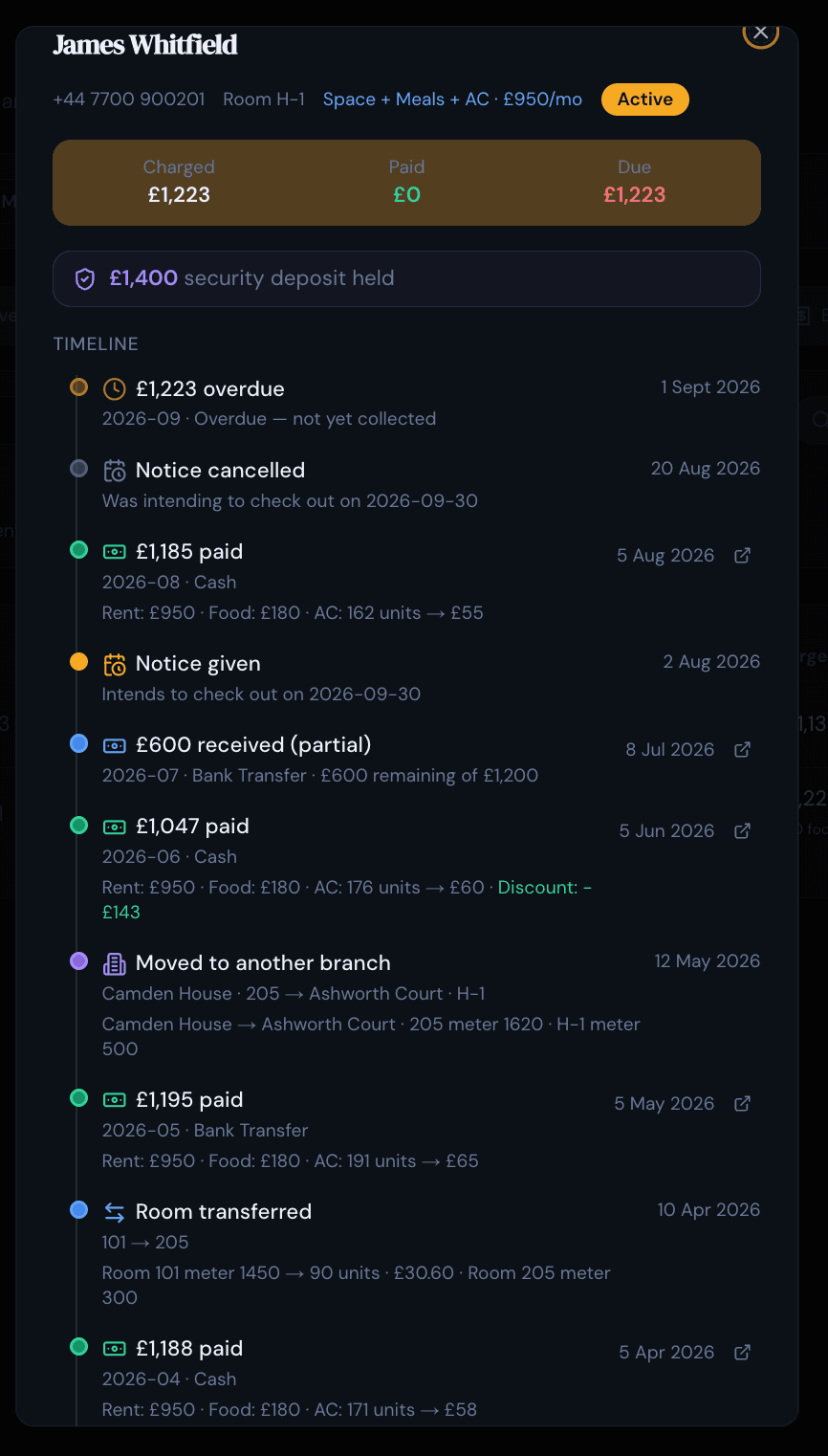
HMO tenant management works best when each tenant has their own record: contact details, tenancy dates, documents, deposit and payment history. The value is having that history in one place instead of reconstructing it from email. In PulseHub, each tenant’s history sits on the member timeline: admissions, room changes, charges, payments, deposits and complaints in a single record. When a question comes up about a specific tenant, the answer is already on one screen. For the full picture, see our guide to HMO tenant management from move-in to move-out.
Rent collection and payment tracking
Good HMO rent collection shows what’s due, what’s been paid and what’s overdue, per room and per tenant, without you rebuilding it each month. That’s tenant rent tracking done properly: rent schedules, part-payments, deposits and a clear view of arrears. PulseHub keeps rent schedules, receipts, part-payments, deposits and overdue balances on a dedicated payments screen, separate from the tenant’s history so the numbers stay clean. For a deeper look at this one job, see our guide to tracking HMO rent, payments and arrears.
Occupancy management
An empty room earns nothing quietly. Occupancy tracking shows which rooms and beds are occupied, available or allocated, so voids are visible and you can plan re-lets before the income stops. Across a portfolio, that’s the difference between spotting a void today and spotting it on the next bank statement.
Maintenance and complaints
Repairs and complaints are constant in shared housing. Being able to log an issue, assign it and keep a record of what was done, and when, protects you and keeps tenants informed. PulseHub records maintenance and complaints with their status and history, and the complaints screen supports QR-based submission so a tenant can report an issue from the property.
Multi-property management
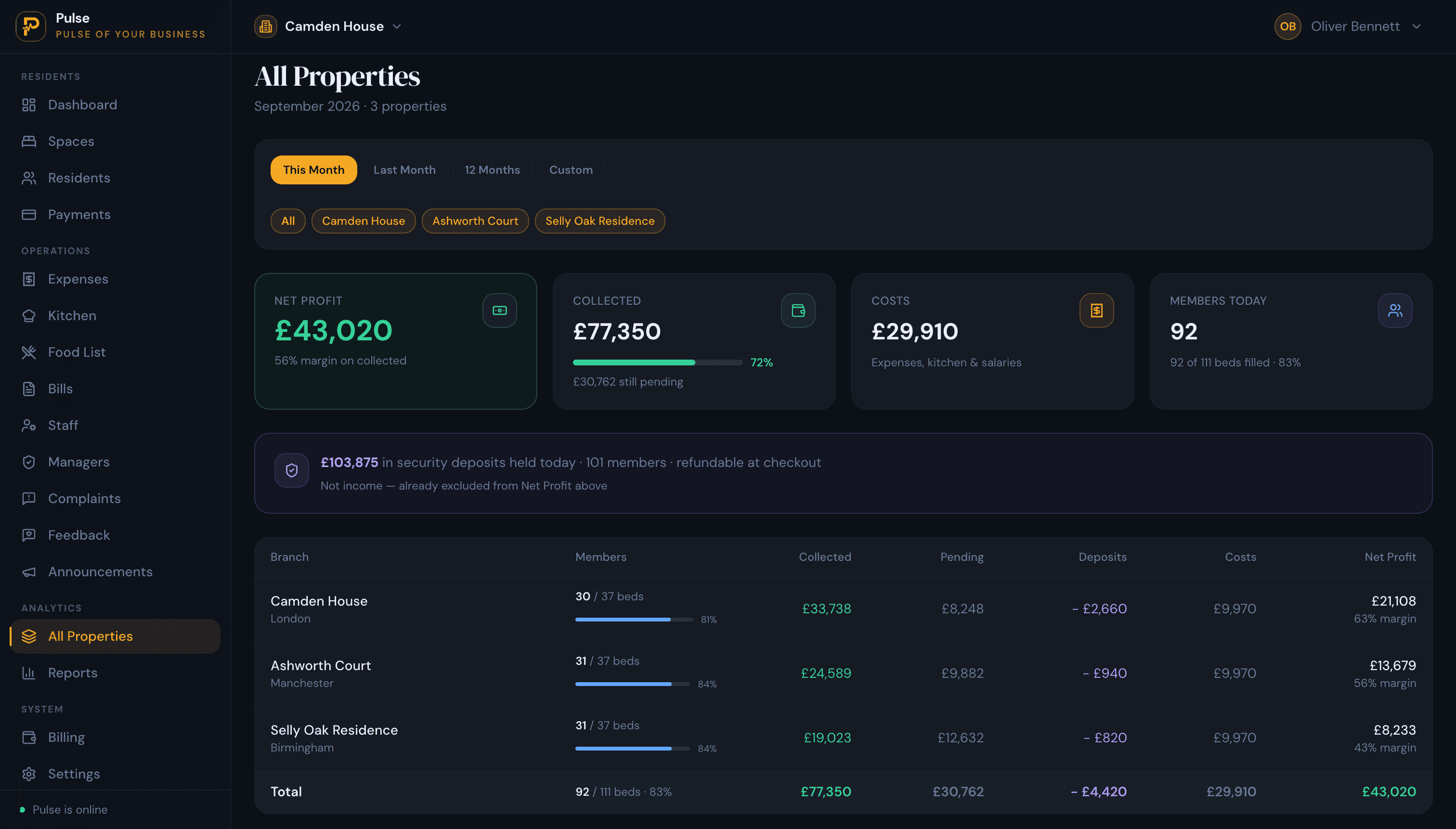
Once you have more than one HMO, the point is to stop running each property as a separate island. A capable HMO management system runs every property from one account, with an easy way to switch between them and a portfolio view that compares them. PulseHub has a property switcher for moving between sites and an All Properties view that compares occupancy, collections, costs and profit.
Reporting and financial visibility
This is where HMO property portfolio management earns its keep. You should be able to answer “how is this property doing?” and “how is the portfolio doing?” without a spreadsheet marathon. Useful reporting covers occupancy, rent collected, outstanding balances, expenses and per-property performance, enough to catch a problem early. You can see the full set of tools on the features page.
How to manage multiple HMO properties more efficiently
A few habits make the software actually pay off:
- Keep one source of truth. Put everything in the system: tenancies, rent, repairs. Half in software and half in a spreadsheet is worse than either.
- Check voids weekly. A five-minute occupancy sweep across the portfolio catches empty rooms while there’s still time to re-let.
- Record payments as they happen, including part-payments, so arrears are current rather than a month behind.
- Give the right people the right access. If a manager handles a property, role-based access lets them see what they need without handing over everything. PulseHub supports staff access for the properties people actually manage.
- Standardise rooms and rents. Consistent room names and rent schedules make the portfolio view meaningful.
For a step-by-step version of this, see our guide to managing multiple HMO properties without spreadsheets.
HMO management software vs spreadsheets
Spreadsheets are free, flexible and familiar, and for a single small HMO they can be enough. The picture changes as you add properties, rooms and part-payments. Here is how the two compare on the jobs that come up day to day.
| What you’re managing | Spreadsheet | HMO management software |
|---|---|---|
| Room and bed structure | Manual columns you design and maintain | Built in: property, rooms and beds |
| Multiple properties | Separate tabs or files per site | One account, with a switch between sites |
| Rent and arrears | Formulas; part-payments are easy to get wrong | Tracked per room and tenant, including part-payments |
| Voids and occupancy | Checked manually | Visible at a glance |
| Working as a team | Risk of overwriting each other | Shared, with role-based access |
| History and audit trail | Limited to what you record by hand | Kept automatically for each tenant |
| Cost | Free | A monthly subscription |
| Setup | None | A short initial setup |
Software’s advantage isn’t that it’s clever; it’s that the structure is already built for rooms, tenants and rent, and it keeps a history you didn’t have to maintain by hand. The trade-off is a monthly cost and a short setup. For a landlord with one room let to a friend, a spreadsheet is fine. For a growing portfolio, the admin usually outgrows the spreadsheet before you’d like it to.
What should you look for when choosing HMO software?
- Built for rooms, not whole units. If it can’t let a room or a bed, it isn’t HMO software.
- Clear rent and arrears. Part-payments, deposits and overdue balances handled properly.
- Real multi-property support. One account, easy switching, a portfolio view.
- Occupancy you can act on. Voids visible at a glance.
- Sensible pricing. Matched to your number of properties, with a trial so you can test it on your own data.
- A UK fit. GBP pricing and terminology that matches how you actually operate.
PulseHub is priced by the number of properties, with plans for 1, 3 or 10. There’s a 14-day free trial with no card, so you can test it against your own rooms and rents before deciding. You can compare plans on the pricing page, or contact the team if you run a larger portfolio.
How PulseHub fits the HMO workflow
PulseHub follows the way an HMO actually runs, with each step leading to the next:
Property → Rooms & beds → Tenant → Rent → Payments → Timeline → Portfolio
- Property. Set up each site.
- Rooms and beds. Organise the spaces inside it.
- Tenant. Add tenants and allocate them to rooms.
- Rent. Set a rent schedule for each one.
- Payments. Record what comes in, including part-payments and deposits.
- Timeline. Each tenant’s history stays in one place.
- Portfolio. Compare every site in one view.
Every step above uses functionality that exists in PulseHub today.
Frequently asked questions
What is HMO management software?
HMO management software lets you manage a house in multiple occupation at the room and tenant level: who lives in each room, what rent is due, which rooms are empty, and jobs like maintenance and shared bills, across one or more properties from a single account.
How does HMO software help manage rent?
It tracks rent schedules, payments (including part-payments), deposits and overdue balances per room and per tenant, so arrears stay visible without rebuilding a spreadsheet every month.
Can HMO software manage multiple properties?
Yes. A capable system runs every property from one account, with an easy way to switch between them and compare them. PulseHub includes a property switcher and an All Properties view, and its plans cover 1, 3 or 10 properties.
Can HMO software track rooms and tenants?
Yes. It should model the property as rooms and beds, and hold a record for each tenant covering dates, documents, deposit and payment history. In PulseHub, each tenant’s history sits on the member timeline.
How much does HMO management software cost?
Pricing varies by provider and usually scales with the number of properties or rooms. PulseHub publishes GBP plans for 1, 3 or 10 properties with a 14-day free trial and no card required; see the pricing page for current figures.
Is HMO software suitable for small landlords?
It can be. If you run a single small HMO, a spreadsheet may be enough. Once you manage several rooms across more than one property, or juggle part-payments and voids, software usually saves more time than it costs.
Start managing your HMO properties with PulseHub
If you let by the room and you’re managing more than one property, the pattern is familiar: the spreadsheet grows, the WhatsApp threads multiply, and voids and arrears slip through. PulseHub brings rooms, tenants, rent, occupancy and maintenance into one account, with a portfolio view across every property. See how it fits your operation on the HMO management page, browse PulseHub for UK operators, or start a free trial and set up your first property in minutes.