Student accommodation
Student Accommodation Management: A Complete Guide for UK Operators
· 10 min read
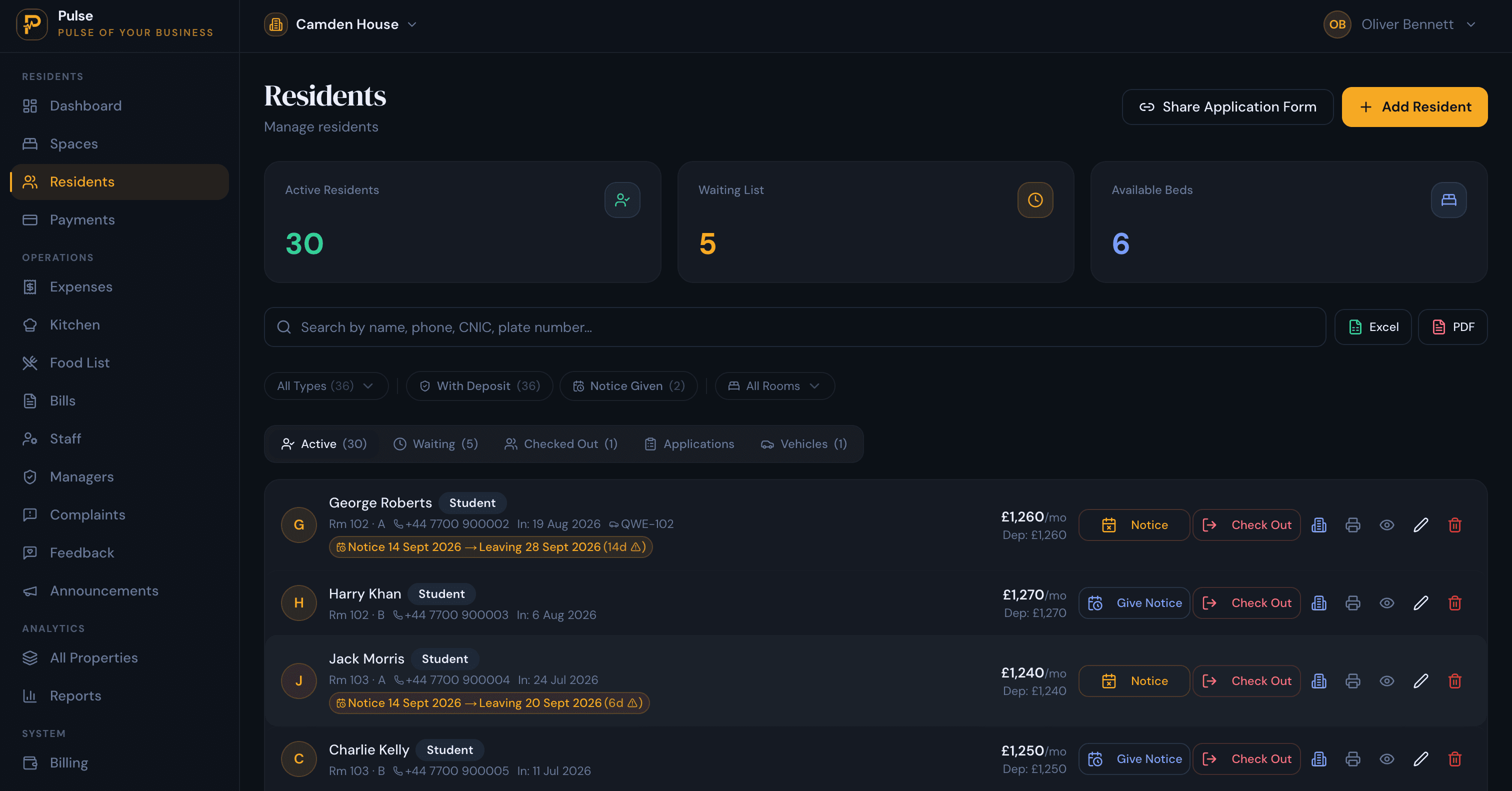
One student house is manageable on paper. You know the tenants, you remember who has paid, and the boiler is the only thing that surprises you. The trouble starts when there are three or four houses, forty-odd beds, and a September when most of them turn over in the same fortnight.
Suddenly the questions get harder. Which beds are still free for the new intake? Who is a fortnight behind on rent? Which room did that maintenance request come from, and did anyone actually book the plumber? The work has not become more complicated, there is just more of it, and it is spread across a spreadsheet, an inbox and a group chat that no one fully trusts.
This guide is for UK operators who let student accommodation by the room, whether that is a handful of shared houses or a purpose-built block. It covers what you actually need to keep on top of, where it tends to go wrong, and how the right system takes the admin out of it without pretending to run the business for you.
What is student accommodation management?
Student accommodation management is the day-to-day running of rooms let to students: filling beds, keeping records for each resident, collecting rent and deposits, tracking who lives where, handling repairs, and reporting on how each property is doing. It differs from standard buy-to-let in two ways. You are letting by the room or bed rather than the whole property, and the whole operation is shaped by the academic year, with most tenancies starting and ending within the same short window.
That covers a range of operators: landlords with a few student houses, letting agents managing them on an owner’s behalf, and teams running purpose-built student accommodation. Many student houses are also houses in multiple occupation, which brings its own responsibilities. If that applies to you, our guides to HMO management software and managing multiple HMO properties without spreadsheets are useful companions, and you can check licensing rules for your area on GOV.UK. Software helps you run the property; it does not decide your legal obligations.
What does a student accommodation operator need to manage?
Strip away the jargon and the job comes down to a handful of moving parts that all have to stay in step. Here is what each one looks like in practice.
Properties, rooms and beds
Everything starts with an accurate picture of the space you let. That means the property, the rooms inside it, and the beds inside those rooms, because a four-bed house can hold four separate tenancies. PulseHub is organised this way, so a bed is something you can allocate and fill, not a line buried inside a single tenancy. Room types matter too: a studio, an ensuite and a shared twin are priced and let differently.
Residents and the letting cycle
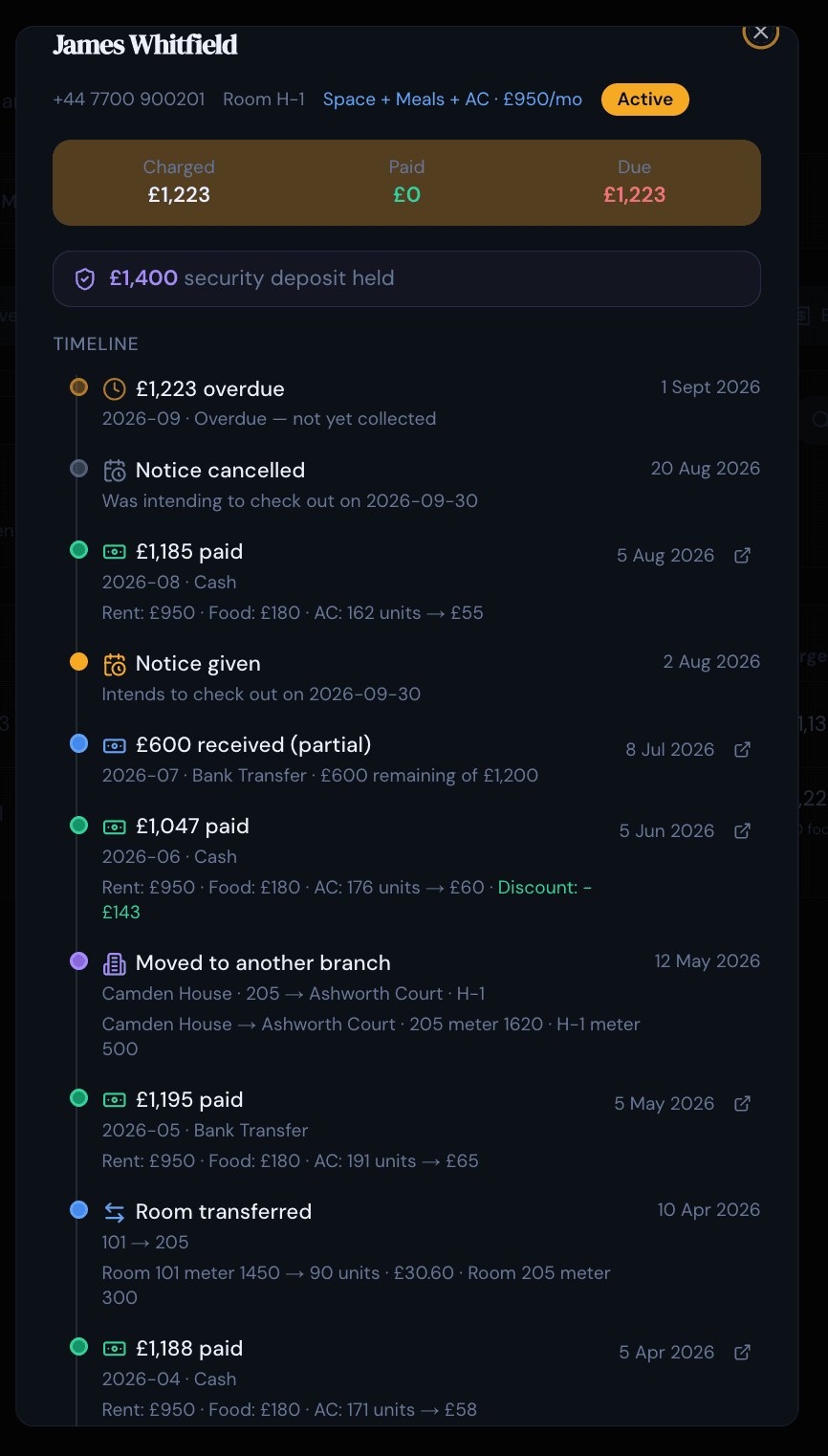
Each resident needs their own record: contact details, tenancy dates, documents, deposit and payment history. For UK student lets that record usually also holds the guarantor agreement and any Right to Rent check, kept as documents against the resident rather than in a separate file. In student accommodation that record moves through a predictable cycle, from enquiry and application, to move-in, to the occasional room change, to a notice period and check-out at the end of the year. PulseHub keeps it on a per-resident timeline, and tracks applications and a waiting list so an enquiry in July is not a scrap of paper by the time you need it in September.
Rent, deposits and payments
Rent in student housing rarely arrives as one clean monthly figure. Some pay by term, some by instalment, some are a fortnight late because a loan has not landed, and part-payments are normal, while international students often pay a term or the whole year up front. You need to see what is due, what has been paid and what is outstanding, per resident, without rebuilding it each month. Deposits sit alongside that and usually need protecting in a government-backed scheme; you can read the rules on GOV.UK. PulseHub records rent schedules, receipts, part-payments, deposits and overdue balances on a dedicated payments screen, so the money stays clean and separate from the resident’s wider history.
Occupancy, maintenance and records
An empty bed earns nothing, and in student lettings a bed empty in October may stay empty until the next academic year. Knowing your occupancy, which beds are taken, free or allocated, is what lets you plan re-lets and viewings before the income stops. Repairs and complaints need logging and closing out with a record of what was done, and you will want a way to keep documents and send the occasional announcement to a house. PulseHub covers occupancy, records maintenance and complaints with their status and history, and its complaints screen supports QR-based submission so a resident can report an issue from the property.
Reporting across the portfolio
Finally, you need to answer two questions without a weekend of spreadsheet work: how is this property doing, and how is the portfolio doing? Useful reporting covers occupancy, rent collected, outstanding balances and per-property performance. You can see the full set of tools on the features page.
Why student accommodation becomes difficult to manage
The problems that push operators off spreadsheets tend to be the same ones:
- Everything turns over at once. A portfolio that is calm in February becomes a scramble at the start of the academic year, when dozens of check-outs and move-ins land in the same few weeks.
- Rent that does not line up. Term-time instalments, late loans and part-payments mean a single paid or unpaid column stops telling the truth quickly.
- Voids you cannot see. Across several houses it is easy to lose track of which beds are free and from when, and an unfilled bed in autumn is a long, expensive gap.
- Room changes mid-year. Someone swaps rooms in November and the rent, the deposit and the occupancy all have to move with them.
- History no one can find. The tenancy PDF is in email, the rent is in a spreadsheet, the repair is in a chat, and the deposit is in your head.
- No shared, trusted view. When a colleague updates their copy of the spreadsheet, yours is already out of date.
On their own, each of these is a minor annoyance. Stacked across several houses and squeezed into a few weeks of turnover, they are how a good student portfolio quietly loses income.
How to manage student accommodation more efficiently
The fix is less about working harder in September and more about keeping a steady rhythm the rest of the year. A workable approach looks like this:
- Keep one record per resident. Put contact details, documents, deposit and payments in one place so you are never reconstructing a tenancy from your inbox.
- Watch occupancy on a schedule. A short weekly sweep of available beds catches voids while there is still time to re-let, especially in the run-up to a new intake.
- Record payments as they happen. Log part-payments the day they arrive so arrears are current rather than a month stale.
- Close the loop on maintenance. Log every issue, assign it, and mark it done, so nothing lives only in someone’s memory.
None of this is glamorous, but it is the difference between a September you plan for and one you survive.
Student accommodation software vs spreadsheets
A spreadsheet is free, flexible and familiar, and for a single house it can be all you need. The picture changes as you add properties, beds and part-payments, and as the whole thing turns over each year. Here is how the two compare on the jobs that come up most.
| What you’re managing | Spreadsheet | Management software |
|---|---|---|
| Rooms and beds | Columns you design and maintain per house | Property, rooms and beds built in |
| Several houses | A separate tab or file per property | One account across every property |
| Rent and part-payments | Formulas that break when rent arrives in parts | Tracked per resident, part-payments included |
| Occupancy and voids | Counted by hand | Available beds visible at a glance |
| Academic-year turnover | Rebuilt from scratch each year | Roll residents through check-out and move-in |
| Resident history | Scattered across email and chat | One timeline per resident |
| Working as a team | Risk of overwriting each other | Shared, with role-based access |
| Reporting | Added up at term end | Occupancy and collections updated as you go |
The real difference shows up at the ends of the year. A spreadsheet has to be rebuilt every time the cohort turns over, and every re-let, room swap and part-payment is a manual edit someone has to remember. Software already knows the property as rooms and beds and simply rolls residents through check-out and move-in, keeping the history without you retyping it. That is worth a monthly fee once you are past a single house. For one shared house let to friends, a spreadsheet is still the sensible choice.
What to look for in student accommodation management software
Good student accommodation property management keeps rooms, residents and rent in step. Whether a tool is sold as student housing management software or a student accommodation management system, judge it on how well it handles the jobs in this guide rather than the length of its feature list:
- Built for rooms and beds. If it cannot let a room or a bed, it is not the right tool for shared student housing.
- A proper resident record. Documents, deposit and payment history in one place, ideally as a single timeline you can scan.
- Clear rent and arrears. Part-payments, deposits and overdue balances handled without heroics.
- Occupancy you can act on. Available beds surfaced clearly, so voids show up before term does.
- Real multi-property support. One account, easy switching between houses, and a portfolio view that compares them.
- Reporting and access control. Enough reporting to catch a problem early, and role-based access for the people who run each site.
- A UK fit and a trial. GBP pricing, familiar terminology, and a free trial so you can try it against your own properties before you commit.
How PulseHub helps student accommodation operators
PulseHub is accommodation management software for operators who run rooms rather than whole units, which is exactly how student housing works. It is organised around properties, rooms and beds, so you allocate residents to a specific bed and keep occupancy current as people move in, swap rooms and leave. Each resident has a record, and their history, from admission through charges, payments, deposits, room changes and check-out, sits on a single member timeline, so a question about any resident is answered on one screen.
On the money side, rent schedules, receipts, part-payments, deposits and overdue balances live on a dedicated payments screen. When you run more than one house, a property switcher moves you between sites and an All Properties view compares occupancy, collections and outstanding balances across the portfolio. Maintenance and complaints are logged with their status and history, and reporting gives you per-property and portfolio figures without rebuilding it by hand. Every property also gets a free public page where students can see available rooms, beds, rent and amenities and enquire or join the waitlist, which feeds straight back into your applications.
How PulseHub fits the student letting cycle
PulseHub follows the way a student property actually runs, with each step leading to the next:
Property → Rooms & beds → Resident → Rent → Payments → Timeline → Portfolio
You can see it framed for your market on the student accommodation management software page and PulseHub for UK operators.
A practical student accommodation management checklist
Use this as a quick audit of your own operation. If you can tick most of it, the turnover weeks will feel a lot less like firefighting.
Setup
- Every property added, with rooms and beds mapped to the real layout
- Room types and rents set so the portfolio view means something
Residents
- A record for each resident with documents and deposit
- Allocations kept current as people move in, move room or leave
- Applications and the waiting list tracked in one place
Money
- Rent schedules set for each resident
- Payments recorded as they arrive, part-payments included
- Arrears reviewed weekly so they never drift a month behind
Operations
- Maintenance and complaints logged, assigned and closed
- Room changes updated the day they happen
Oversight
- Occupancy checked before each intake so voids are filled in time
- Reports reviewed monthly, per property and across the portfolio
- Access given by role, so managers see only their sites
Frequently asked questions
What is student accommodation management?
Student accommodation management is the day-to-day running of rooms let to students: rooms and beds, resident records, admissions and move-ins, rent and deposits, occupancy, maintenance and reporting, usually across one or more properties and organised around the academic year.
What does student accommodation management software do?
It replaces the spreadsheets and message threads with one system for rooms, residents, rent and occupancy. A good system holds a record for every resident, tracks what is paid and what is overdue, shows which beds are free, and keeps a history you did not have to maintain by hand.
How do you manage multiple student accommodation properties?
Run every property from one account rather than a file per house. PulseHub has a property switcher for moving between sites and an All Properties view that compares occupancy, collections and outstanding balances, so you can see each house and the whole portfolio without adding up tabs.
How do you track student accommodation payments?
Record rent against each resident on a schedule, log payments (including part-payments and deposits) as they arrive, and keep overdue balances visible. In PulseHub, rent, receipts, part-payments and arrears sit on a dedicated payments screen, separate from each resident’s history.
Can student accommodation software manage rooms and occupancy?
Yes. It should model the property as rooms and beds so you can allocate a resident to a specific bed, see which beds are available, and handle room changes and check-outs. PulseHub is built around properties, rooms and beds, with occupancy visible at a glance.
What should you look for in student accommodation management software?
Room and bed management, a proper resident record, clear rent and arrears, occupancy you can act on, real multi-property support, reporting and role-based access. For UK operators, GBP pricing and a free trial so you can test it on your own rooms and rents before committing.
Does PulseHub integrate with university or student-finance systems?
No. PulseHub focuses on operational records: rooms, residents, occupancy, payments, maintenance and reporting. It does not currently integrate with university admissions or student-finance systems.
Running student accommodation with PulseHub
Student accommodation is not hard to understand, it is just relentless to keep in order, and the pressure lands all at once when the academic year turns. Keeping rooms, residents, rent and occupancy in one place is what turns that scramble into a routine. If you would like to see how it fits your houses, explore PulseHub for student accommodation, compare plans on the pricing page, or start a 14-day free trial and set up your first property. There is no card required.