HMO management
How to Manage Multiple HMO Properties Without Spreadsheets
· 8 min read
Managing one HMO on a spreadsheet is workable. Managing four or five is where it starts to cost you: a void nobody spotted, rent that was half-paid and never chased, a deposit no one can find. This is a practical way to run several HMOs without spreadsheets, and how to move off them if you already have.
It’s written for UK operators letting by the room across more than one property. Nothing here needs a big system or a finance background, just a clear method and one place to keep it. If you’re still weighing up tools first, our guide to what HMO management software is and how to choose one covers the basics.
Why spreadsheets stop working past your first HMO
Spreadsheets break because an HMO is a set of rooms and tenancies, not a single unit, and once you have several of them the same small problems multiply faster than you can keep up by hand. The patterns are always similar:
- Tab sprawl. A file per property, or one enormous sheet, and you’re forever scrolling to find the room you need.
- Part-payments and mixed dates. A paid/unpaid column can’t represent “£600 of £1,200 in, the rest due on the 20th” across dozens of rooms.
- Voids you notice late. An empty room at property three stays invisible until the month’s totals come in light.
- Two people, one file. A manager edits the sheet while you do, and someone’s change quietly disappears.
- Deposits and history in your head. What was held, what was refunded, who moved rooms back in May.
- No portfolio view. “How is the portfolio doing?” becomes a weekend of adding up tabs.
What you need to track across an HMO portfolio
At portfolio scale, four things need to stay current for every property:
- Properties. Each site, its rooms and beds, and who is responsible for it.
- Rooms and beds. Which are occupied, available or allocated, and from when.
- Tenants. Contact and tenancy details, documents, deposit, and a running history.
- Payments. Rent due, paid, part-paid and overdue, plus deposits, utilities and any other charges.
The reason a spreadsheet struggles is that these are related: a tenant belongs to a bed, a bed to a property, a payment to a tenant. Software holds those relationships for you, which is most of the work. For the tenant side of this in detail, see our guide to managing HMO tenants from move-in to move-out.
A simple system for running several HMOs
The operators who stay on top of several HMOs tend to run the same few habits.
Keep one source of truth
Put every property, tenant, rent and repair in one place. Half in software and half in a spreadsheet is worse than either, because you never trust which is right.
Standardise rooms and rents
Use consistent room names and rent schedules across sites. It sounds trivial, but it’s what makes a portfolio view meaningful and comparisons between properties honest.
Run a weekly rhythm
Once a week, do a five-minute pass across the portfolio: which rooms are empty and from when, who is in arrears, what maintenance is still open. Small and current always beats a month-end scramble.
Record payments as they happen
Log each payment, including part-payments and deposits, when it lands rather than in a monthly catch-up. Arrears then stay accurate instead of running a month behind reality. For the detail on this, see our guide to tracking HMO rent, payments and arrears.
Scope access per property
Give each manager access to only the property they run. They see what they need, and you keep the whole picture without handing over everything.
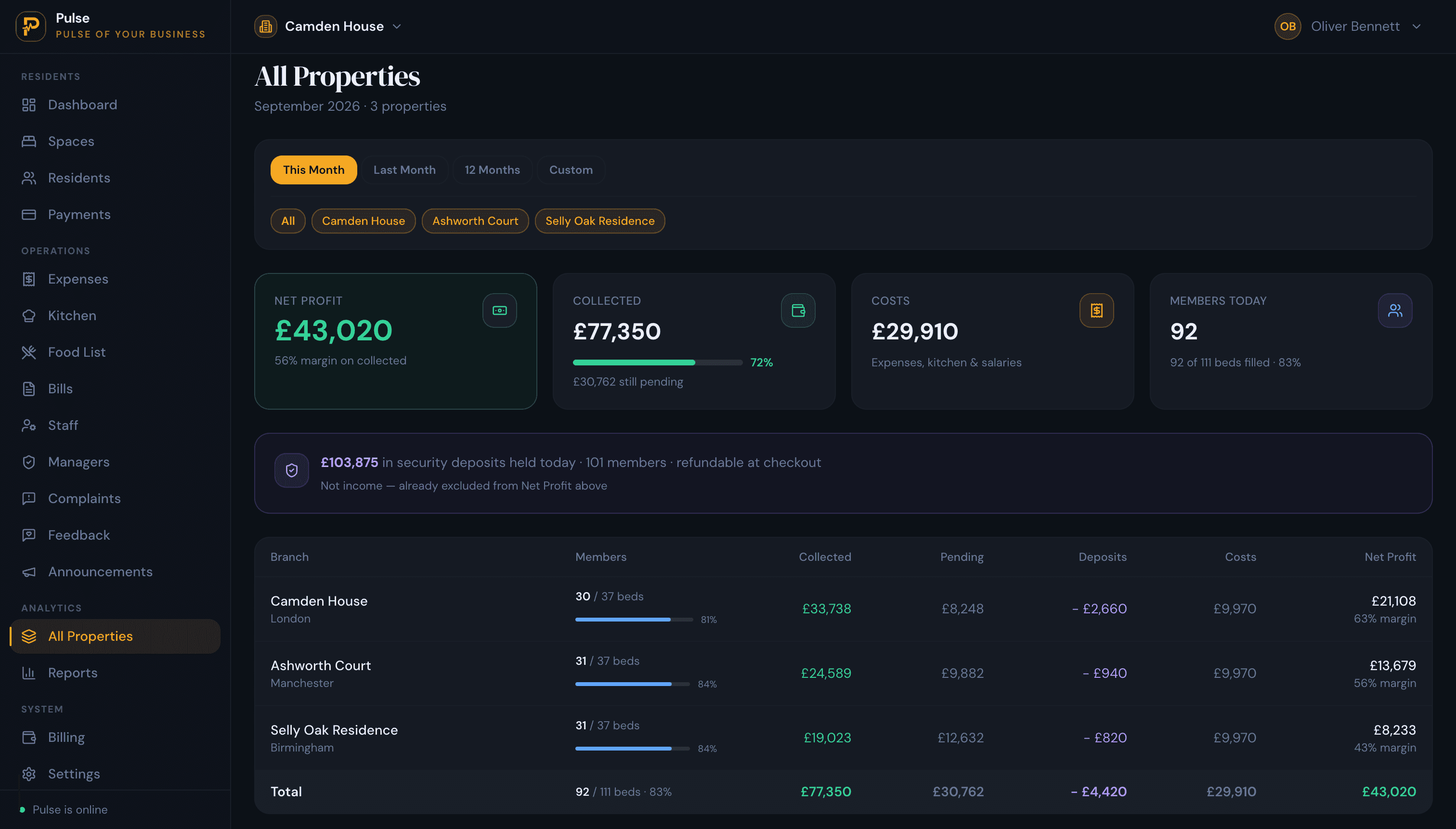
Compare sites in a portfolio view
Keep one screen that shows occupancy, collections, costs and outstanding dues per property, so a weak site shows up early instead of at year end.
Switch between sites, or compare them all in one view
How to move off spreadsheets without losing anything
You don’t have to switch overnight. The safe way is to run the new system alongside your spreadsheet for one rent cycle, then retire the sheet once the numbers match.
- Pick one system and one cut-over date.
- Set up each property, then its rooms and beds.
- Add tenants and allocate them to rooms.
- Enter opening balances: the current rent position, deposits held, and any arrears.
- Run in parallel for one rent cycle, recording payments in both, and check the totals agree.
- Switch over, and keep the spreadsheet as a read-only archive.
A free trial is the low-risk way to do the parallel run before you commit to anything.
Where PulseHub fits
PulseHub is built for exactly this: property, rooms and beds; a record and timeline for each tenant; rent, part-payments and deposits on a payments screen; a property switcher and an All Properties view for the portfolio; and role-based access per property. See it in context on the HMO management page, or explore the full platform.
Frequently asked questions
Can I run multiple HMOs in one system?
Yes. A capable HMO system runs every property from one account, with a way to switch between them and compare them, so you don’t need a separate login or file per property.
How do I track rent across several properties?
Record rent due, paid, part-paid and overdue per room and tenant as payments land, and use a portfolio view to see collections and arrears across every property at once.
How do I move my HMO spreadsheet into software?
Set up your properties, rooms and beds, add tenants with their opening balances and deposits, then run the new system alongside the spreadsheet for one rent cycle before you switch.
Can staff see only their own property?
Yes, with role-based access. In PulseHub you can give a manager access to the properties they run without exposing the rest of the portfolio.
How are part-payments handled across properties?
Each payment, including a partial one, is recorded against the tenant, so the outstanding balance stays accurate per room and rolls up across the portfolio.
Is software worth it for just two or three HMOs?
Often yes. The point where a spreadsheet costs more time than it saves usually arrives around the second or third property, especially once part-payments and voids are involved.
Bring your portfolio into one place
If you’re managing more than one HMO, the win isn’t a fancier spreadsheet, it’s not needing one. PulseHub keeps rooms, tenants, rent, payments and every property in a single account, with a portfolio view across the lot. Start a free trial and set up your first property in minutes.