HMO management
How to Track HMO Rent, Payments and Arrears in the UK
· 10 min read
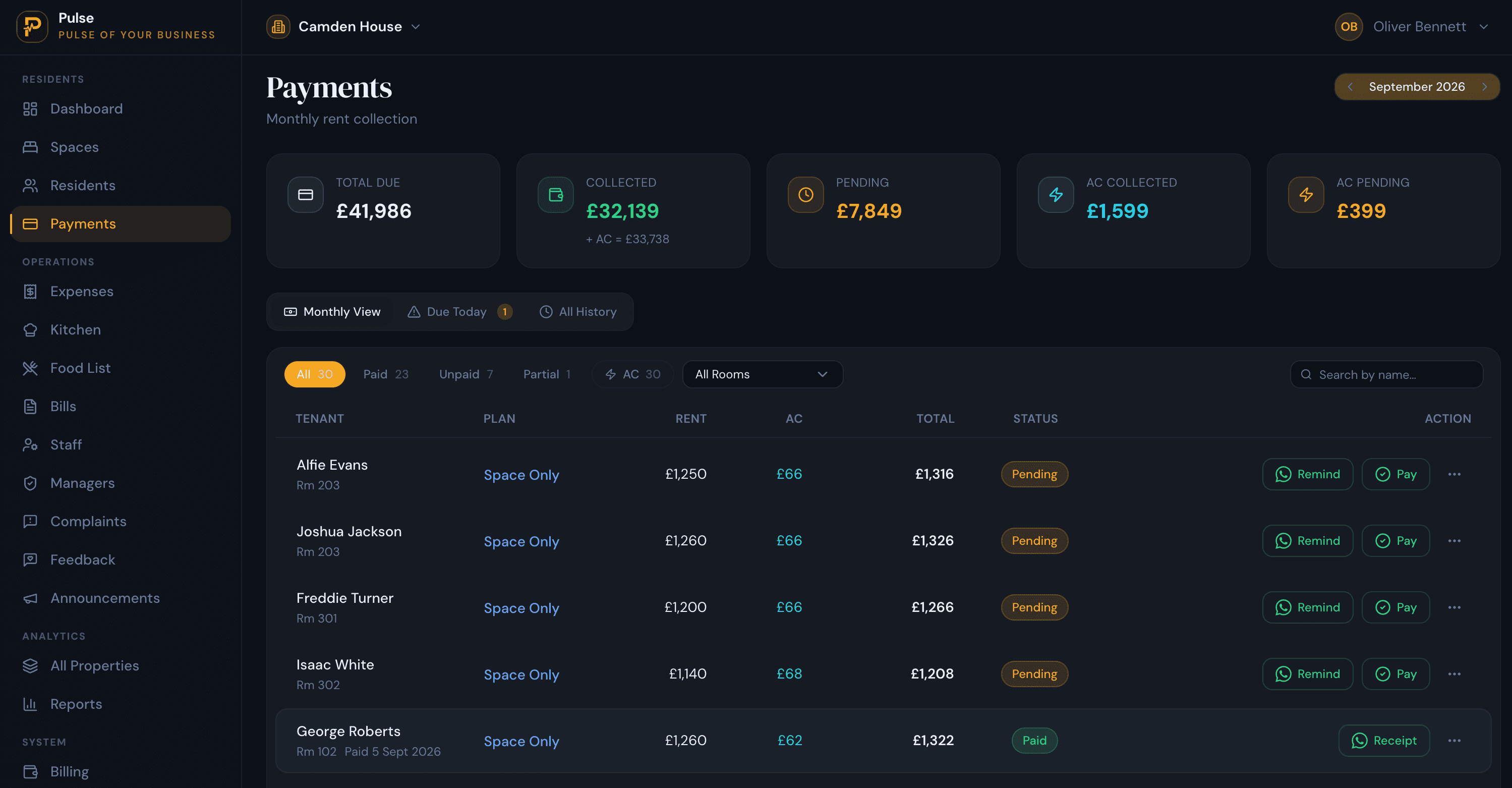
Rent tracking sounds like the simplest part of running an HMO, and with one property it is. You know who is in each room, roughly when they pay, and whether anyone is behind. The trouble is that an HMO is not one rent. A six-bed house is six tenancies, six rent amounts, and six due dates, and once you run three or four houses you are keeping thirty-odd separate rent positions in your head or in a spreadsheet that only you fully understand.
That is where the questions get awkward. Who is actually overdue this week, and by how much? Did that tenant pay half now and promise the rest on the 20th, or did they pay in full late? What is the real outstanding balance across the whole portfolio right now, not last month? Getting these wrong is not just untidy; unnoticed arrears are money you have already lost the chance to chase early.
This guide is for UK HMO landlords and operators who let by the room. It covers exactly what to track, how to build a system that survives more than one property, how to stay on top of rent arrears, and when it is worth moving from a spreadsheet to dedicated software.
Why HMO rent tracking gets complicated
The complexity is not really about volume. It is that the same house holds several independent rent arrangements, and they rarely line up. A few things pull them out of step:
- Different rent amounts per room. An ensuite double and a small single in the same house are let at different rents, sometimes with bills included in one and not the other.
- Different due dates. Rooms are let as they fall vacant, so tenants pay on the day they moved in, not on a tidy shared date. One house can have payments due across the whole month.
- Part-payments. A tenant pays some now and the rest on payday. A single paid-or-unpaid marker cannot represent that, but it is completely normal in shared housing.
- Deposits and extra charges. Deposits, a late-payment note, a replaced key, a contribution to a shared bill: these sit alongside rent and are easy to muddle into the rent figure.
- Keeping the balance accurate. The outstanding balance is only true if every payment has been recorded. Fall a week behind on data entry and the number on screen is fiction.
- More than one property. Multiply all of the above by four houses and the honest answer to "how are we doing on rent?" becomes a manual tally across every file.
What HMO landlords need to track
Good rent tracking comes down to holding a small set of facts for every room, and keeping them current. For each tenancy you want to know:
- The tenant, property and room. Who is renting which room in which house.
- The rent amount and payment due date. What is owed and when it falls due.
- Payments received. Each one, on the date it arrived, including part-payments.
- The outstanding balance. Rent due minus what has been paid, kept live.
- The overdue amount. The part of the balance that is now past its due date.
- Deposits and other charges. Held separately so they never inflate the rent figure.
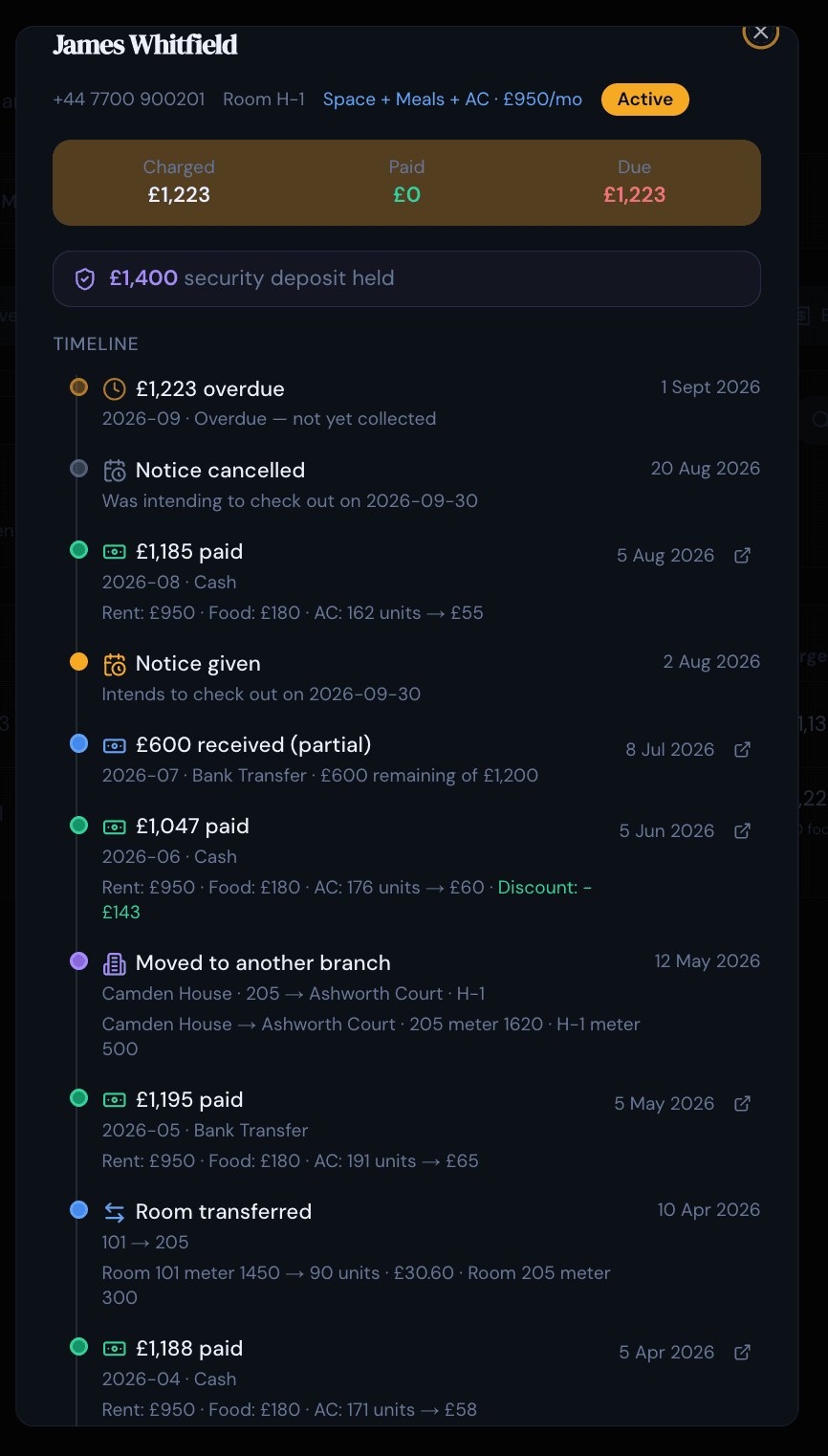
- Payment history and notes. A record of what was paid and any arrangement agreed.
The theme running through that list is room-by-room rent tracking. In an HMO the useful unit is the room and the tenant in it, not the building. A property-level total hides the one room that is two months behind.
How to track HMO rent using a spreadsheet
A spreadsheet is a perfectly reasonable starting point, and for a single HMO it can be all you need. A workable layout is one row per room, with columns for the tenant, the rent, the due date, the amount paid and a simple formula for the balance (rent minus paid). Add a new tab each month and you have a basic rent ledger that costs nothing.
It starts to strain in predictable places rather than all at once. Part-payments are the first: a single "paid" cell cannot show that £450 of a £900 rent is in and the rest is due on the 20th, so you end up with notes in the margins. Mixed due dates are the second: sorting who is overdue today means eyeballing dates by hand. Then comes the month roll-forward, where last month's arrears have to be carried into the new tab without dropping anyone. Add a second and third property, each in its own file or tab, and there is no single view of arrears across the portfolio. Share the file with a manager and you risk two people overwriting each other.
None of this makes spreadsheets wrong. It just means the effort of keeping them accurate grows with the portfolio, and the cost of a small mistake (a missed part-payment, an arrear carried over wrong) grows with it.
How to track rent across multiple HMO properties
Whether you use a spreadsheet or software, the same simple system keeps rent under control across several houses. The order matters more than the tool:
- Record each property and room. Set the structure up once so every room exists as its own line.
- Assign each tenant to a room. Rent is owed by a person in a room, so that is where it should sit.
- Set the rent and the due date. Per room, with any bills-included or extra-charge detail noted.
- Record every payment when it lands. Full or partial, on the actual date, not in a monthly catch-up.
- Let the balance and overdue flag follow. Rent due minus payments received, kept current per room, with anything past its due date flagged.
The step people skip is the fourth one. Recording payments as they arrive, rather than in a monthly reconciliation, is the single habit that keeps every other number honest. If you want the wider weekly routine this fits into, our guide to managing multiple HMO properties without spreadsheets covers the full rhythm.
How to manage HMO rent arrears
Arrears management, and the rent collection that follows from it, is really the pay-off of good tracking. If your balances are accurate and current, chasing what is owed becomes routine rather than dramatic. A few principles do most of the work:
- Spot overdue payments quickly. The value of a live balance is that a room slipping behind shows up this week, not on next month's statement.
- Distinguish a late payment from a part-payment. "Paid in full, three days late" and "paid half, half still owed" need different responses, so your records should distinguish them clearly.
- Keep the balance accurate. Let the outstanding figure be calculated from recorded payments rather than re-added by hand, so the balance remains accurate if a payment dispute arises.
- Keep the records. A dated payment history and a record of any payment arrangement you agree are worth keeping if a tenancy later ends in dispute.
- Follow up consistently. A steady, early nudge on a small arrear works better than an awkward conversation about three months owed.
What to do once rent is seriously overdue depends on the tenancy and is beyond the scope of this guide; it is not legal advice. The practical point is narrower: accurate, up-to-date records are what let you act early, and early is almost always cheaper than late.
What HMO rent tracking software should provide
If you decide a spreadsheet has run its course, judge any HMO rent tracking software on how well it handles the work above rather than the length of its feature list. The capabilities that actually matter are:
- Room-level rent tracking. Rent held per room and tenant, not lumped at property level.
- Tenant payment history. Every payment against each tenant, easy to look back on.
- Automatic outstanding balances. Balances derived from recorded payments, not hand-maintained formulas.
- Arrears visibility. A clear view of who is overdue and by how much, per room and across properties.
- Part-payments and charges. Partial payments, deposits and extra charges handled without fudging.
- Receipts. A record you can give a tenant for a payment made.
- Reporting. Collections, outstanding balances and per-property performance you can actually read.
- Multiple-property support. One account across every house, with a portfolio view.
- Payment reminders. A prompt for tenants who are due or overdue, if that fits how you operate.
- Access control. Role-based access so a manager sees only their sites.
HMO rent tracking software vs spreadsheets
The honest comparison is not "software good, spreadsheet bad". It is about where each one fits. A spreadsheet is free and flexible; software builds the structure and the maths in for you and keeps a history you did not have to maintain. Here is how they compare on the jobs that come up when tracking rent.
| Tracking task | Spreadsheet | Rent tracking software |
|---|---|---|
| Rent per room | A column or row you set up and maintain by hand | Held per room and tenant by default |
| Part-payments | A paid/unpaid cell cannot show "£450 of £900 in" | Each payment logged, balance updates itself |
| Outstanding balance | A formula you have to get right and copy down | Calculated automatically per tenant |
| Arrears across properties | Checked tab by tab, file by file | Rolled up in one portfolio view |
| Payment history | Only what you remember to type in | Kept automatically against each tenant |
| Receipts | Written or messaged separately | Produced from the recorded payment |
| Working as a team | Risk of overwriting each other | Shared, with role-based access |
| Month roll-forward | New tab and manual carry-over each month | Continuous, no rebuild |
As a rough rule, the switch pays off around the second or third property, or the moment part-payments and mixed due dates start causing mistakes. For a single room let to a friend, a spreadsheet is still the sensible choice.
How PulseHub helps track HMO rent
PulseHub is accommodation management software organised the way an HMO actually works: property, then rooms and beds, then the tenant in each room. Because rent sits at room and tenant level, you track what is due and what has been paid per room rather than per building, which is the distinction that matters most for shared housing.
Rent schedules, receipts, part-payments, deposits and overdue balances live on a dedicated payments screen. Each payment, including a partial one, is recorded against the tenant, so the outstanding balance stays accurate for that room and rolls up across the portfolio rather than being re-added by hand. Every tenant also has a member timeline that keeps their rent charges, payments, deposits and room moves in one record, so the full history for anyone is a single look.
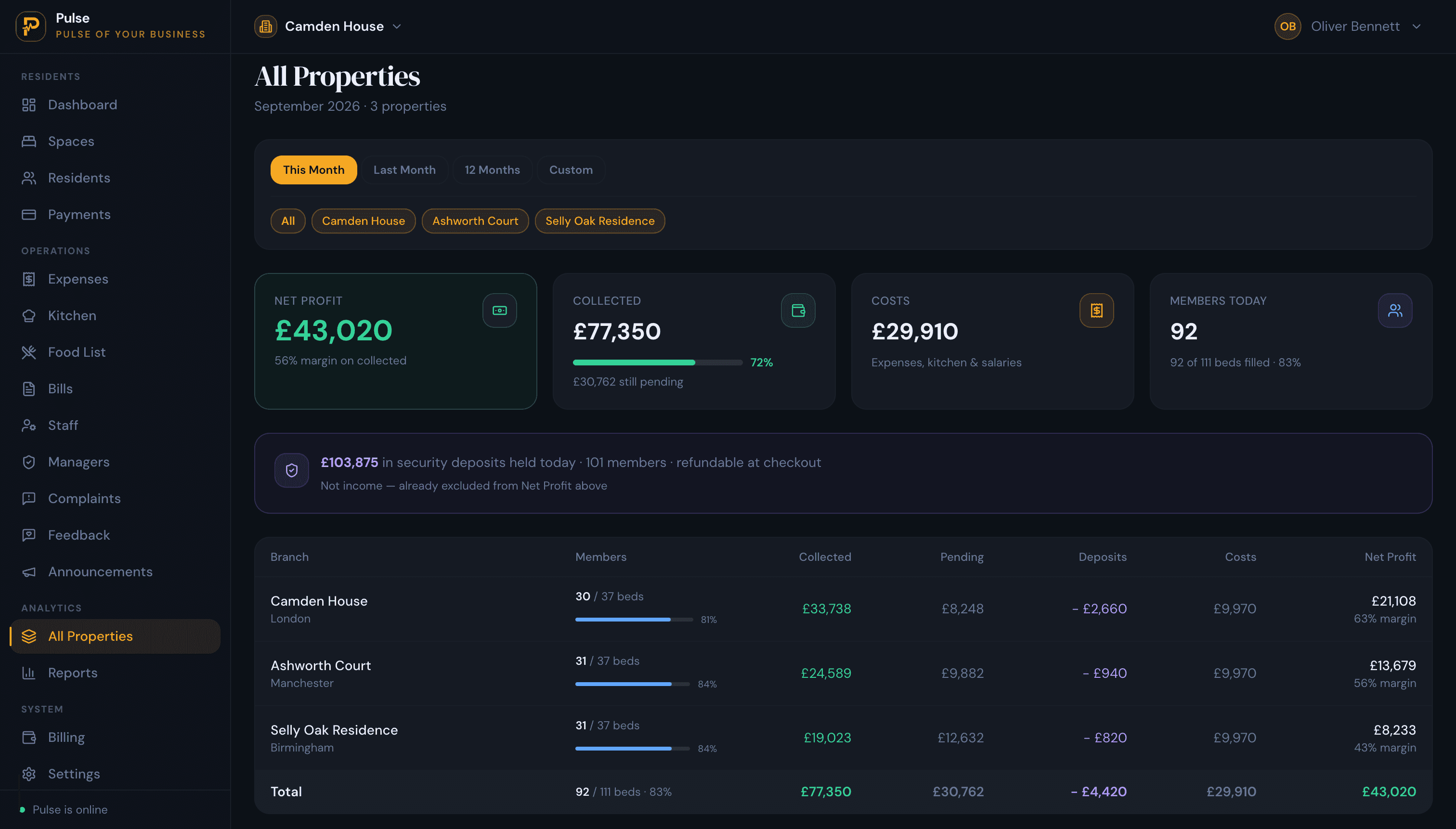
When you run more than one house, a property switcher moves you between sites and an All Properties view compares occupancy, collections and outstanding balances, so arrears across the portfolio are visible in one place instead of tab by tab. Reporting covers collections, outstanding balances and per-property performance. You can see the full toolset on the features page, or how it works for UK operators on the HMO management software solution page.
Rent, from due to paid to arrears, in one place
Because every payment is recorded against the tenant, the balance and the arrears position follow automatically, per room and across the portfolio:
Rent set → Payment recorded → Balance updated → Arrears visible → Portfolio view
See it in your own market on PulseHub for UK operators, or read the companion guide, what HMO management software is and how to choose.
HMO rent tracking checklist
Use this as a quick audit of how you track rent today. If most of it is true, arrears rarely take you by surprise.
Set up
- Every property, room and tenant recorded in one place
- The rent amount and due date set for each room
- Opening position entered: current balance, deposit held, any arrears
Record
- Every payment logged when it lands, part-payments included
- Deposits and extra charges kept separate from rent
- A receipt produced for each payment
Review
- A live outstanding balance for every room and tenant
- A weekly pass over who is overdue and by how much
- Collections and arrears compared across all properties
Frequently asked questions
What is the easiest way to track HMO rent?
For one small HMO, a single spreadsheet with a row per room works. Once you run several properties, or you are dealing with part-payments and different due dates, the easiest reliable method is software built around rooms and tenants that records each payment and works out the outstanding balance for you.
How do I track rent arrears across multiple HMOs?
Record rent due and every payment against each tenant, so each room shows a live outstanding balance, then use a portfolio view to see who is behind across all properties at once. In PulseHub, the All Properties view rolls up collections and outstanding balances so arrears surface without you adding up separate spreadsheets.
Can I track HMO rent by room?
Yes, and for an HMO you should. Because each room can be a separate tenancy with its own rent and due date, rent needs tracking per room and per tenant rather than per property. PulseHub is organised as property, rooms and beds, so rent, payments and arrears are held at room and tenant level.
What should an HMO rent tracker include?
At a minimum: the tenant, property and room, the rent amount and due date, each payment received (including part-payments), the outstanding balance, the overdue amount, and a payment history you can look back on. Deposits and any extra charges belong there too.
Is HMO rent tracking software better than a spreadsheet?
It depends on scale. A spreadsheet is fine for a single small HMO. The point where software saves more time than it costs usually arrives around the second or third property, or as soon as part-payments, mixed due dates and shared editing start causing mistakes.
How can landlords keep track of overdue HMO rent?
Record payments as they arrive so balances stay current, keep a clear view of who is overdue and by how much, and check it on a regular weekly rhythm rather than at month end. Accurate, up-to-date records are what let you follow up early, before a small arrear becomes a large one.
Track your HMO rent with PulseHub
Rent tracking goes wrong quietly: a missed part-payment here, an arrear carried over wrong there, until the portfolio total no longer matches reality. Keeping rent, payments and arrears at room and tenant level, and recording each payment as it lands, is what keeps the numbers honest. If you would like to see it working on your own rooms and rents, explore PulseHub for HMO operators, compare plans on the pricing page, or start a 14-day free trial. There is no card required.