Accommodation management
Accommodation Management System: Features, Benefits and How to Choose
· 12 min read
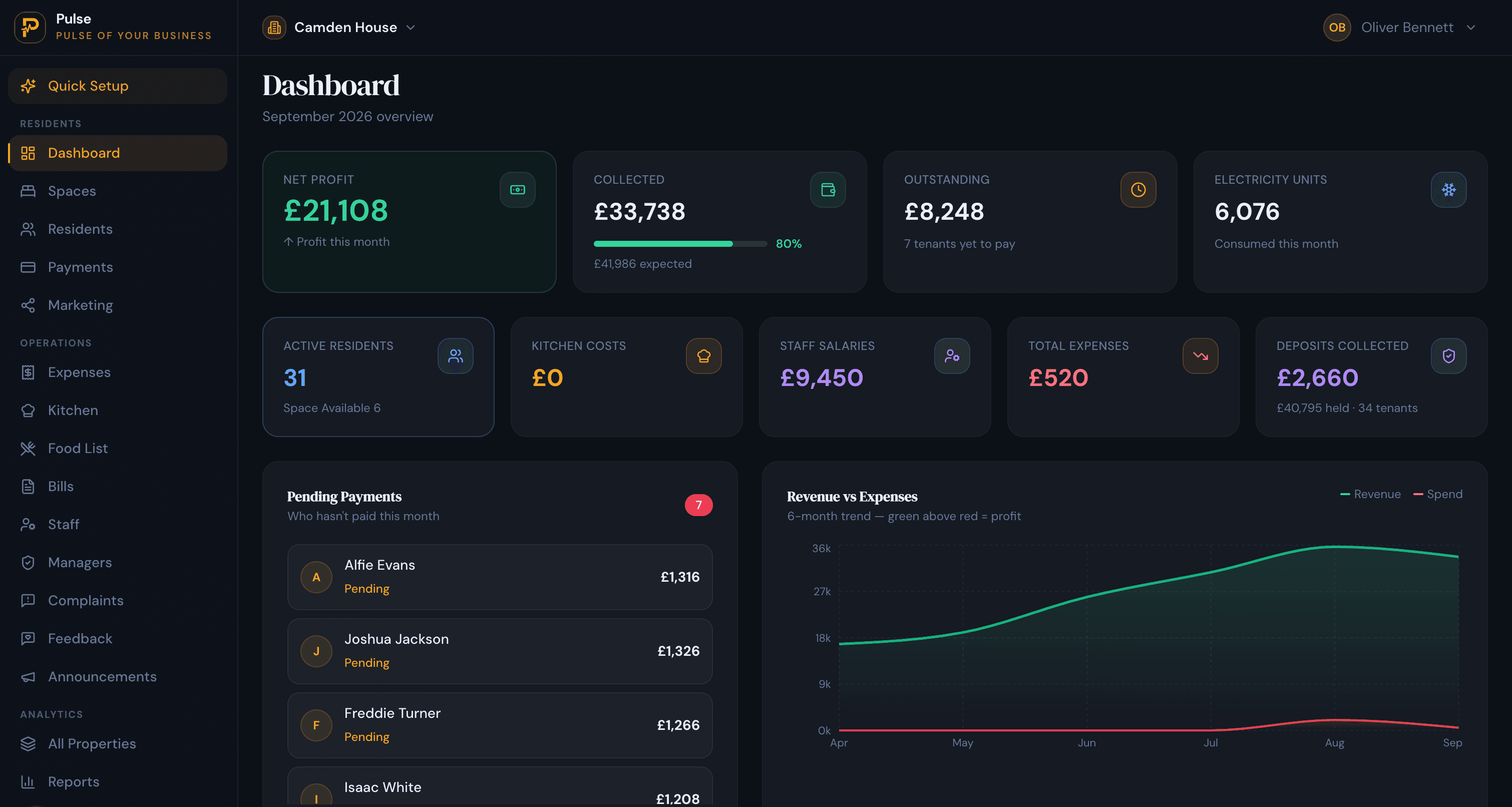
An accommodation management system is software for running residential or shared accommodation at the room and resident level. It keeps rooms and beds, residents, rent and payments, occupancy, utilities and maintenance in one place, across one or more properties, so you can run the operation from a single account instead of a stack of spreadsheets.
The phrase covers a lot of ground, and search results for it mix hotel booking software, campus tools and facilities systems. This guide is written for a specific reader: an operator who lets rooms or beds by the month rather than by the night. That includes HMOs and shared houses, student accommodation, hostels and boarding houses, co-living, and staff or worker accommodation.
If that is you, the sections below explain what the software does, the features that actually matter, how it differs from a hotel system and from spreadsheets, and how to choose one that fits how you operate.
What is an accommodation management system?
Put plainly, it replaces the pile of spreadsheets, document folders and chat threads that most operators run on. It records who lives in each room, what rent and charges they owe, which rooms sit empty, and the recurring jobs such as utility bills, maintenance and complaints, and it holds all of that across every property behind one login.
The defining idea is the unit of management. General lettings or sales software treats a property as one unit with one tenancy. Accommodation operators do not work that way. A single building can hold many rooms and beds, each with its own resident, start date, rent and deposit, plus shared kitchens and bathrooms and bills that need splitting. Software built for this models the property as a structure of rooms and beds, so a room is something you can fill, bill and track on its own.
Terminology varies by country and by property type. Some operators say residents, others say tenants or boarders; some charge rent, others call it accommodation fees. The property itself has different names: a house in multiple occupation (HMO) in the UK, a paying guest (PG) accommodation or hostel in India, a dormitory or bedspace in the Philippines, a rooming house or shared housing in the United States, and a boarding house in many other markets. Some of these carry local licensing rules, the UK HMO among them, but the underlying operations are the same wherever you are, which is why one system can serve all of them.
Who needs an accommodation management system?
It is most useful for anyone managing accommodation by the room or bed rather than by the whole property:
- HMO and shared-housing operators renting rooms individually in houses that share facilities. See our guide to HMO management software.
- Student accommodation operators, known as student housing operators in the US, running halls or student houses through the letting cycle. See student accommodation management.
- Hostels, boarding houses, dormitories and PG accommodation with longer-stay residents rather than nightly tourists.
- Co-living operators running shared-living sites with communal space and shared bills.
- Staff and worker accommodation providers housing employees across one or more sites.
- Small and mid-sized portfolios that have outgrown a spreadsheet but do not need heavyweight enterprise software. A typical fit is a portfolio of 1 to 10 properties.
Essential features of an accommodation management system
The exact labels differ between products, but a system worth adopting should cover the jobs below. Here is what each one looks like in practice, with how PulseHub handles it where relevant.
Rooms, beds and property structure
The software should mirror how the building is actually laid out: a property, the rooms inside it, and the beds inside shared rooms. In a hostel dorm or a student flat you let an individual bed; in a co-living house, an individual room. PulseHub is organised around property, building, floor, room and bed, so the smallest lettable space can be allocated, billed and tracked on its own rather than disappearing inside one whole-property tenancy.
Resident and tenant records
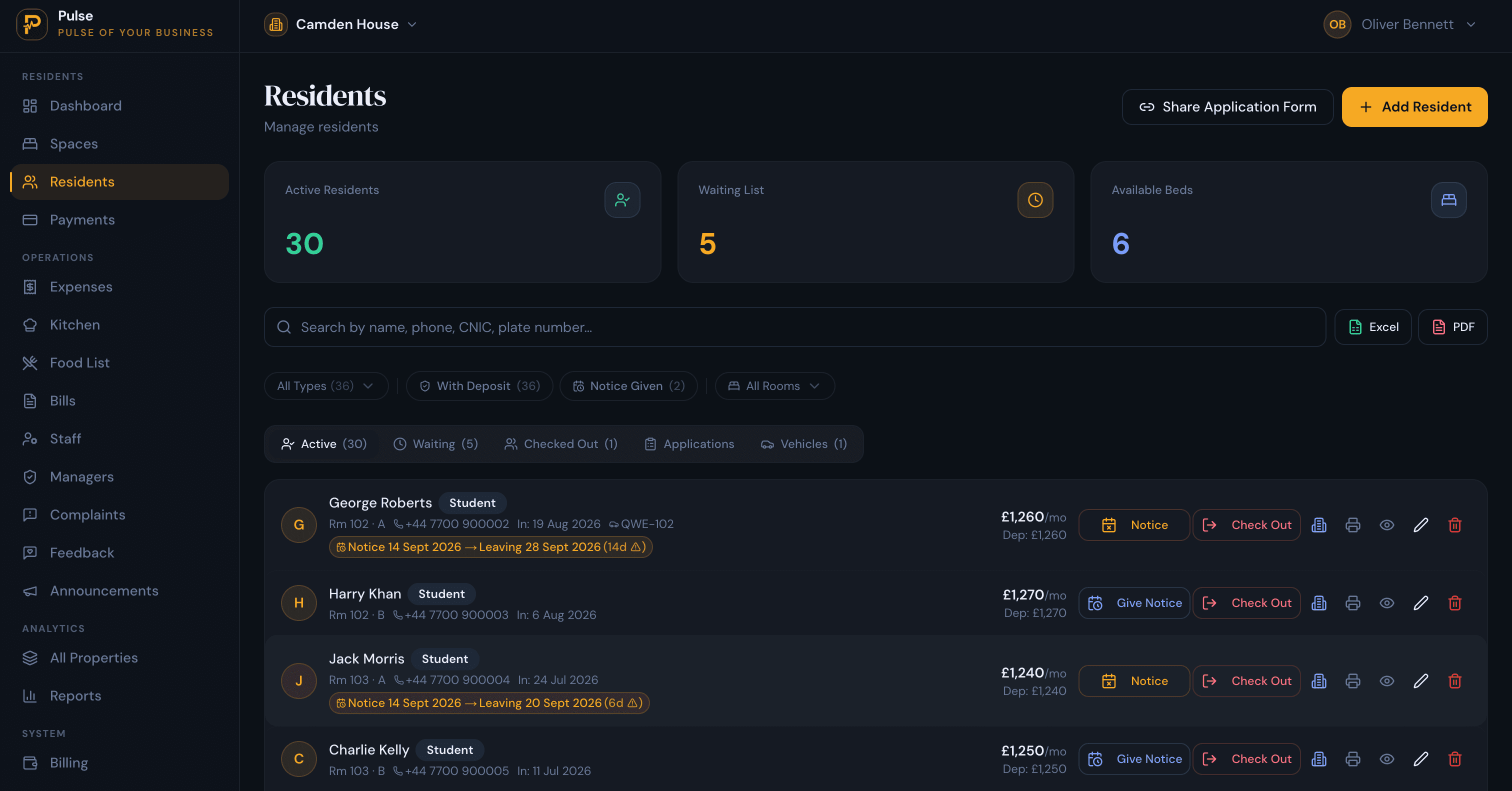
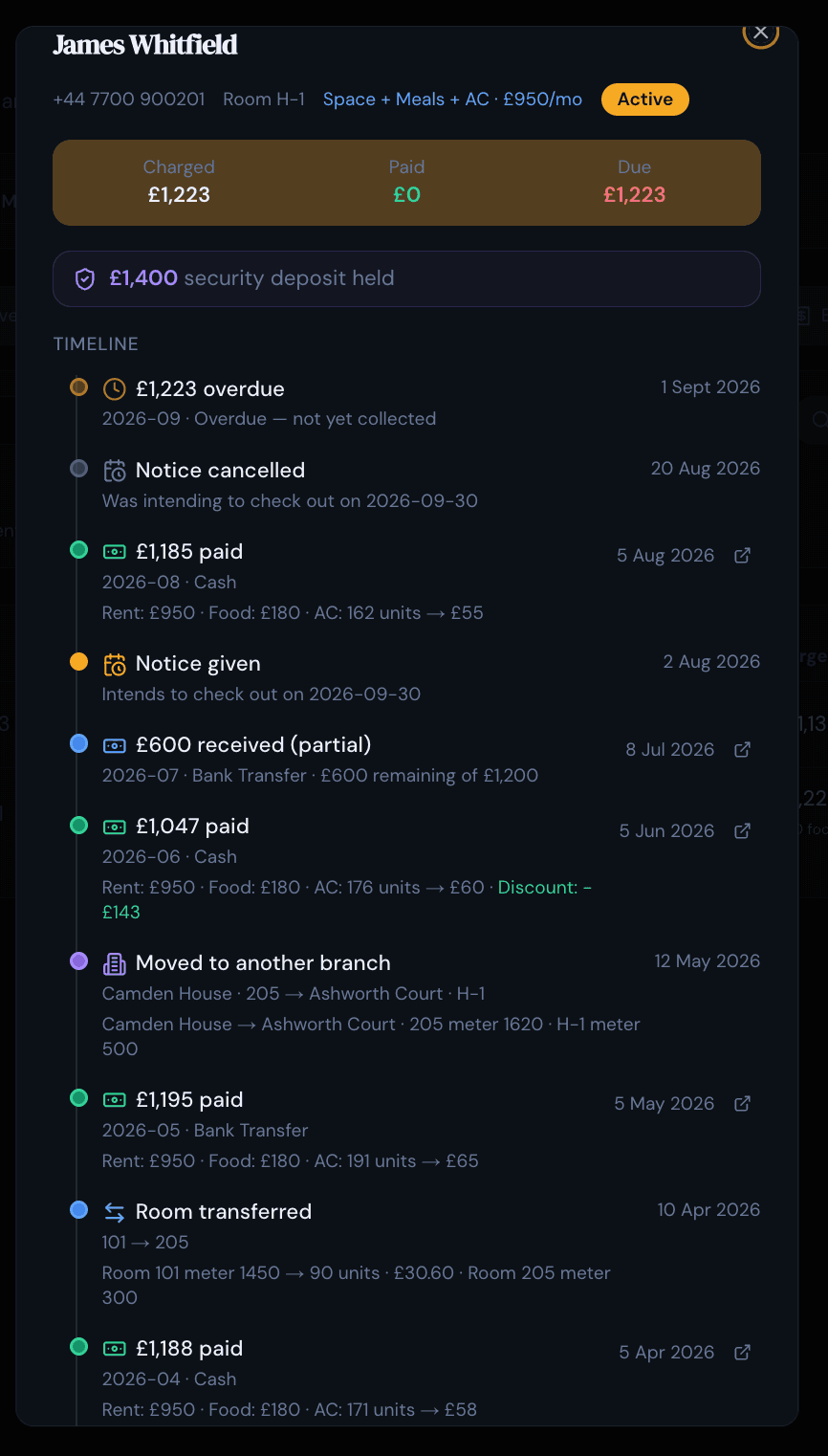
Each resident should have their own record: contact details, dates, documents, deposit and payment history. The value is having that history in one place instead of rebuilding it from email. In PulseHub, each resident has a timeline that gathers admissions, room changes, charges, payments, deposits and complaints in a single view, so a question about one person is answered on one screen.
Admissions, allocation and check-in or check-out
Moving someone in and out is a process, not a single action. Good software handles applications or a waiting list, allocates a room or bed, records the deposit, and later runs a clean check-out that settles any final charges against the deposit. Keeping this inside the system means the record is complete rather than scattered across messages.
Rent and payment tracking
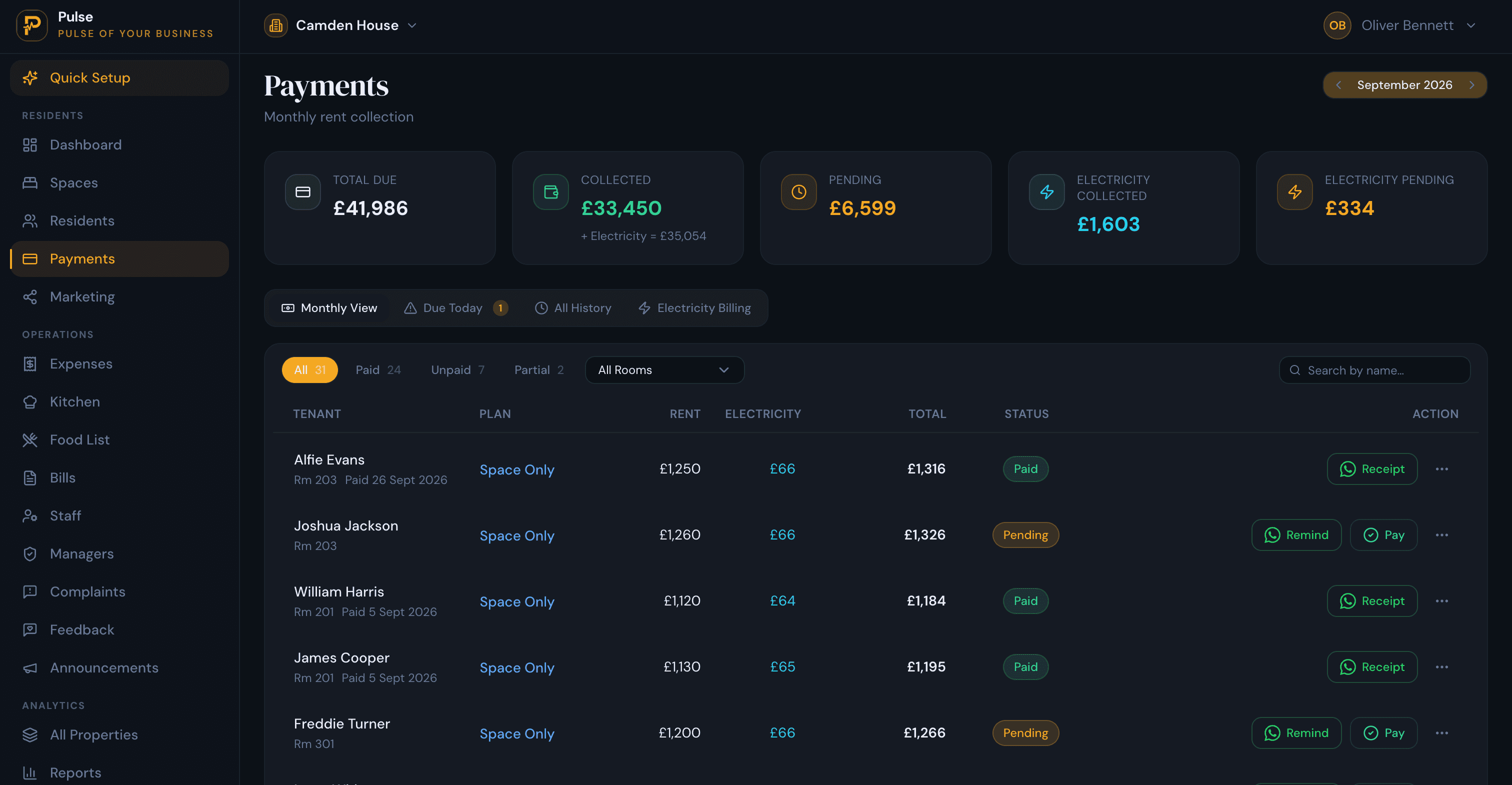
This is the part that pays for itself. At any moment you should be able to see what is owed, what has been paid and what is overdue, for each resident and each room, without rebuilding a spreadsheet at the start of every month. In practice that means rent schedules, advance and part-payments, deposits and receipts held together. PulseHub keeps these on a payments screen that sits apart from each resident’s history, so collections and arrears stay readable even when a dozen part-payments land in a single week. For a closer look at this one job, see tracking rent, payments and arrears.
Utility and bill allocation
Shared accommodation usually means shared costs. Electricity, gas, water and internet often sit with the operator and have to be divided fairly across rooms or residents, sometimes from meter readings. Adding those charges to the bill alongside rent, instead of tracking them in a parallel spreadsheet, keeps a resident’s statement complete and quick to produce. PulseHub supports utility charges, including metered electricity, on a resident’s bill.
Occupancy and voids
Empty space is the quietest cost in accommodation: nobody emails to say a bed is sitting unused. Occupancy tracking shows at a glance which rooms and beds are taken, free or reserved, so a void becomes a re-let plan rather than a gap you notice on the next bank statement. For a hostel or student site turning over dozens of beds a term, that visibility is most of the job.
Maintenance and complaints
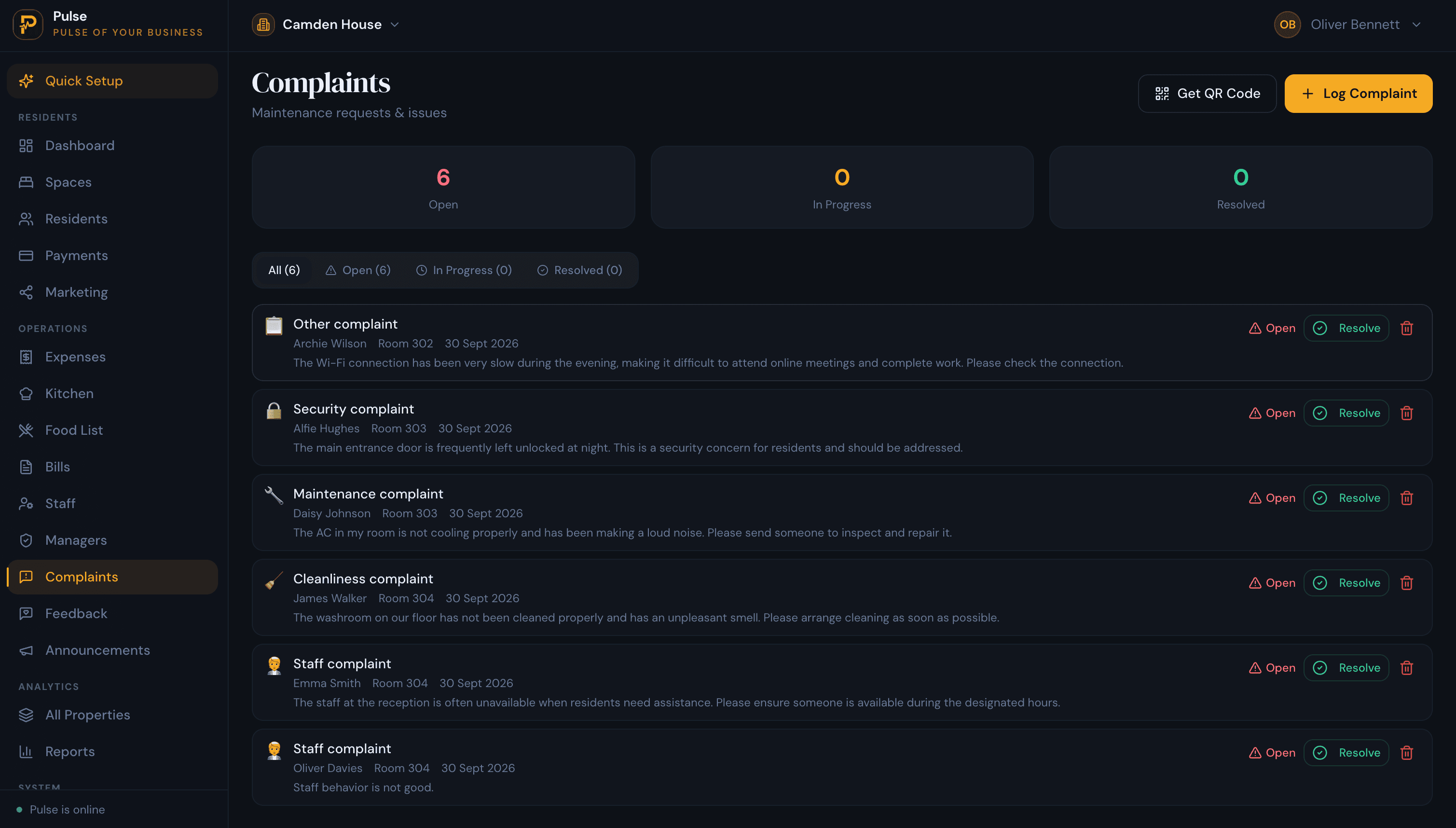
Repairs and complaints never stop in shared housing, and a lost request turns into a bigger problem fast. The software should let you log an issue, assign it to someone, and keep a dated record of what was done, which protects you and keeps residents informed. PulseHub tracks maintenance and complaints with their status and history, and lets a resident raise an issue from the property by scanning a QR code.
Multi-property management
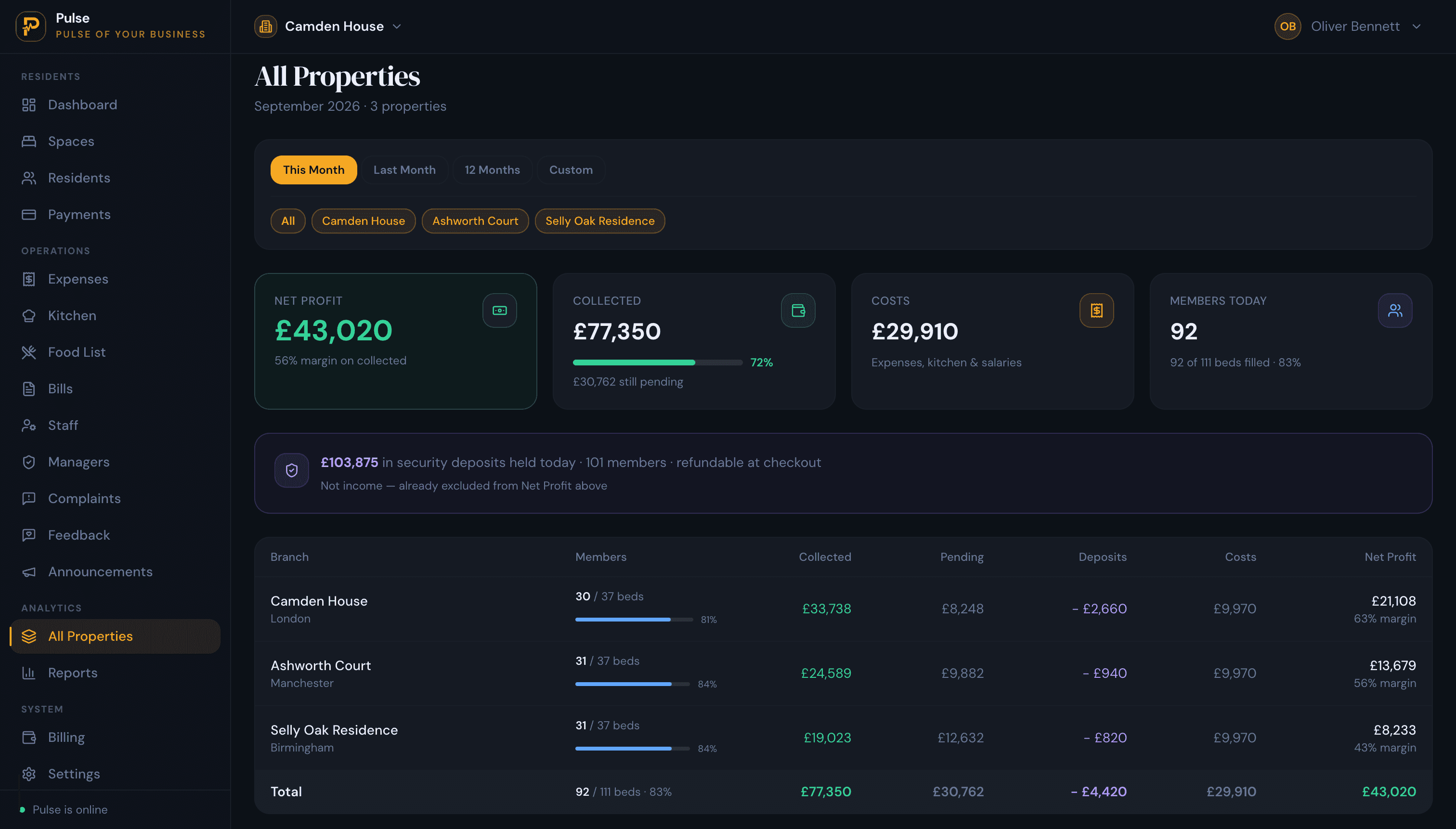
The moment you run a second site, the goal is to stop treating each one as a separate island with its own spreadsheet. A capable system pulls every property into one account, with a quick switch between them and a portfolio view that puts them side by side. PulseHub has a property switcher and an all-properties view that compares occupancy, collections, costs and profit across sites. For the wider version of this problem, see managing multiple properties without spreadsheets.
Reports and financial visibility
Numbers you cannot see do not help you. Reporting should let you answer how one property is doing and how the whole operation is doing without a weekend of adding up tabs: occupancy, rent collected, outstanding balances, expenses and a per-property comparison, enough to catch a problem while it is still small. You can see the full set of tools on the features page.
Staff access and permissions
If a manager looks after one site, role-based access lets them see and do what they need without handing over the whole business. Shared access also avoids the overwriting and version problems that come with a spreadsheet passed between people.
Benefits of an accommodation management system
The features matter because of the outcomes they produce. In day-to-day terms, a good system gives you:
- Fewer surprises. Voids and arrears are visible early, while you can still act on them.
- Accurate money. Rent, part-payments, deposits and utility charges add up correctly, per room and per resident.
- Less admin. One source of truth replaces email, spreadsheets and chat threads, so routine questions take seconds.
- A portfolio view. You can compare properties and see how the whole operation is performing without rebuilding the numbers.
- A record you can trust. Each resident’s history is kept automatically, which helps with disputes, deposits and handovers.
None of this requires the software to be clever. The gain comes from a structure that is already built for rooms, residents and rent, keeping a history you did not have to maintain by hand.
Accommodation management system vs hotel PMS
This is the comparison that causes the most confusion, because both deal with rooms. The difference is the length of stay and everything that follows from it. A hotel property management system (PMS) is built around nightly reservations and distribution; an accommodation management system is built around monthly stays and ongoing residents.
| Aspect | Hotel PMS / booking system | Accommodation management system |
|---|---|---|
| Core unit | Room-nights and nightly reservations | Rooms and beds let for months, with ongoing tenancies |
| Who stays | Short-stay guests on nightly rates | Residents or tenants on monthly rent |
| Billing | Folios, nightly rates, channel commissions | Monthly rent, deposits, part-payments and utility bills |
| Getting occupants | OTA and GDS channel management | Own listing page and waitlist; no OTA needed |
| Occupancy | Nightly availability calendar | Long-stay occupancy, voids and notice periods |
| Best fit | Hotels, B&Bs and short-stay lets | HMOs, student housing, hostels, co-living and staff accommodation |
A simple test: if you quote a nightly rate and rely on booking channels, you are closer to the hotel model. If you sign residents onto monthly rent, hold deposits and chase part-payments, you need accommodation management software. Some operators run a mix, but most lean clearly one way.
Accommodation management system vs spreadsheets
Most operators start with a spreadsheet, and for a single small property it can be enough. It is free, flexible and familiar. The strain shows as you add properties, rooms and part-payments: room structure has to be maintained by hand, part-payments are easy to get wrong, voids are checked manually, and a shared file risks people overwriting each other. Software removes that overhead because the structure and the history are built in, at the cost of a monthly subscription and a short setup. For a step-by-step view of moving off Excel, see our guide to managing multiple properties without spreadsheets.
How to choose the right accommodation management system
When you compare options, weigh them against how you actually operate:
- Built for rooms and beds. If it cannot let a room or a bed, it is not accommodation management software.
- Clear rent and arrears. Part-payments, deposits and overdue balances handled properly, not bolted on.
- Real multi-property support. One account, easy switching, and a portfolio view.
- Occupancy you can act on. Voids and availability visible at a glance.
- Utility and bill handling, if you recharge electricity, gas or water to residents.
- A simple interface. Software only helps if your team will actually use it, so a low learning curve matters.
- Sensible pricing and a trial. Matched to your number of properties, with a free trial so you can test it on your own rooms and rents.
- A regional fit. Currency, terminology and payment methods that match how you operate.
Does an accommodation management system work across countries?
Yes, because the core operations do not change with the border. Rooms and beds, residents, rent, occupancy, utilities and maintenance are universal. What changes is the wrapper around them: currency, the words operators use (a PG, a dormitory, an HMO and a boarding house all describe the same core model), accepted payment methods, and local legal or licensing rules.
A system that serves multiple markets handles the universal parts the same way and adapts the local details. PulseHub publishes regional versions, for example for the UK, India, the Philippines and Pakistan, with pricing in the local currency and locally relevant details such as accepted payment methods. One point is worth stating plainly: software helps you run the operation, but it does not remove your responsibility to follow the law where you operate, including licensing, tax and tenancy rules. In the UK, for example, HMO licensing is your obligation regardless of the tools you use. See our guide to HMO compliance in England for what that involves.
How PulseHub works as an accommodation management system
PulseHub is built around the sequence accommodation actually follows, each step feeding the next:
Property → Rooms & beds → Resident → Rent → Payments → Timeline → Portfolio
- Property. Set up each site.
- Rooms and beds. Organise the spaces inside it.
- Resident. Add residents and allocate them to rooms.
- Rent. Set a rent schedule, with any utility charges.
- Payments. Record what comes in, including part-payments and deposits.
- Timeline. Each resident’s history stays in one place.
- Portfolio. Compare every site in one view.
Every step above uses functionality that exists in PulseHub today.
Frequently asked questions
What is an accommodation management system?
An accommodation management system is software for running residential or shared accommodation at the room and resident level. It keeps rooms and beds, residents, rent and payments, occupancy, utilities and maintenance in one place, across one or more properties, so an operator can run day-to-day operations without disconnected spreadsheets.
What is the difference between an accommodation management system and a hotel PMS?
A hotel property management system is built around nightly reservations, folios and distribution channels for short-stay guests. An accommodation management system is built around longer stays: residents on monthly rent, deposits, part-payments, utility bills and notice periods. If you let rooms by the month rather than by the night, the second model fits.
Who needs accommodation management software?
It suits operators who manage accommodation by the room or bed rather than by the whole property: HMO and shared-house landlords, student accommodation operators, hostels and boarding houses, co-living operators, and staff or worker accommodation providers. It is most useful once you run more than one property or juggle part-payments and voids.
What features should an accommodation management system have?
At a minimum: a structure of property, rooms and beds; resident records; admissions, allocation and check-in or check-out; rent and payment tracking with deposits and part-payments; utility or bill allocation; occupancy and voids; maintenance and complaints; multi-property management; reports; and staff access with permissions.
Can accommodation management software manage multiple properties?
Yes. A capable system runs every property or branch from one account, with an easy way to switch between them and a portfolio view that compares them. PulseHub includes a property switcher and an all-properties view, and its plans cover 1, 3 or 10 properties.
Does accommodation management software work in different countries?
The core operations (rooms, residents, rent, occupancy, utilities and maintenance) are the same everywhere, so the software is useful internationally. What changes between countries is terminology, currency, payment methods and local legal or licensing rules. Regional versions of PulseHub add locally relevant details, but no software removes your obligation to follow local law.
How much does accommodation management software cost?
Pricing varies by provider and usually scales with the number of properties or rooms. PulseHub is priced by the number of properties, with plans for 1, 3 or 10, and a 14-day free trial with no card required. See the pricing page for current figures in your region.
Choosing the right system for your accommodation business
An accommodation management system earns its place when you manage by the room and run more than one property: occupancy, arrears and bills stop slipping through spreadsheets and chat threads, and the whole operation fits on one screen. The right choice is the one built for monthly stays and rooms, that your team will actually use, priced for your number of properties.
PulseHub brings rooms and beds, residents, rent, occupancy, utilities and maintenance into one account, with a portfolio view across every property. See how it fits your operation on the features page, compare plans on the pricing page, or start a free trial and set up your first property in minutes. If you run a larger portfolio, you can also talk to the team.