PG management
PG Management Software in India: Features and How to Choose
· 7 min read
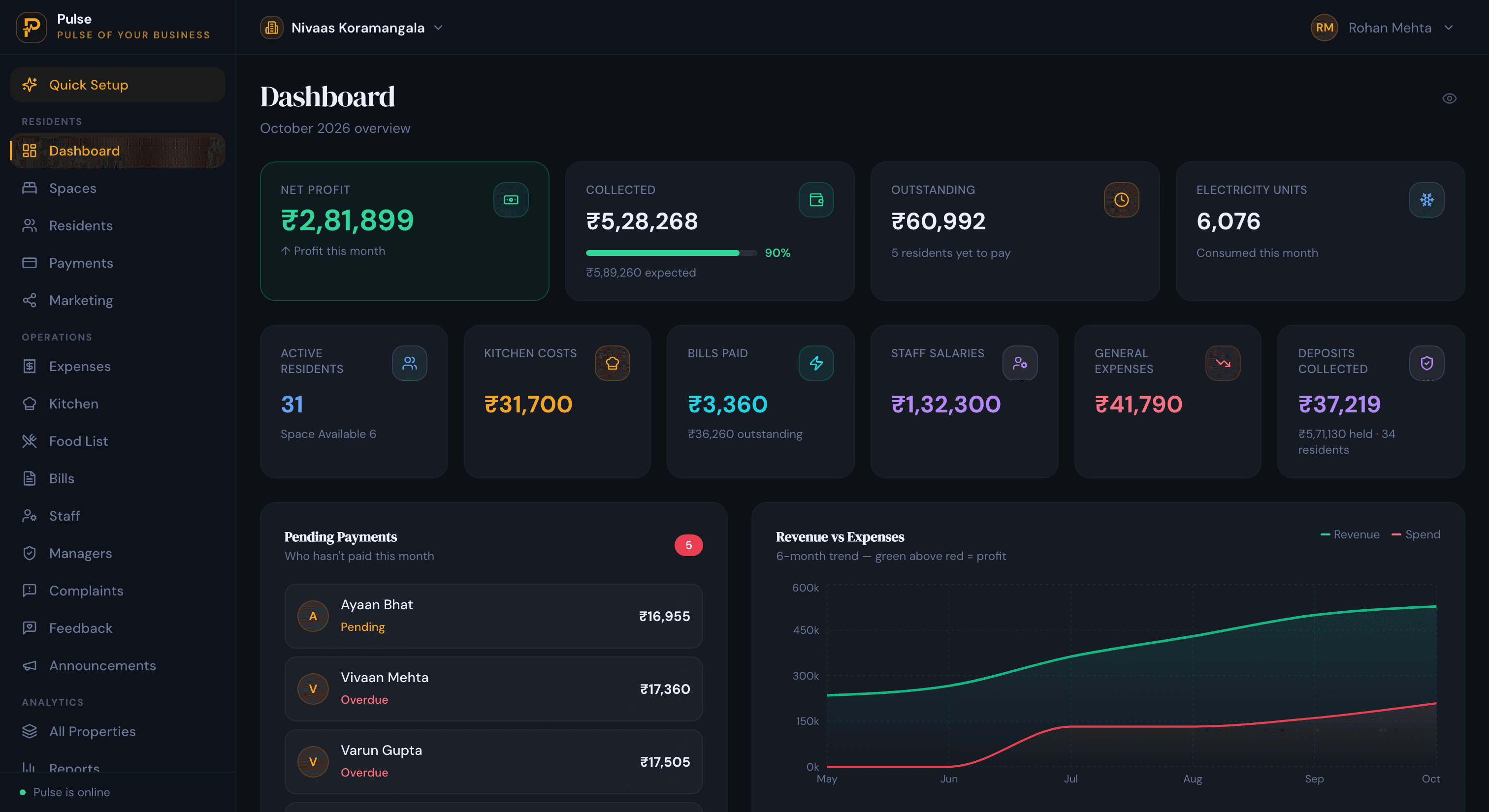
PG management software is the tool a paying guest operator uses to run the whole PG from one place: which bed each resident is in, what they owe for rent, meals and electricity, who has paid, and which beds are free. It takes over from the register, the calculator and the pile of WhatsApp messages, and it works whether you run one PG or several across a city.
In India a PG usually means letting beds by the month to students and working professionals, often with meals included and electricity billed on top. That combination, rent plus food plus power plus a deposit, spread across beds that fill and empty on different dates, is what makes a PG awkward to run on paper. This guide covers what the software does, the features that actually matter, and how to choose one that fits the way you operate.
What is PG management software?
PG management software is a tool for running a paying guest accommodation day to day. It records who sleeps in each bed, bills rent along with meals and electricity, tracks what each resident has paid and owes, and shows which beds are free, across one PG or a group of them from a single account.
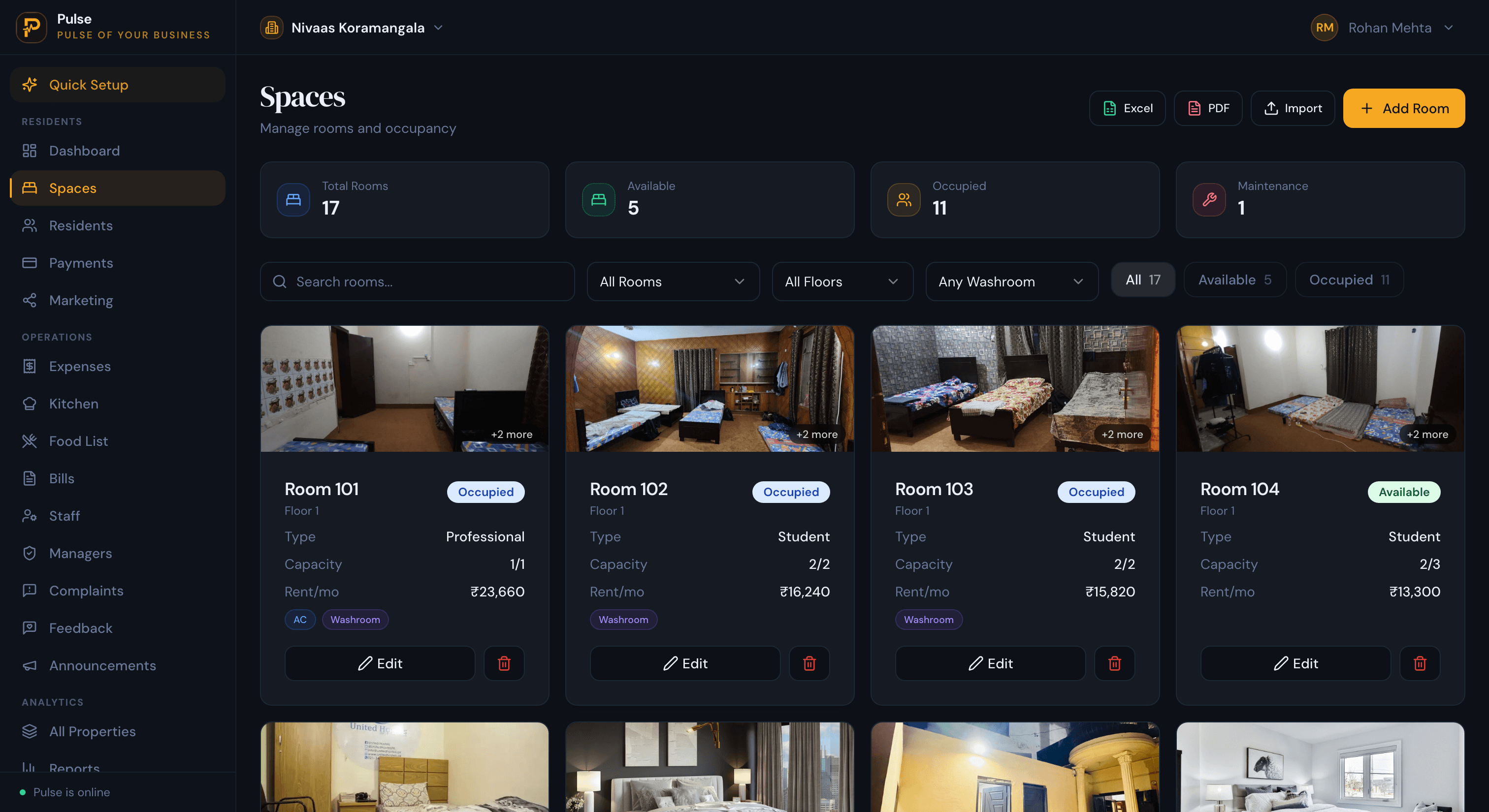
A PG is let bed by bed, not flat by flat. Several residents share a room, each on their own rent and move-in date, so the software has to understand rooms and beds rather than whole units. PulseHub shows each PG as rooms and beds, with the room type, capacity, rent, AC status and whether the room has an attached washroom, so a single bed can be allocated and billed on its own.
PG and hostel are close cousins. PG is the usual word in India for a smaller, owner-run house, while hostel tends to mean a larger or institutional building, but the operations are the same, so the same software serves both. If your property is more of a hostel, our guide to hostel management software covers the same ground from that angle. The wider category sits in our guide to the accommodation management system.
Why running a PG gets hard on paper
The jobs that push PG owners off a register are usually these:
- Rent that never lines up. Beds fill on different dates, so each resident is on a different cycle. Add a few part-payments and a single paid-or-unpaid list stops telling the truth.
- Electricity arguments. Power recharged to residents, by meter or share, is a regular source of disputes, and of money you never recover once someone has left.
- Meals on top of rent. If food is included or charged, it has to sit on the same bill as the rent, not on a separate note you reconcile later.
- Deposits at check-out. Settling a deposit gets messy when the final month, the last electricity reading and any dues all have to come off it at once.
- Everything in different places. A register for rent, a calculator for power, WhatsApp for reminders, and your memory for the rest.
- More than one PG. Run two or three across the city and the paperwork grows faster than the income.
What PG management software should do
Product names differ, but a PG system worth paying for should cover the jobs below, and here is the way PulseHub does each of them.
Beds and rooms
The software should let you set up each room and allocate individual beds, and show each room filling up as residents come and go. PulseHub lays out each PG as rooms and beds with rent, AC and washroom details, so you are managing beds, not guessing from a flat-level list.
Resident profiles and onboarding
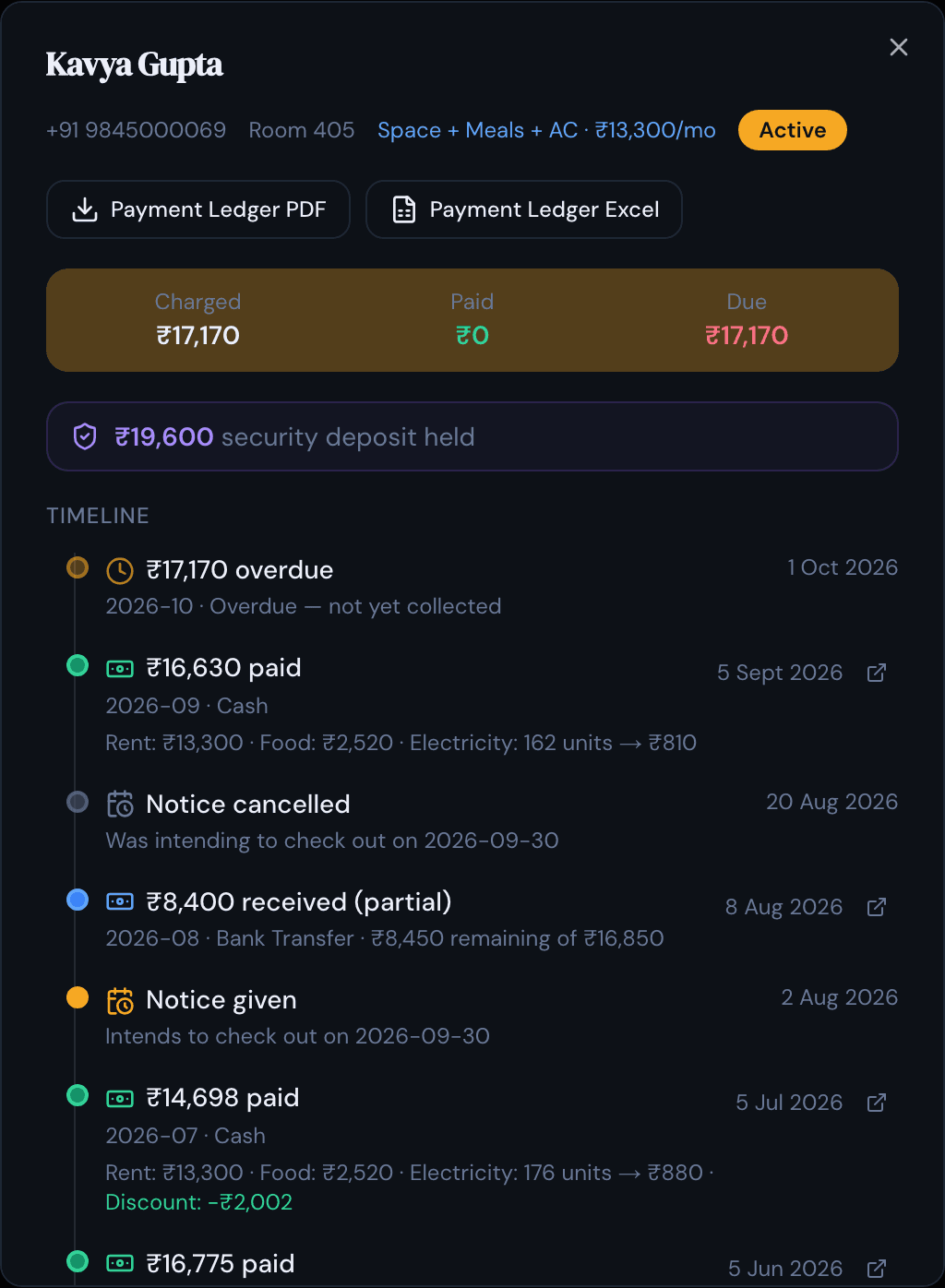
Each resident should have a profile holding their contact details, documents, bed allocation, deposit and payment history, so anything you need about them sits on one screen rather than buried in old chats. PulseHub keeps a profile and a running timeline for each resident, plus a waiting list of who is due to move in and when.
Rent, meals and electricity on one bill
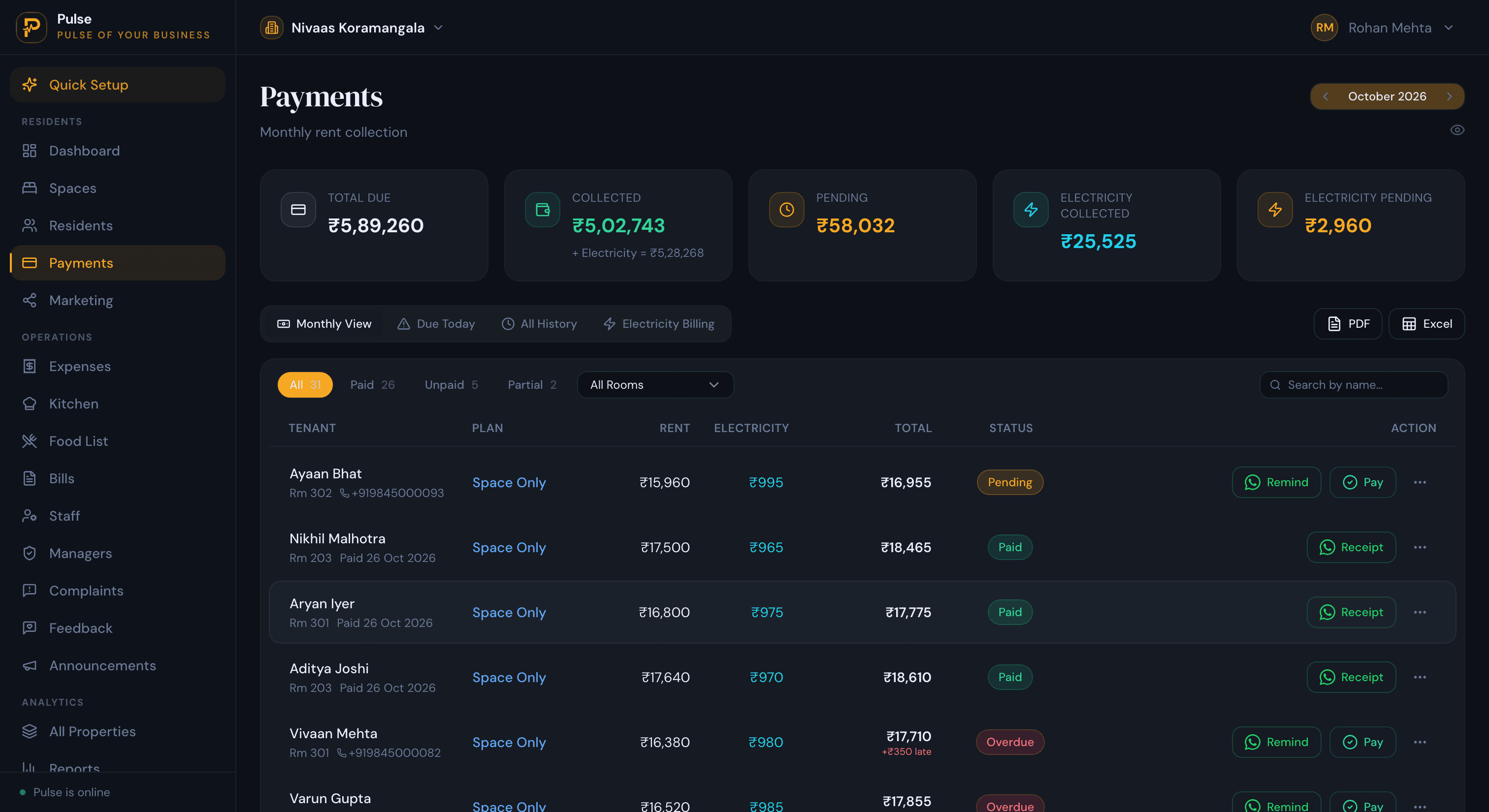
This is the part that separates PG software from a plain rent tracker. On a PG statement, food and the month’s electricity sit under the rent line, not on a second sheet you reconcile later. PulseHub puts all three on one monthly bill per resident, carries any advance or part-payment forward, and keeps the collections-and-dues list on a separate screen so a busy week of partial payments stays legible.
Recording payments and receipts
Residents pay in different ways, so the software should let staff record a payment by UPI, bank transfer or cash against the right resident, and hand back a receipt. PulseHub records payments made by UPI, bank transfer or cash and generates a receipt you can share online or over WhatsApp. It records the money that comes in; it is not a payment gateway that collects it for you.
Deposits and check-out
A deposit should stay visible against each resident until they leave, and check-out should pro-rate the final month and settle the last electricity reading and any dues against the deposit, so the refund or balance is clear to both sides. PulseHub holds the deposit on the resident’s record and settles it at check-out against the final bill.
Occupancy and a waiting list
A vacant bed is the easiest cost to miss, because nothing in a PG announces it. The occupancy screen marks each bed occupied, vacant or held, and the waiting list holds the next intake with their dates, so you can slot an arrival into the week a resident gives notice rather than the week after they have gone.
Running several PGs
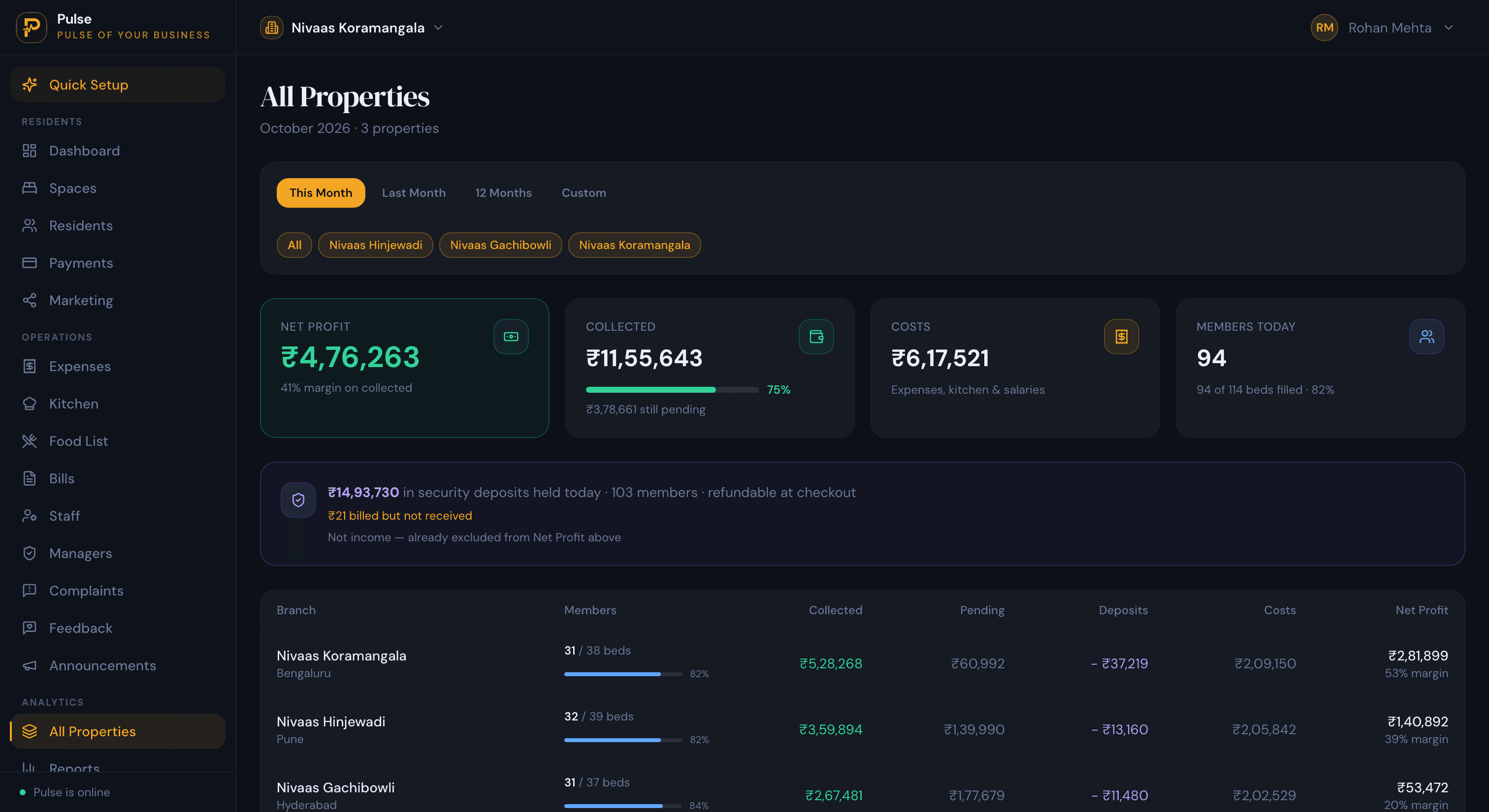
Once you run more than one PG, you want them on one screen rather than a separate register for each. PulseHub moves between PGs in a click and lines them up on occupancy, collections, dues, costs and profit.
A public page for your PG
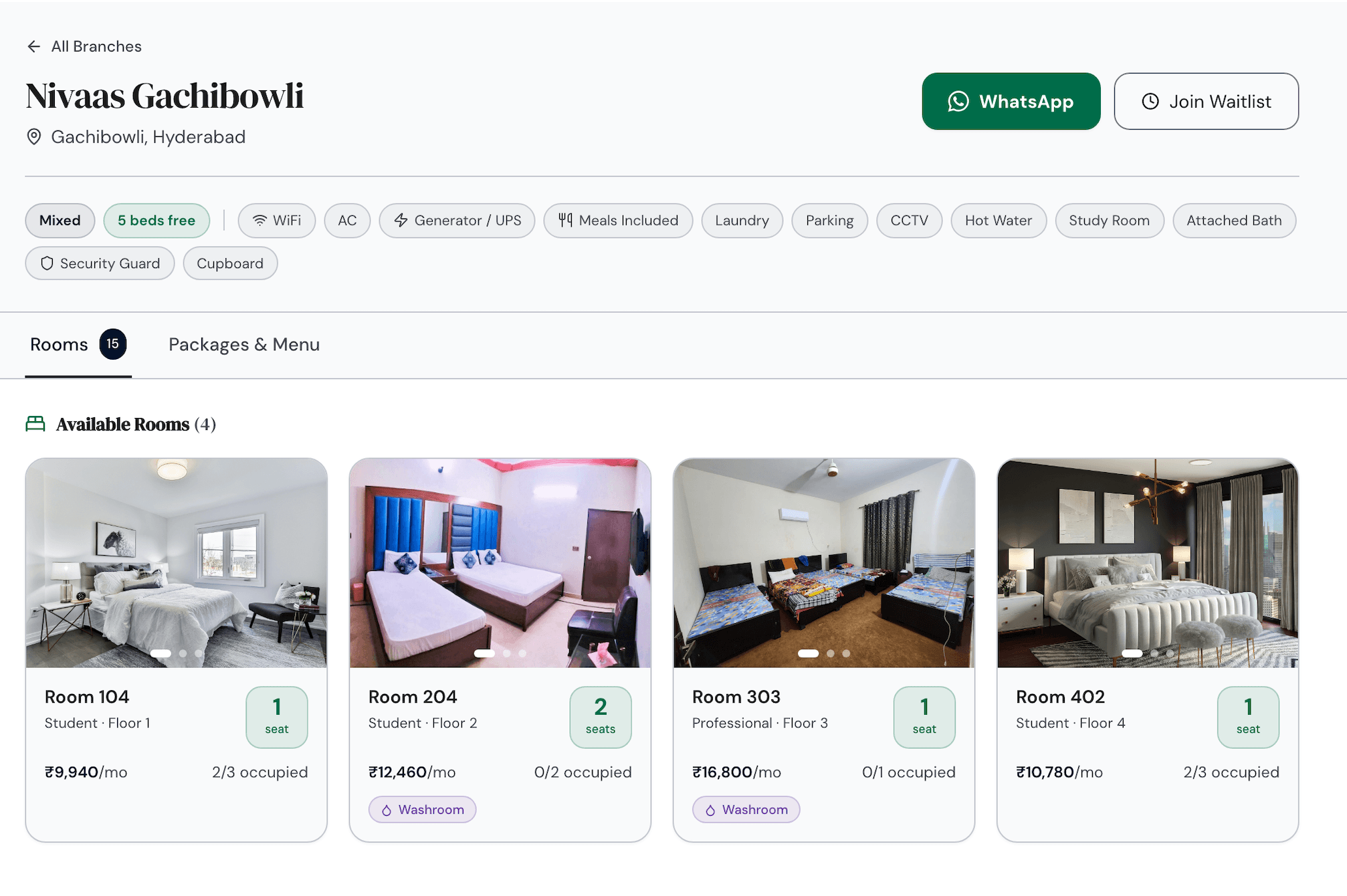
Enquiries are easier to convert when they land in one place instead of across five phone numbers. PulseHub can publish a page for each PG with photos, the beds currently free, the rent, and what is included, from meals and WiFi to power backup, plus a WhatsApp enquiry or waitlist button so a prospective resident can reach you directly.
PG software vs a register and WhatsApp
A register and a WhatsApp group carry one small PG fine. The strain starts with the second floor of beds and the first set of electricity meters: rent falling due on a dozen different dates, part-payments noted in the margin, and a deposit that has to square with a final meter reading when someone leaves on short notice. A register tells you who paid last month, not who still owes for power this month. Software takes that bookkeeping off you and keeps each resident’s full history in one place you can actually search. For the move off manual records step by step, see our guide to managing multiple properties without spreadsheets.
How to choose PG management software
- It manages beds, not just rooms. Allocate and bill a single bed.
- Rent, meals and electricity on one bill, with part-payments and deposits handled properly.
- Payment recording with receipts. UPI, bank transfer and cash, with a receipt you can share on WhatsApp.
- Check-out that settles the deposit against the final month, electricity and dues.
- Occupancy and a waiting list you can act on.
- One account for every PG, with a view that compares them.
- Rupee pricing and a trial, plus an interface your staff can use without training.
PulseHub is priced in rupees by the number of properties, with plans for 1, 3 or 10 and a 14-day free trial that needs no card. See PulseHub for India, compare plans on the pricing page, or talk to the team if you run a larger group of PGs.
How PulseHub runs a PG
A PG runs in a repeating cycle, and PulseHub is built to follow it:
Waiting list → Allocate bed → Bill rent, food & meter → Collect & receipt → Settle deposit → Compare PGs
- Waiting list. Hold prospective residents with the dates they want to move in.
- Allocate. Give an incoming resident a specific bed in a specific room.
- Bill. Set the monthly rent, add the food package and the electricity meter.
- Collect. Record each UPI, bank-transfer or cash payment and send the receipt.
- Move-out. Read the final meter, clear dues and refund the balance of the deposit.
- Compare. See every PG together, in rupees.
A PG you set up today uses every step above; none of it is a roadmap item.
Frequently asked questions
What is PG management software?
PG management software runs a paying guest accommodation at the bed and resident level. It records who is in each bed, bills rent along with meals and electricity, tracks deposits and part-payments, shows which beds are free, and keeps it all in one place, across one PG or several. It takes over from the register, the calculator and the WhatsApp group a PG often runs on.
Is PG management software different from hostel software?
Not really. A PG and a residential hostel both let beds by the month with rent, meals, deposits and shared facilities, so the same software fits both. PG is the common term in India for smaller, owner-run houses; hostel often means a larger or institutional building. The day-to-day operations are the same.
What should PG management software include?
Bed-level allocation; a profile for each resident with documents; rent billed with meals and electricity; deposits, part-payments and clear dues; payment recording with receipts you can share on WhatsApp; occupancy and a waiting list; check-out settlement; a way to run several PGs from one account; and reports in rupees.
Can it bill meals and electricity along with rent?
Yes. For a PG, meals and electricity often belong on the same bill as the rent. Good software puts rent, meal charges and metered or shared electricity on one monthly bill, so nothing lives on a separate sheet. PulseHub bills rent, food and metered electricity together on each resident’s statement.
Can it record UPI, bank transfer and cash payments?
Yes. Staff can record a payment made by UPI, bank transfer or cash against the right resident and bank account, and share a receipt online or over WhatsApp. PulseHub records these payments; it is not a payment gateway that collects money on your behalf.
Can it manage multiple PGs or branches?
Yes. You can run every PG from one account, switch between them, and compare them on occupancy, collections, dues and costs. PulseHub includes a branch switcher and an all-branches view, and its plans cover 1, 3 or 10 properties.
How much does PG management software cost in India?
Pricing usually scales with the number of PGs or beds. PulseHub is priced in rupees by the number of properties, with plans for 1, 3 or 10 and a 14-day free trial that needs no card. See the India page or the pricing page for current figures.
Run your PG on PulseHub
A single PG on a register is manageable. Add food bills, meter readings, deposits to refund and a second or third PG across town, and the arithmetic stops fitting in a notebook. PulseHub holds the beds, residents, monthly bills, payments and deposits for every PG in one rupee account, with a single view that compares them. See PulseHub for India, compare plans on the pricing page, or start a free trial and set up your first PG in minutes.