Dormitory & bedspace
A Philippine Operator’s Guide to Dormitory and Bedspace Management Software
· 8 min read
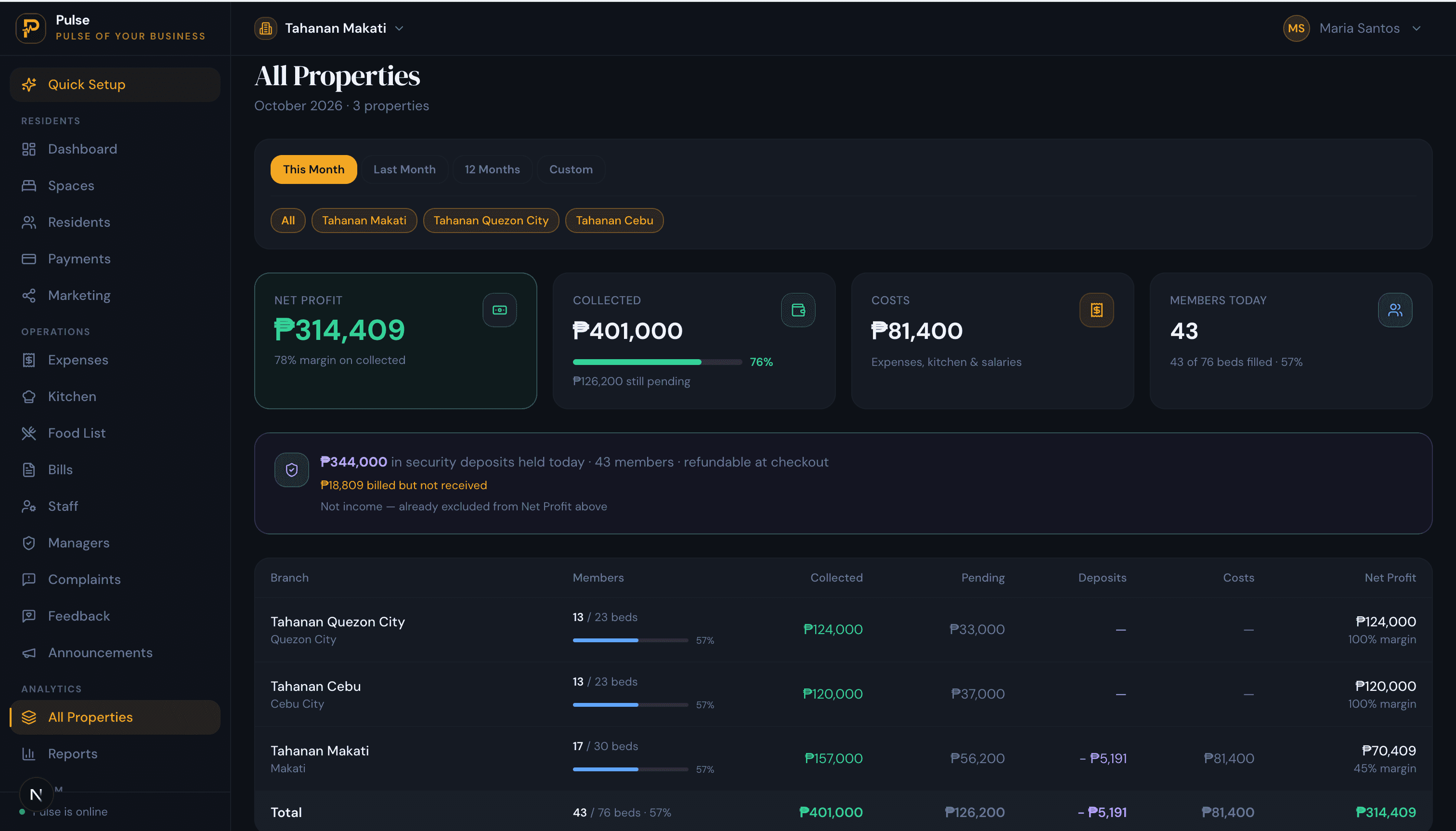
Run a dormitory in the Philippines and you are really keeping two calendars at once. Students arrive together for the school year and leave together when the term closes. The bedspacers working in the BPO towers and the service trade come and go one at a time, on night shifts and their own notice. Both groups rent a single bed rather than a room, and both pay by the month. Dormitory and bedspace management software is what lets one operator hold both populations, with their beds, bills and deposits, without losing the plot.
On paper that job is a notebook of names, a calculator for the power bill and a phone full of screenshots. It works until the building fills up. This guide sets out what the software does, why letting by the bed and juggling two intakes changes the work, and how to judge a tool that fits a Philippine operation rather than a generic property manager.
Dormitory, bedspace and boarding house
The words get used loosely, so it helps to set them side by side. A bedspace is the smallest unit, a single bed rented inside a shared room and taken by a bedspacer for a monthly fee. A dormitory is a whole building of shared rooms let that way, usually near a campus or an office district. A boarding house is much the same, with meals more often part of the arrangement. What they share outweighs what sets them apart: each lets space by the bed, bills monthly, holds a deposit, and shares kitchens, bathrooms and power. A tool built around the bed runs any of them, which is why this guide treats them as one.
This is one corner of a larger subject. For the overview, our guide to the accommodation management system covers the whole family of room-by-room operations. If your building runs more like a hostel, the hostel management software guide looks at it from there.
Two calendars under one roof
The thing that makes a Philippine dormitory distinct is who sleeps in it. Most buildings hold a mix of students and working bedspacers, and the two live on different clocks. Students move as a cohort tied to the academic year: a wave of them arrives before classes, and a wave checks out within the same fortnight at the end of a term. Workers in the BPO and service sectors sign up whenever a job starts, keep odd hours, and give notice on no particular schedule.
Those two rhythms pull the operation in opposite directions, and it is where paper quietly fails:
- The end-of-term cliff. When a floor empties across two weeks, every one of those deposits has to be settled and every bed re-let before the next intake, all at once.
- One waiting list, two kinds of arrival. You are holding beds for a student group booked months ahead and for a worker who wants somewhere by Friday, and both need to be visible.
- Air-con is a real line item. In the heat, an air-conditioned room is worth paying for and worth metering, so power is a charge tenants will question rather than a rounding error.
- Meals split the room. Some bedspacers take the food plan and some cook for themselves, so even people in the same room owe different totals each month.
- Staggered due dates. Beds that filled on a dozen different days fall due on a dozen different days, and a single paid-or-not column cannot keep that straight for long.
- Branches on different clocks. A dorm beside Makati offices and one by a Cebu campus peak at different times, yet one owner has to read them together.
What dormitory and bedspace software should do
Call them what you like; the jobs that follow are what separate a dormitory tool from a generic rent app, and PulseHub is built around each of them.
See the building as rooms and beds
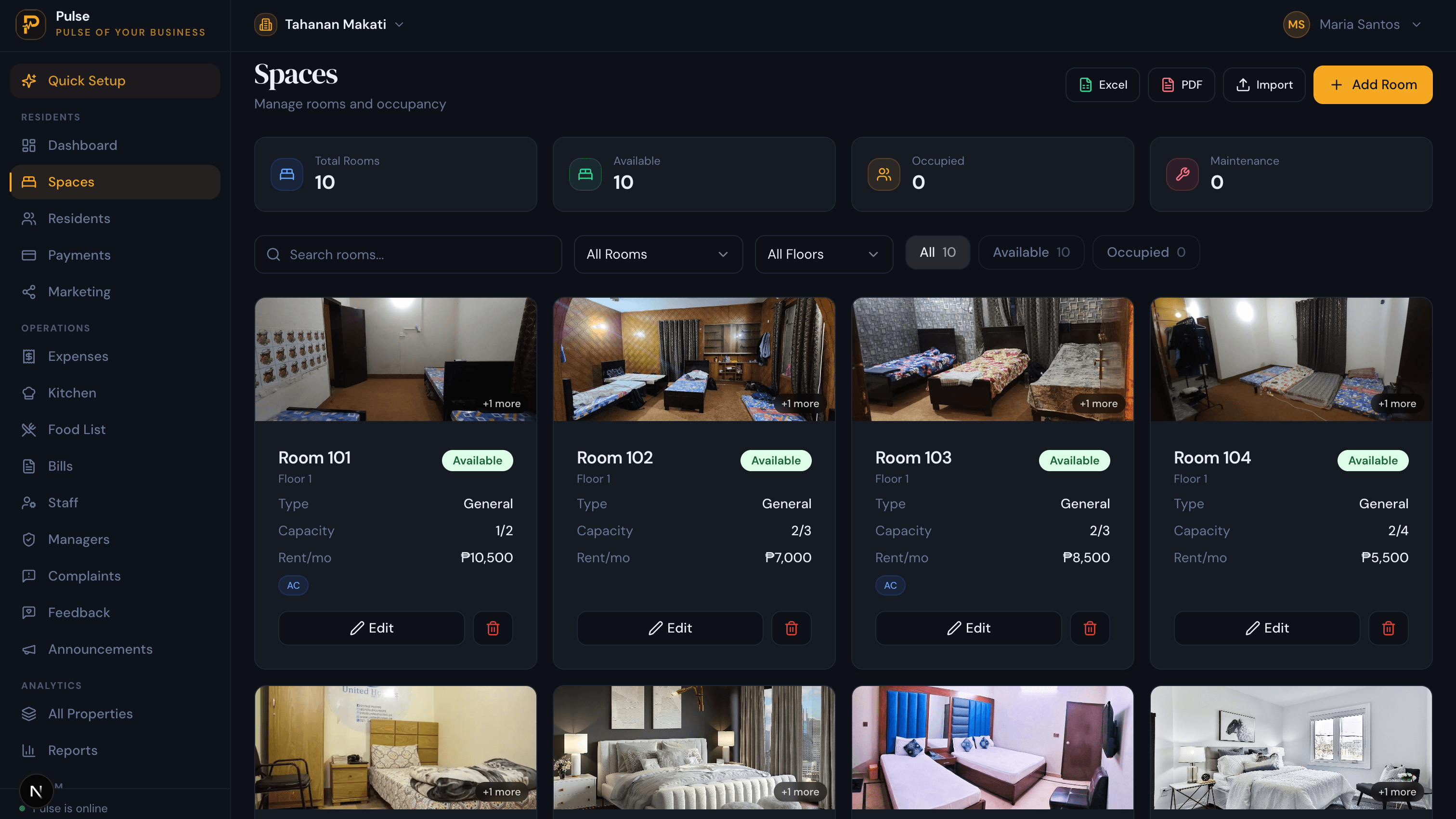
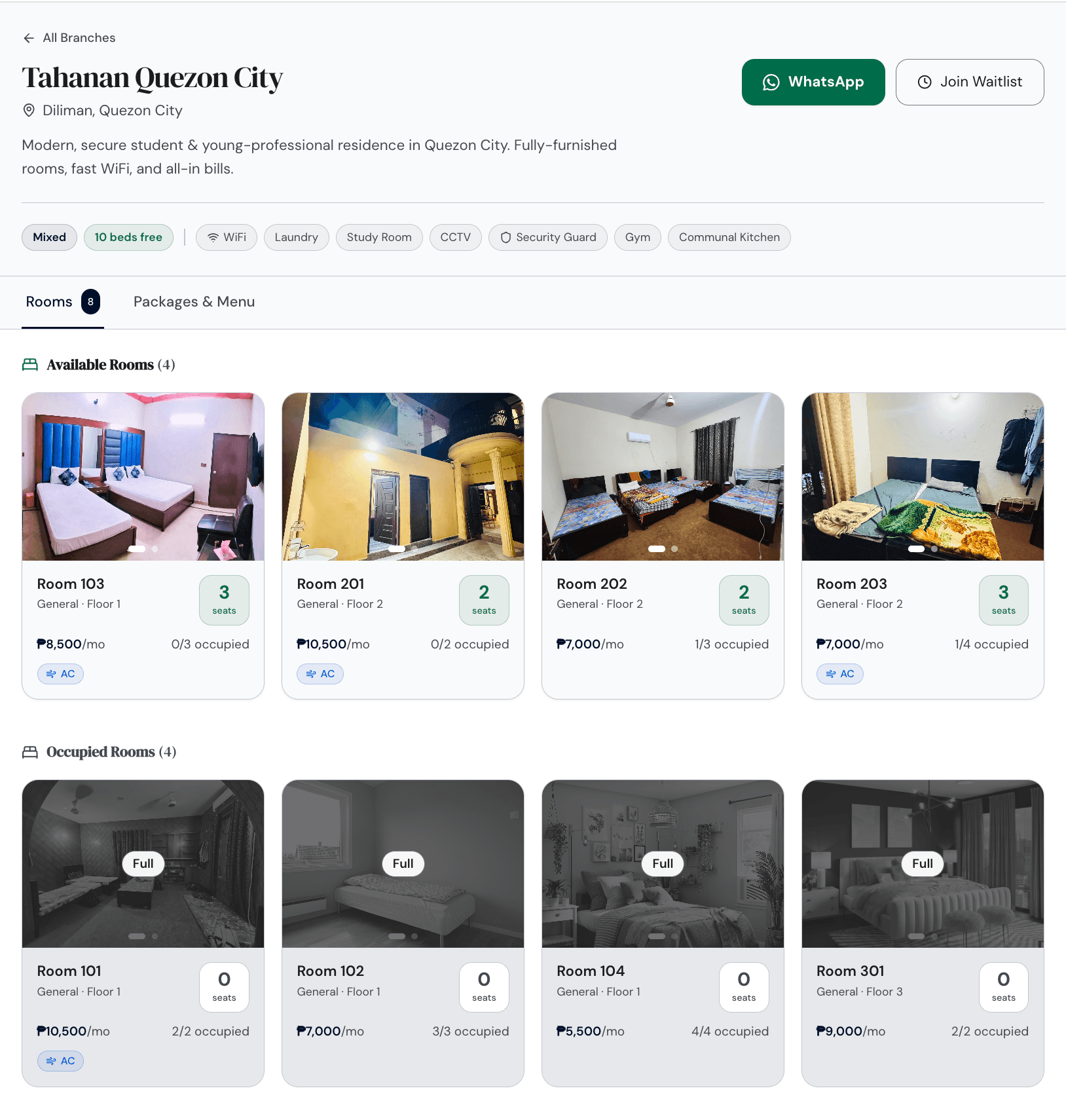
Because you let a bed, the software has to see the building the way you do, as floors and rooms with individual beds inside them. In PulseHub each branch is built from its rooms, every room carrying its capacity, its monthly rate and whether it is air-conditioned, and a bed is the thing you hand to a person. You fill a room seat by seat, and the occupied count stays honest as people come and go.
Hold a record for every tenant
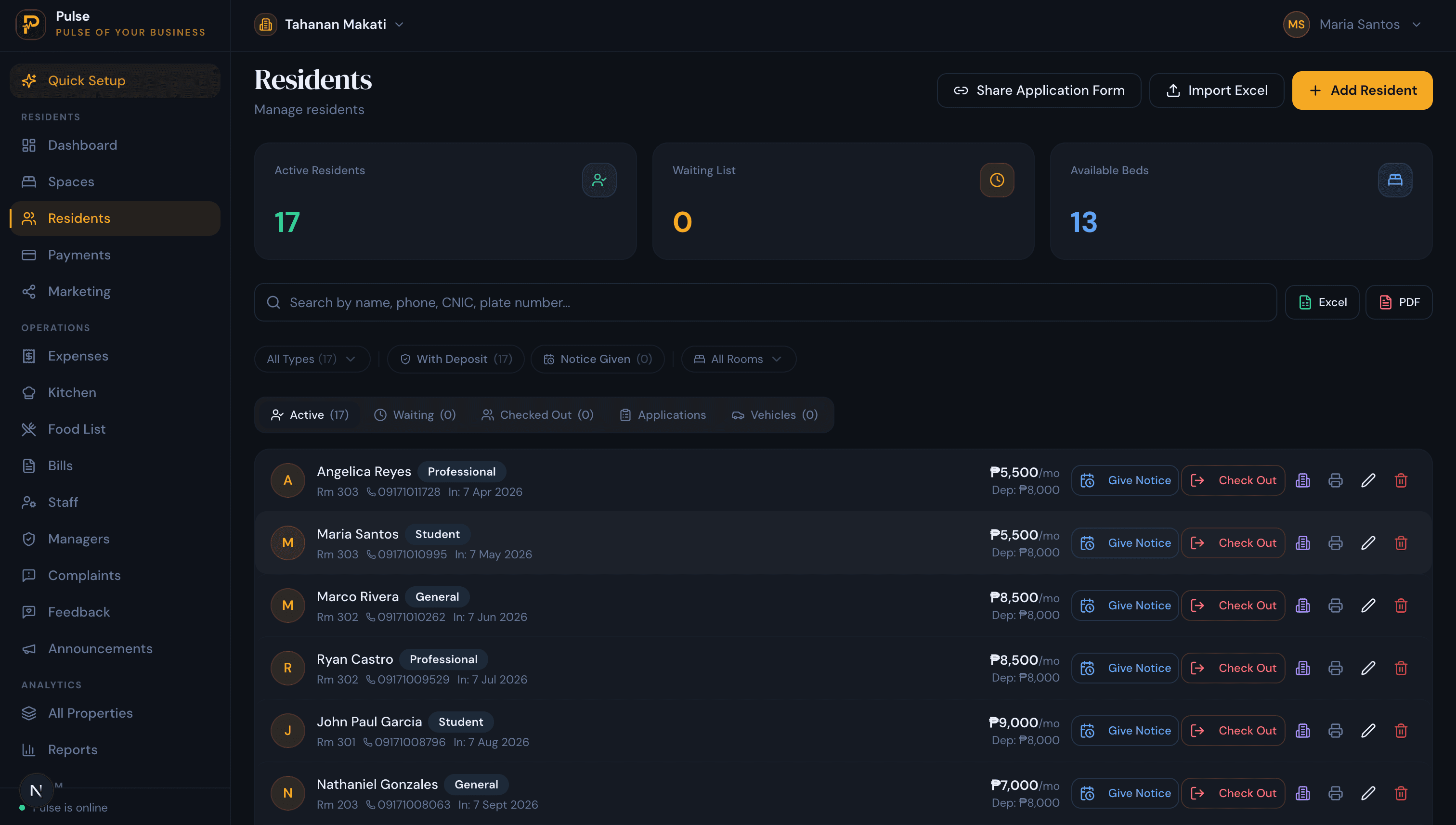
A bedspacer’s record should carry the things you reach for when they call: the bed they hold, their contract and ID, the deposit you are keeping, and the history of what they have paid. When a student cohort and a dozen workers are in the building at once, that record is how you answer any question without digging through chats. PulseHub keeps a profile and a dated timeline for each tenant, and a waiting list behind it for whoever is booked in next.
Build one monthly bill, not three
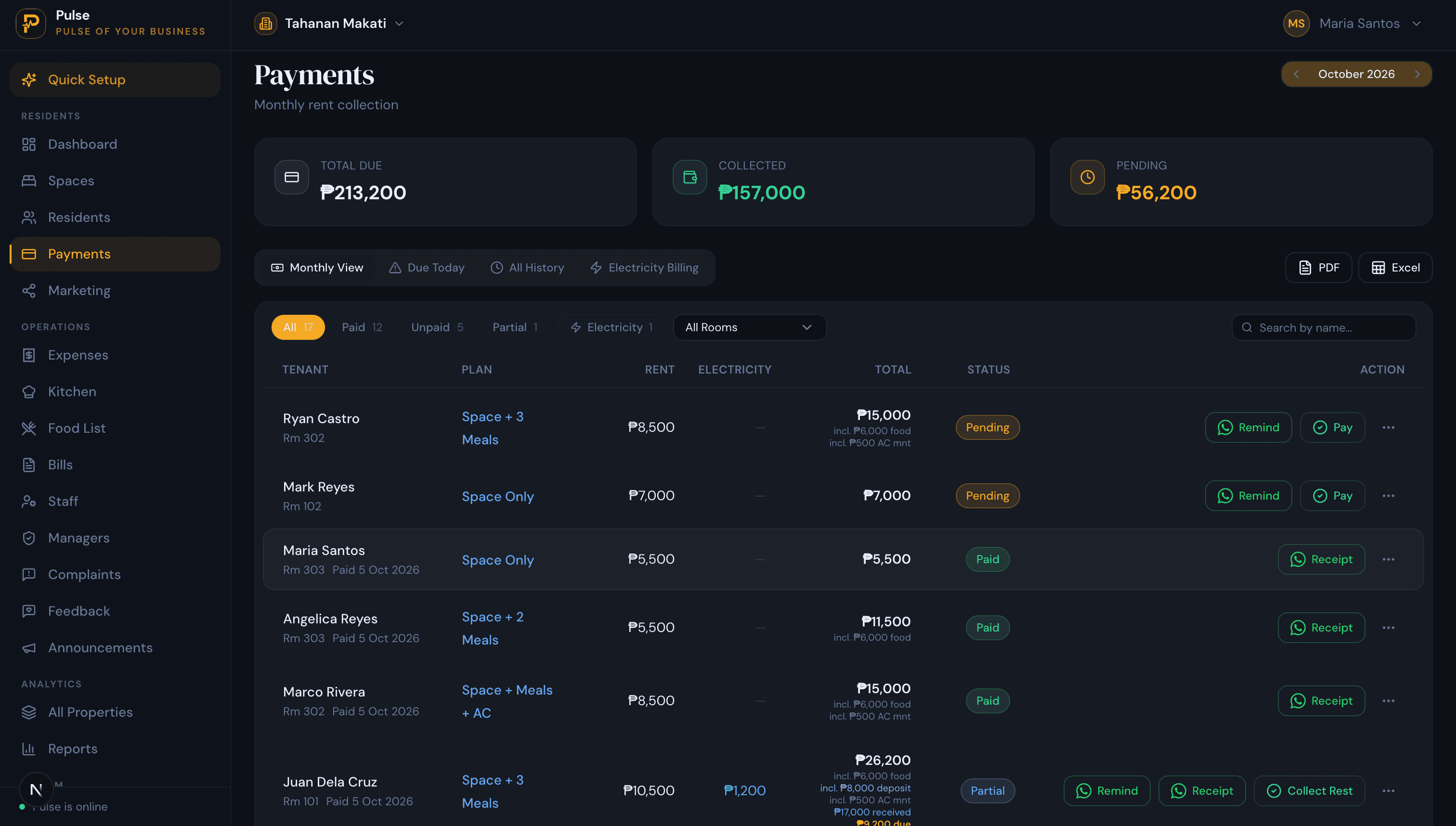
A dormitory bill is rarely just rent. A student on full board, a worker who skips the meal plan, and an air-conditioned room with its own meter all come out to different numbers, and they should land on one statement instead of three running notes. PulseHub builds each tenant’s monthly bill from their own rent, meal plan and electricity in pesos, rolls any part-payment into the following month, and keeps the arrears on a list of their own so a heavy collection day stays readable.
Record payments the way tenants actually pay
Tenants settle in cash, by bank transfer, or through an e-wallet, and whoever is on the desk should be able to put any of those against the right person in seconds and hand back a receipt. PulseHub does the recording and the numbered receipt, which a tenant can keep online or on chat, while the money itself still moves through your own drawer and bank. It is a ledger, not a collector standing between you and your tenant.
Know which beds are earning tonight
The number that decides whether a dormitory makes money is how many beds are paying right now. PulseHub shows each bed as taken, free or held, and the waiting list carries both kinds of arrival, the cohort booked for next term and the worker who wants a bed this week. So when notice comes in you can line up the next tenant for the day the bed opens, which is the whole game in the fortnight a term empties a floor.
Settle the deposit in the open
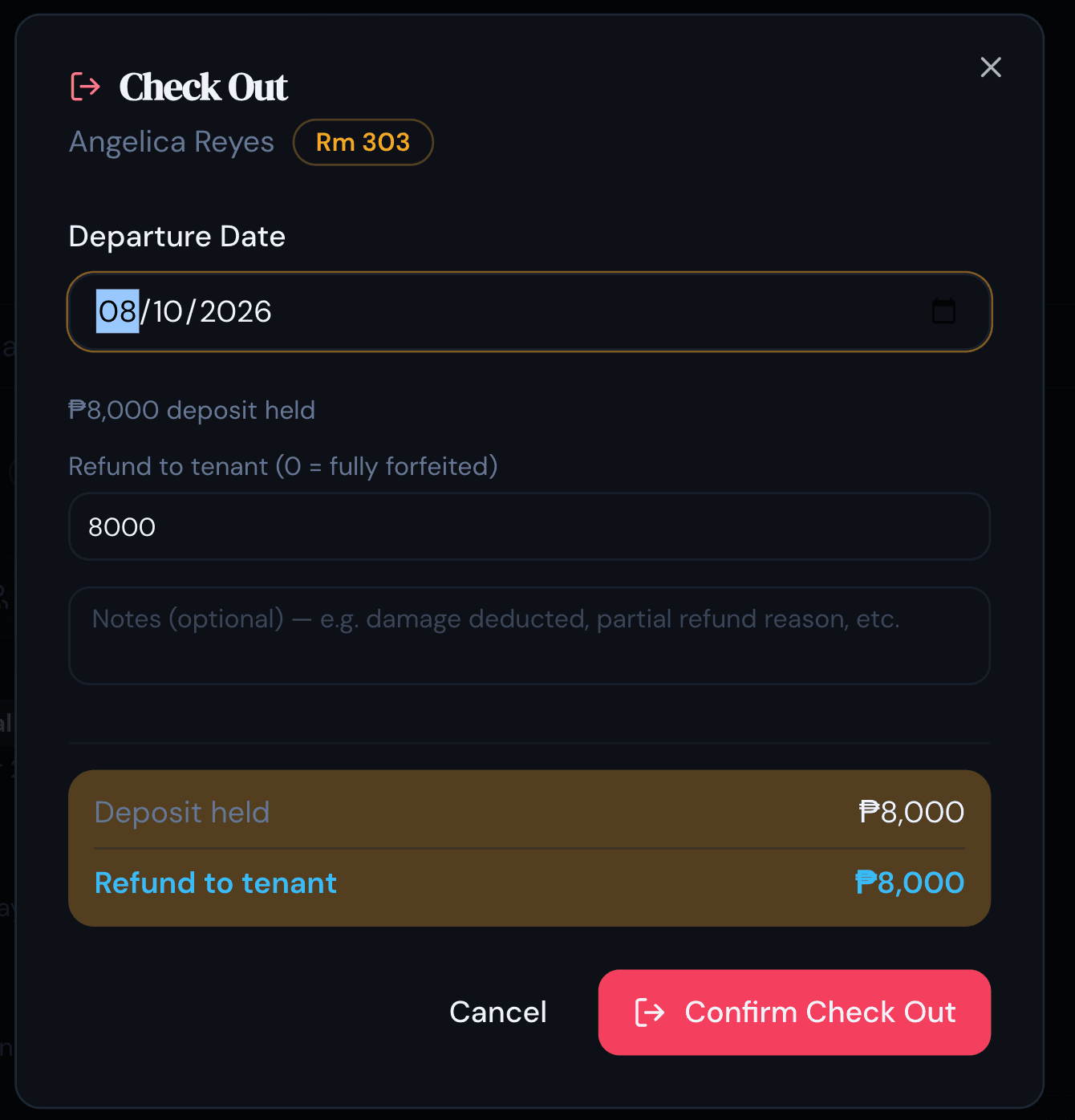
The deposit is the part a tenant remembers, so the move-out arithmetic has to be one they can see. PulseHub holds the deposit on the tenant record for the whole stay and, at check-out, brings the final part-month, any last charges and outstanding dues together against it, so the refund or balance is on the screen for both of you. That matters most in the week a cohort leaves together and the settlements all fall due at once.
Fill beds from a public page
Most bedspacers find a building online before they ever ring it. PulseHub gives each branch a public page that lists its rooms with photos, what a bed costs, which beds are open at that moment, and the amenities that actually settle the decision, from air-con and WiFi to meals, with a button to message you or join the waitlist. It reads from your live occupancy, so it never advertises a bed that filled yesterday.
Why a notebook gives out
A notebook can carry one small bedspace with a steady set of faces. It gives out the first time the school year turns over. A floor of students checks out across a fortnight, every deposit needs settling against a final bill, and a fresh cohort needs beds assigned and bills started before classes begin, all while the working bedspacers keep paying on their own dates in the background. A page of columns cannot hold that churn, and it will not surface a tenant’s history a year later when a deposit is questioned. Software absorbs the bookkeeping and keeps every tenant on file, searchable long after they move out. The step-by-step version of that move lives in our guide to managing multiple properties without spreadsheets.
How to choose dormitory and bedspace software
- It lets a single bed, with the building modelled as rooms and beds rather than whole units.
- It bills rent, meals and air-con together on one peso statement, with part-payments and deposits handled cleanly.
- It records cash, bank transfer and e-wallet payments and issues a receipt your tenant can keep.
- It settles the deposit in the open at move-out, against the final month and any dues.
- Its waiting list serves both intakes, the booked student cohort and the walk-up worker.
- It runs every branch from one account, with a view that reads them side by side.
- It is priced for the Philippines and has a trial, with an interface the desk can use untrained.
PulseHub is priced by the number of properties, with tiers for 1, 3 or 10 and a 14-day free trial that needs no card. See PulseHub for the Philippines, compare plans on the pricing page, or talk to the team if you run several branches.
How PulseHub runs a dormitory
From a bed on the public page to the figures across every branch, the work runs in one line:
List a bed → Move a tenant in → Bill rent, meals & air-con → Record payment → Settle at move-out → Read all branches
- List. Publish the branch page so an open bed takes enquiries and waitlist sign-ups.
- Move in. Put a student or a worker into a named bed and start their record.
- Bill. Draw the month from their rent, the meal plan they chose and the room’s power.
- Record. Mark each cash, transfer or e-wallet payment and issue the receipt.
- Move out. Settle the final bill against the deposit and show the balance.
- Read all branches. Compare occupancy, collections and costs in pesos.
Every branch on PulseHub already works this way; nothing in the loop is waiting on a future release.
Frequently asked questions
What is dormitory and bedspace management software?
It is the system a dormitory or bedspace operator uses to keep the whole business in one place: a bed assigned to each tenant, a monthly bill built from their rent, meals and electricity, a record of what they have paid, and a live count of which beds are earning. One account covers a single building or branches in several cities, so the owner stops working from memory, a wall calendar and a stack of chat threads.
What is the difference between a dormitory, a bedspace and a boarding house?
They overlap more than they differ. A bedspace rents a single bed inside a shared room, a dormitory is a whole building of shared rooms let that way, and a boarding house usually folds meals into the deal. The operating job is the same in each: assign a bed, bill it monthly, hold a deposit, and share the kitchens, bathrooms and power. That is why one system handles all three.
What should dormitory software do for a Philippine operator?
The non-negotiables are letting and billing at the level of a single bed, and putting rent, the meal plan and electricity on one monthly peso bill rather than three. Around that it should hold a tenant record with ID and contract, track deposits and part-payments, log cash, bank-transfer and e-wallet payments with a receipt, keep a waiting list that serves both student cohorts and rolling worker intakes, settle deposits cleanly at move-out, and let one owner run and compare several branches.
Can it bill rent together with meals and electricity?
Yes, and in a dormitory that is the whole reason to use software over a spreadsheet. Meal uptake differs bed to bed and air-conditioned rooms often carry their own power charge, so no two bills in a room are identical. PulseHub assembles each tenant’s monthly statement from their own rent, meal plan and electricity, in pesos, and rolls any part-payment into the next month.
Can it record cash, bank transfer and e-wallet payments?
Yes. Whoever is on the desk can log a payment as cash, bank transfer or e-wallet against the right tenant and hand over a numbered receipt to share online or on chat. PulseHub keeps the record and produces the receipt, while the money itself keeps moving through your own drawer and bank. It is a ledger, not a payment collector sitting between you and the tenant.
Can it run several dormitory branches from one account?
Yes. One login covers every branch, you switch between them from the top of the screen, and an all-branches view lines them up on occupancy, collections, dues, costs and profit. PulseHub’s plans are sized for 1, 3 or 10 properties, so a growing operator adds a branch without changing systems.
How much does dormitory and bedspace software cost?
Most tools charge by the number of buildings or beds. PulseHub charges by the number of properties, with tiers for 1, 3 or 10 and a 14-day free trial that needs no card. The Philippines page and the pricing page carry the current figures.
Run your dormitory on PulseHub
One bedspace with a handful of regulars is a notebook job. Put students and shift-workers under one roof, add meal plans, metered rooms, a term-end wave of move-outs and a second branch across town, and the sums stop fitting on a page. PulseHub carries the beds, tenants, bills, payments and deposits for every branch in one place, and reads them back to you in pesos. See PulseHub for the Philippines, compare plans on the pricing page, or start a free trial and set up your first branch in minutes.