Boarding houses
Boarding House Management Software: A Guide for Philippine Operators
· 8 min read
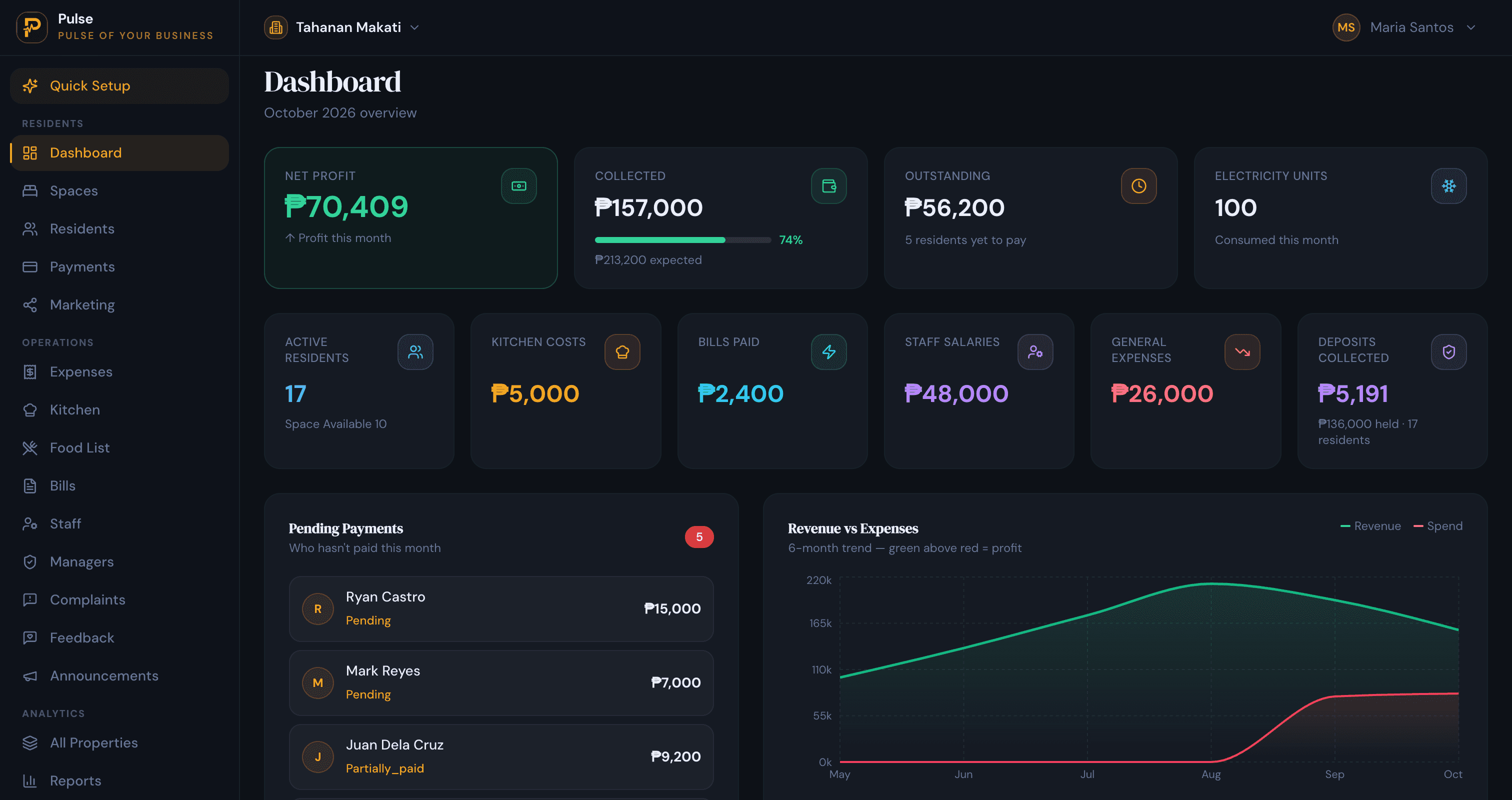
A boarding house is really a small kitchen with bedrooms attached. The boarders pay for a room, but what keeps most of them is that a meal is waiting when they get home, and that one arrangement, room and board together, is what sets a boarding house apart from a plain bedspace. It is also what makes it harder to run. The owner is landlady, cook’s boss and bookkeeper at once, and for a long while all of it fits in her head. Boarding house management software is what takes it out of her head before the house outgrows her memory.
This guide is for Philippine owners weighing up that step. It sets out what the software actually does, why board and meals change the billing in ways a generic rent app never planned for, and how to judge a tool that fits a boarding house rather than an apartment block.
Room and board, in one place
Strip a boarding house down and the owner is doing four jobs for every boarder. There is the letting, which room or bed they hold and for how long. There is the billing, the rent plus whatever they eat and the power they burn. There is the money, the cash handed over on payday or the transfer that lands overnight. And there is the house itself, the kitchen, the bills, the repairs. Boarding house software is simply the one place those four jobs meet, so a question about any boarder has an answer that does not depend on the owner remembering it.
Boarding houses sit inside a wider family of shared living. If yours leans more towards letting plain beds without food, our dormitory and bedspace management software guide looks at it from that angle, and the broader accommodation management system guide covers the whole picture of running rooms by the month.
The kitchen is the business
In a bedspace the money question is simple: is the bed full and has the rent come in. In a boarding house there is a second question underneath it, and it decides whether the house makes money at all: does the food plan cover what the kitchen spends. That is the part owners most often guess at, and the part a notebook handles worst.
It is harder than it looks because the house never eats as one. Some boarders are on full board, some take only dinner, a few cook for themselves and pay for the room alone. Groceries, the gas for the stove and the cook’s wage move week to week. So the true cost of feeding a single boarder is a moving number, and the only way to price the plan honestly is to watch both sides of it:
- Who is actually on board. The headcount eating this month, not the headcount in the house, is what the kitchen spend should be divided across.
- What the kitchen really costs. Groceries, gas and the cook’s wage are the food business, and they belong in the figures beside the rent, not in a separate pile of receipts.
- Whether the plan still pays. When prices climb, a meal charge set a year ago can quietly slip under cost, and you only notice if the two numbers sit next to each other.
PulseHub records kitchen expenses and the cook’s wage alongside how many boarders are on board, so the cost of feeding the house sits beside the board income instead of surfacing as a shock at month end. That single comparison is the difference between a food plan that funds the house and one that slowly drains it.
What boarding house software should do
Meals aside, a boarding house still has to let rooms, bill them and settle up. These are the jobs that separate a tool built for board from a plain rent tracker, and PulseHub is built around each one.
See the house as rooms and beds
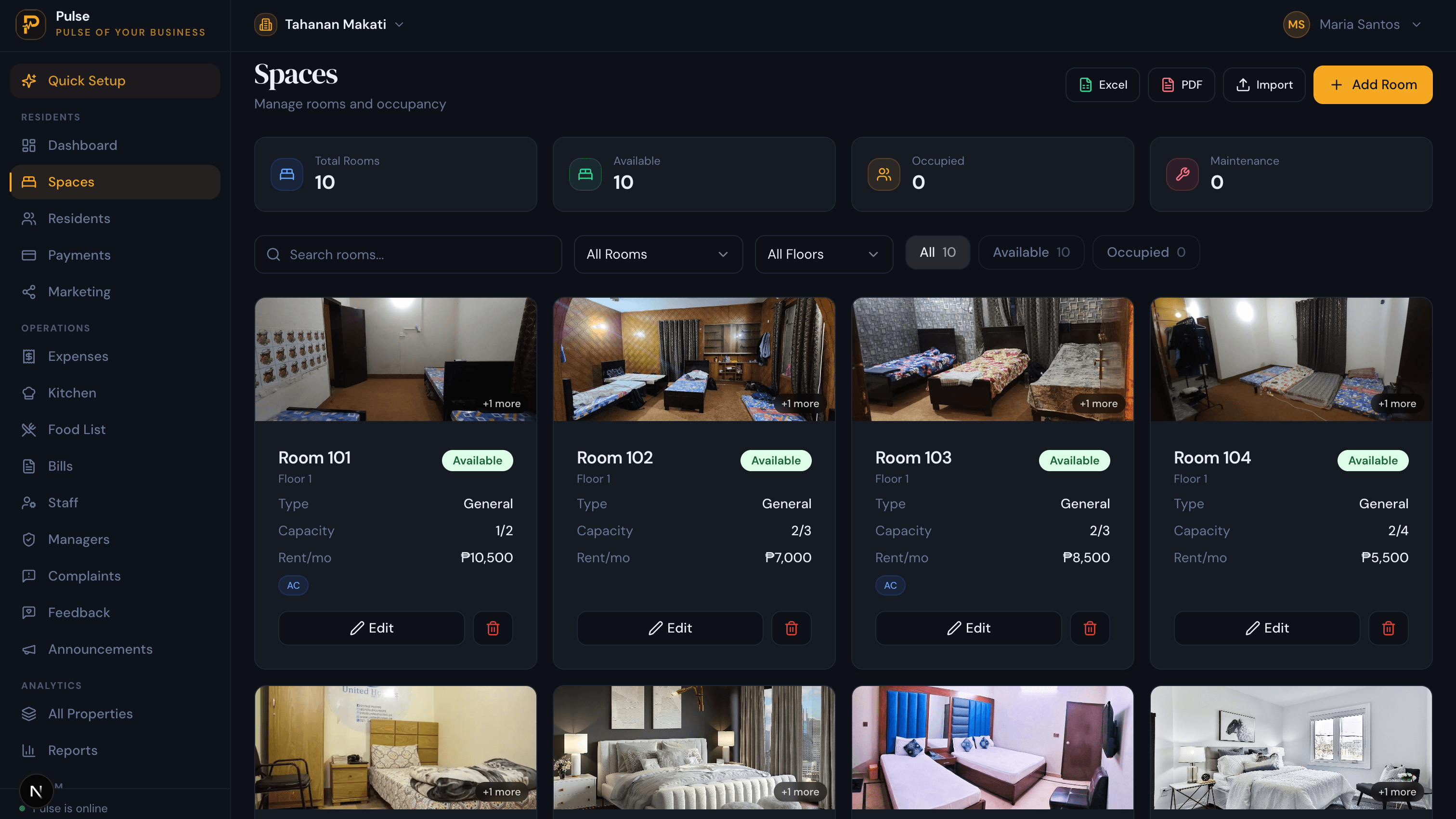
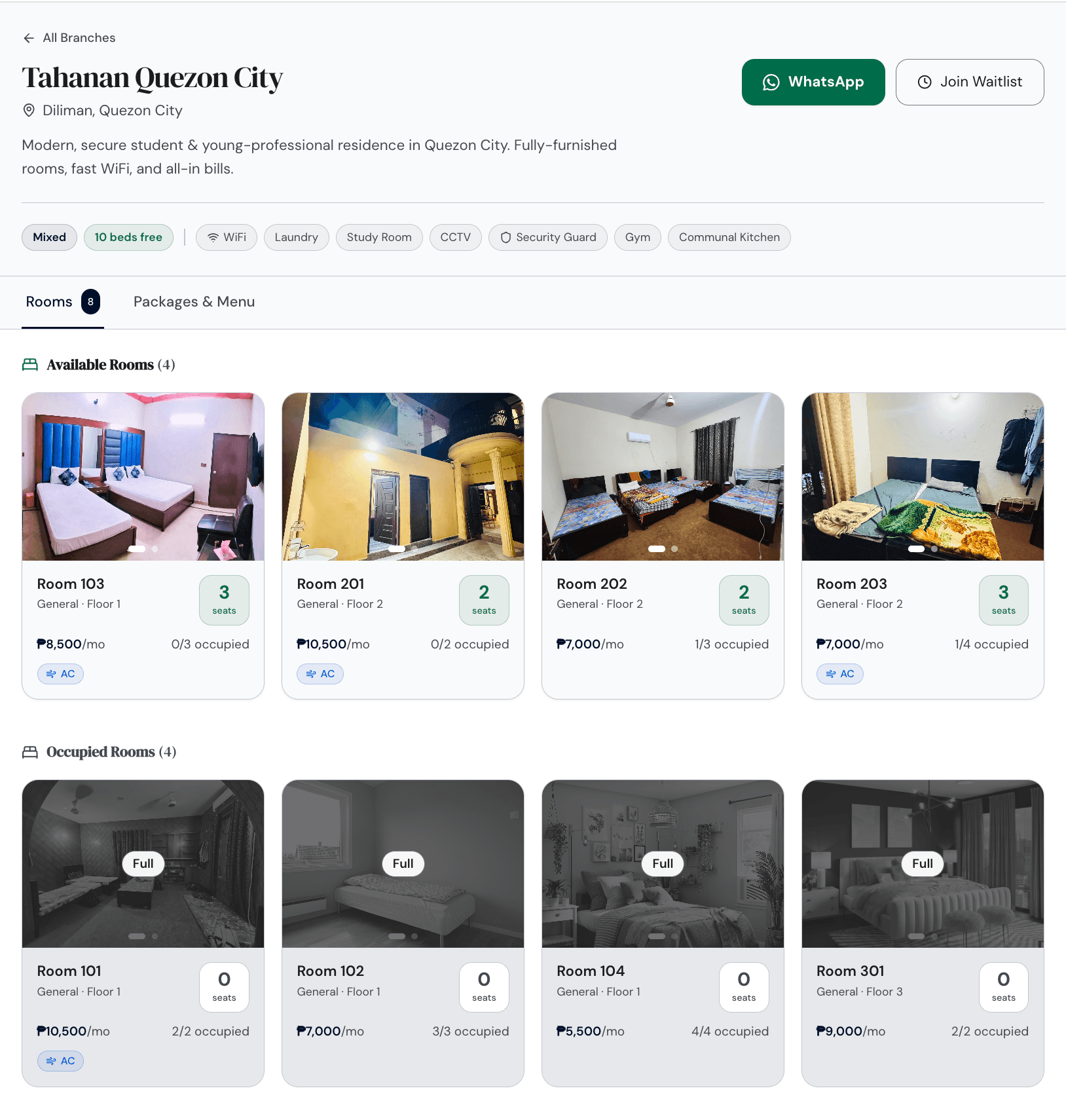
The owner knows every room by heart, until there are more rooms than one person can hold. The software has to carry that picture for her: the house laid out floor by floor, each room with the beds it holds, the monthly rate, and whether it has air-con. A bed is what she actually hands to a boarder, so the moment one is taken the room’s free count drops and she is never quoting a space that has already gone.
Keep a record instead of a memory
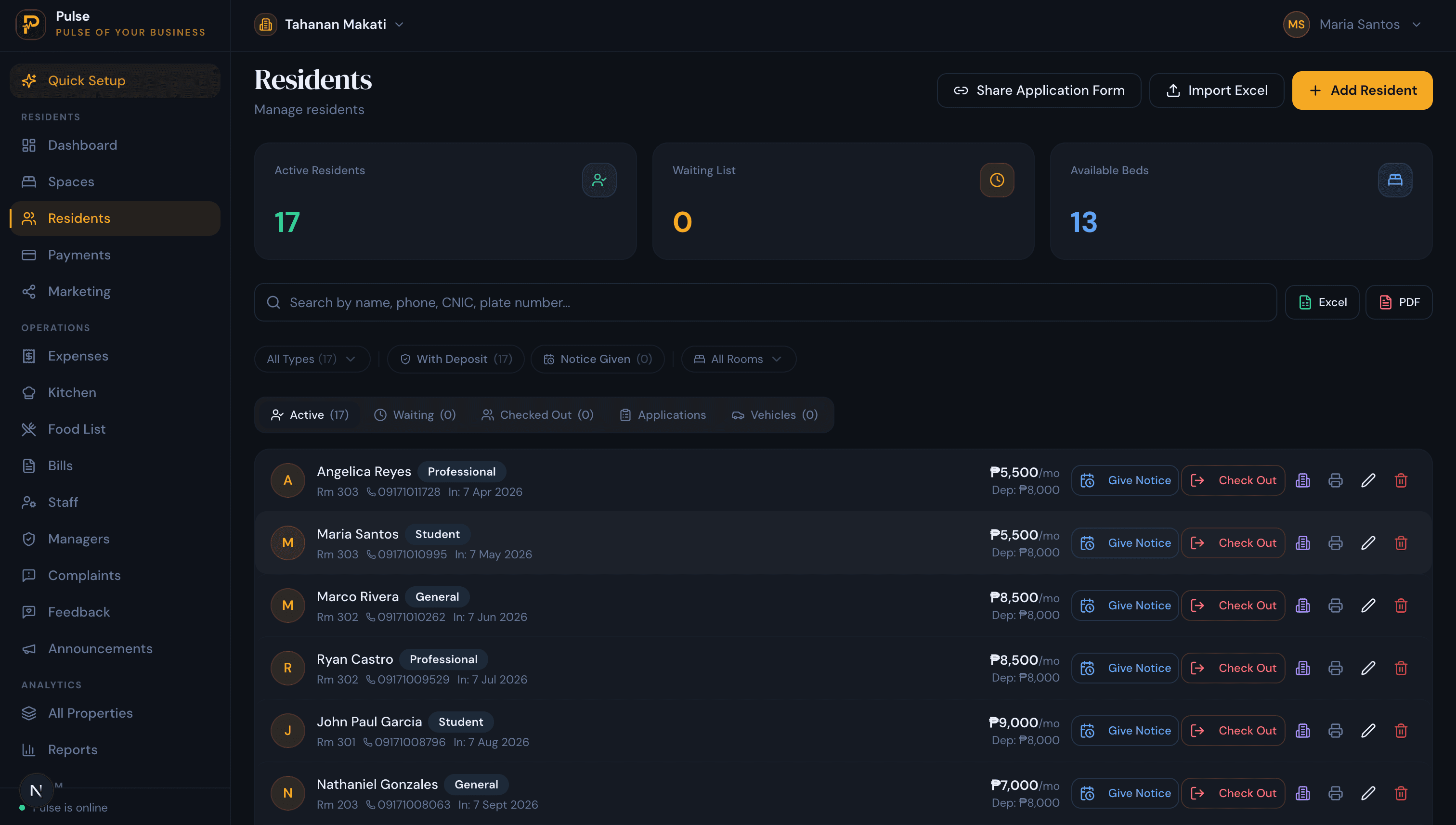
In a small house the owner carries every boarder in her head: who is paid up, whose mother to call, who is leaving next month. That lasts until it fails, and it fails at the worst moment, in a deposit dispute or a parent’s phone call. The record is simply that memory written down, the room held, the contract and ID, the deposit, the meal plan and every payment made. PulseHub turns that into a profile per boarder with every event dated, and the people waiting for a space queue up on the same screen.
Build one bill for room and board
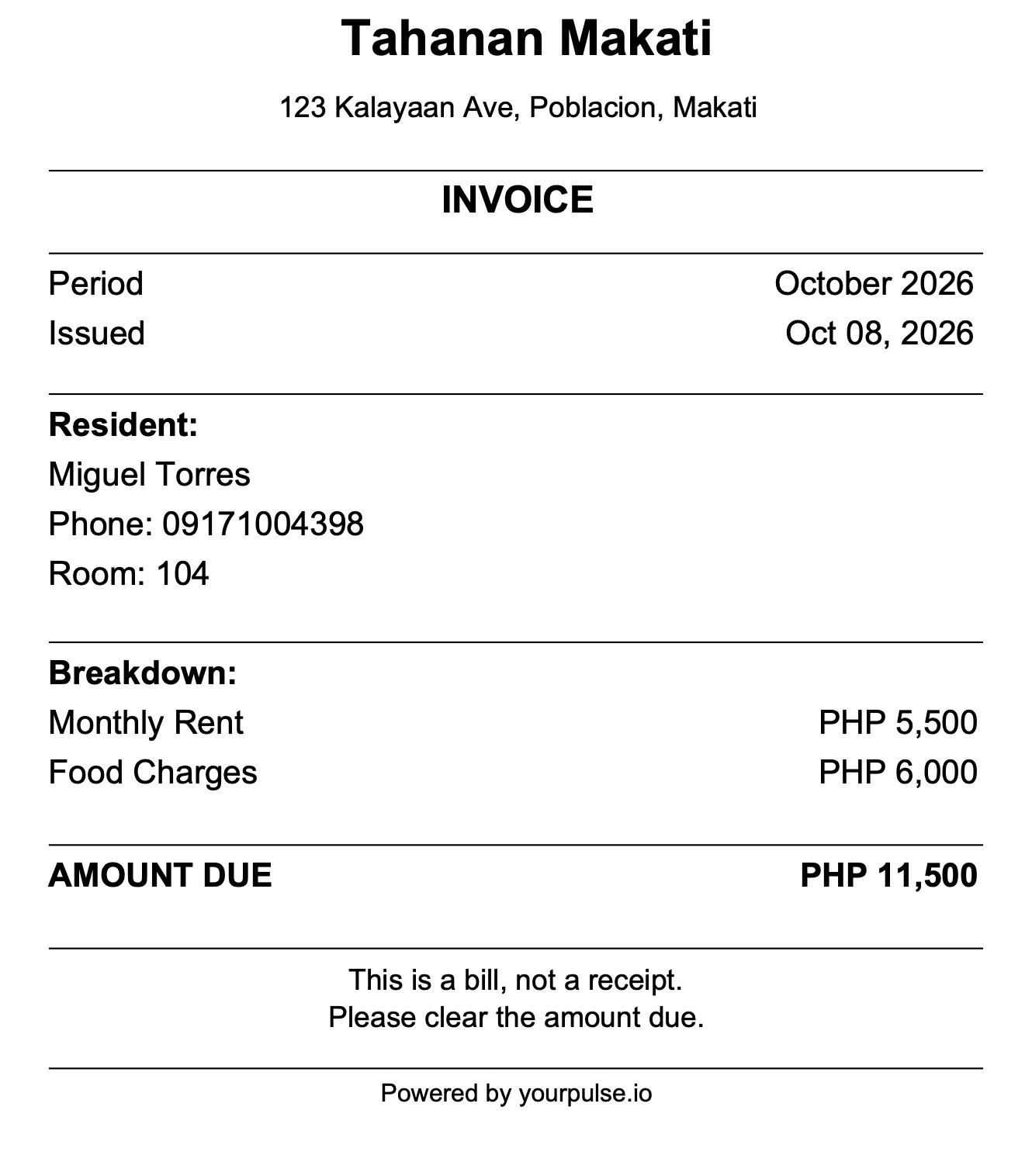
Because board is part of the deal, two boarders in the same room rarely owe the same thing. One is on full board, one takes only dinner, one cooks for himself and pays for the room alone, and an air-conditioned room carries its own power on top. By hand that is four small sums the owner redoes every month and occasionally gets wrong. PulseHub puts each boarder’s rent, meals and electricity onto a single peso statement, built once, so a short payment just leaves a balance that shows up the following month.
Record payments without holding the money
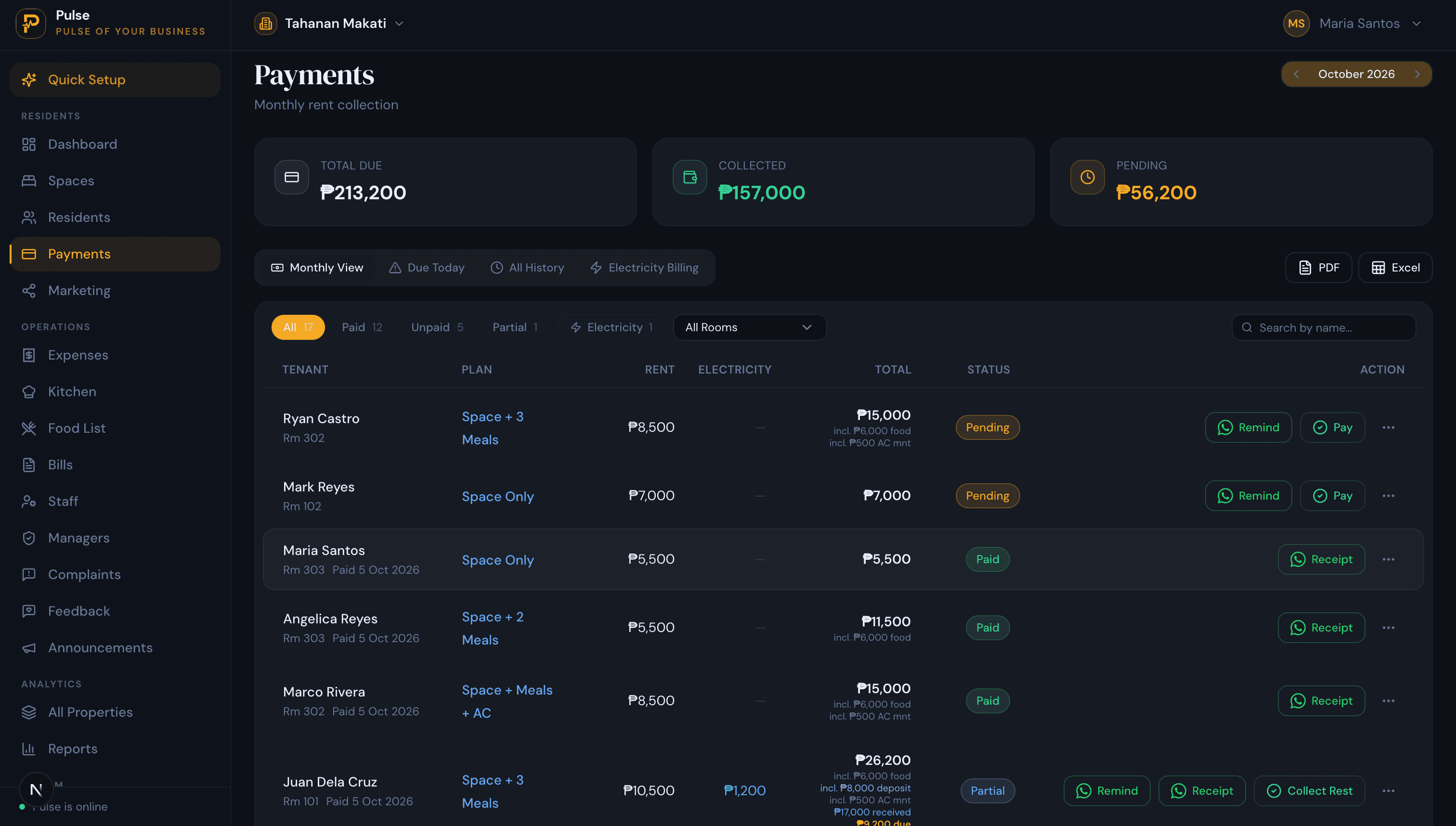
In most houses the owner takes the money herself: a few notes in cash on payday, a transfer overnight, an e-wallet sent from work. The risk is not theft, it is memory, because a month later nobody agrees on what was paid. Logging each payment against the boarder, with a numbered receipt they can keep on their phone, settles that before it becomes an argument. PulseHub records the payment and issues the receipt while the cash still goes into the owner’s own hands and bank; it is keeping the books, not holding the money.
Treat an empty room as money walking out
In a ten-room house an empty room is a tenth of the month gone, and a vacancy that drifts for a few weeks is income the house never gets back. The owner needs to see at a glance which beds are free and who is next in line, not work it out from a notebook the day someone gives notice. PulseHub marks every bed as taken, free or held and keeps the list of boarders waiting for a space, so a room that opens can be promised to the next person for the day it comes free.
Settle the deposit where the boarder can see it
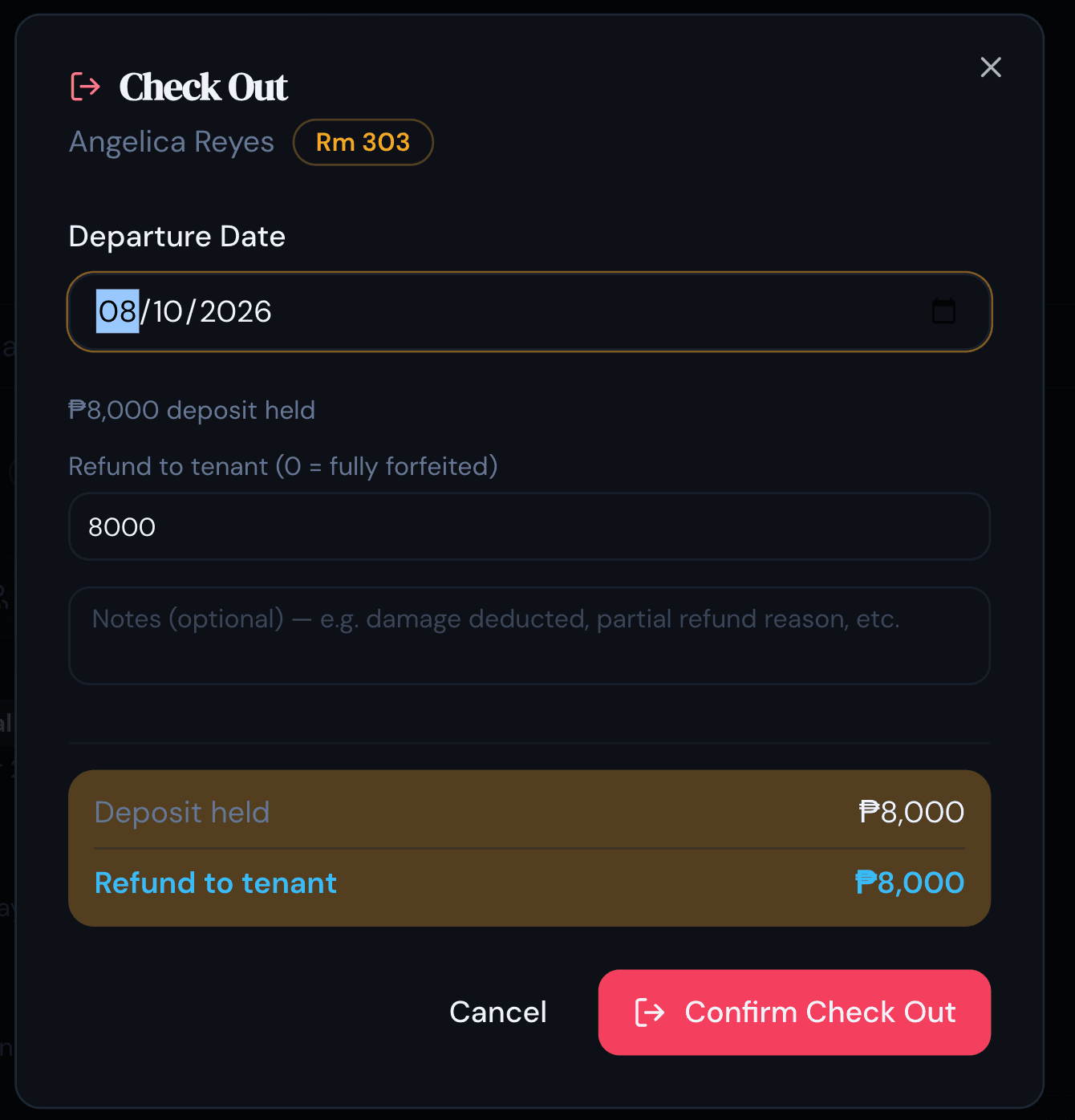
Nothing empties a boarding house faster than a deposit a boarder feels was pocketed, because students and their parents talk and the next enquiry hears about it. The answer is to make the move-out sum one the boarder can see for themselves. The deposit stays on the boarder’s record from the day they move in, and at check-out PulseHub lays the last part-month and anything still unpaid against it, totting up the refund or the shortfall on the spot while the boarder watches, so there is nothing to reopen weeks later.
Fill rooms from a public page
A boarding house used to fill by a sign on the gate and word among classmates. The first look now happens online, and a page that shows the rooms, what they cost with board, and what is free today does the job the sign used to. Each house gets its own page on PulseHub: photographs of the rooms, the price with board, what is open right now, and the handful of things a boarder actually asks about, meals, WiFi, laundry, a secure gate. One tap messages the owner or adds them to the list. The page is drawn from the live house, so a room drops off it the moment it fills and no one arrives for a bed that is already gone.
When the owner’s memory runs out
A single house with a handful of long-staying boarders really does run on a notebook and a good memory. The strain shows when the house fills, a second one opens, or a manager comes in and the numbers suddenly have to live somewhere other than the owner’s head. Who paid, who owes, whose deposit is held, what the kitchen spent: none of that survives a handover on paper, and none of it is still findable a year on when a former boarder queries a deposit. Moving it into software is really moving it out of one person’s memory and into a record the whole house can read. The step-by-step version of that move lives in our guide to managing multiple properties without spreadsheets.
How to choose boarding house software
- It lets a room or a single bed, and pictures the house as rooms and beds rather than one big tenancy.
- It puts rent, board and power on one peso statement, and copes with short payments and deposits without a side ledger.
- It tracks the kitchen, so meal income can be read against groceries, gas and the cook’s pay.
- It logs cash, transfer and e-wallet payments and gives the boarder a receipt, without standing between them and the owner.
- It shows the deposit and the final bill together at move-out, so a refund is never a guess.
- It carries a second or third house in one account, with a single view that compares them.
- It is built for Philippine prices and offers a trial, and is simple enough to run without training.
PulseHub is priced by the number of properties, with tiers for 1, 3 or 10 and a 14-day free trial that needs no card. See PulseHub for the Philippines, compare plans on the pricing page, or talk to the team if you run more than one house.
How PulseHub runs a boarding house
The whole month, from an empty room online to the figures across every house, runs as one loop:
List a room → Move a boarder in → Bill room & board → Record payment → Settle at move-out → Read every house
- List. Put the house page online so an open room starts taking enquiries and waitlist sign-ups.
- Move in. Give a boarder a named room or bed and open their record.
- Bill. Build the month from the room, the board they take and the power they use.
- Record. Mark how the boarder paid, cash, transfer or e-wallet, and give them the receipt.
- Move out. Weigh the final bill against the deposit and show what is owed or returned.
- Read every house. Compare occupancy, collections and costs across houses, in pesos.
Every one of those steps is live in PulseHub today; none of it is a roadmap promise.
Frequently asked questions
What is boarding house management software?
It is the system a boarding house owner uses to run the whole house from one screen instead of a notebook: a room or bed held by each boarder, a monthly bill that already includes their board and power, a record of what they have paid, and a live count of which rooms are earning. One account can cover a single house or a few of them, so the owner is no longer the only place the numbers live.
How is a boarding house different from a dormitory or a bedspace?
The arrangements overlap, but board is the thing that sets a boarding house apart. A bedspace rents a bed and a dormitory rents beds by the building, usually without food. A boarding house folds meals into the monthly rate, so the kitchen becomes part of the business and the bill is for room and board together. That is why boarding house software has to price and track meals, not just the room.
Can it put room and board on one monthly bill?
Yes, and for a house that feeds its boarders that is the whole point of it. The rent, the meals a boarder takes and any air-con power are one arrangement, so PulseHub settles them into a single monthly statement in pesos rather than three figures the owner keeps in her head. A boarder who pays short just carries the balance into the next month, with nothing lost track of.
Does it help with meal and kitchen costs?
Yes. A boarding house lives or dies on whether the food plan covers what the kitchen spends. PulseHub lets you record kitchen expenses, groceries, gas and the cook’s wage, alongside how many boarders are on board, so you can see the cost of feeding the house against what the meal charges bring in rather than guessing at the end of the month.
Can it record cash, bank transfer and e-wallet payments?
Yes. The owner can mark a payment as cash, bank transfer or e-wallet against the right boarder and hand back a numbered receipt they keep on their phone. PulseHub records it and makes the receipt, while the money itself still goes into the owner’s own hands and bank. It keeps the books; it does not hold or move the cash, so there is nothing sitting between the owner and her boarders.
Can it run more than one boarding house from one account?
Yes. An owner with several houses runs them under one login and opens any of them from a dropdown, while a combined view puts each house on its own line: how full it is, what it collected, what is still owed, what the kitchen cost and what it cleared that month. Billing is sized by the number of properties, 1, 3 or 10, so a third house is one more line here, not another system to learn.
How much does boarding house software cost in the Philippines?
PulseHub does not charge per boarder or per room. It charges by the number of properties, with tiers for 1, 3 or 10 and a 14-day free trial that needs no card. Philippine plans are billed in USD while the portal itself runs in pesos; the Philippines page and the pricing page carry the current figures.
Run your boarding house on PulseHub
One house with a few steady boarders is a job for a notebook and a good memory. Fill every room, feed them from a kitchen that has to pay for itself, start taking payments three different ways, then take on a second house down the road, and no single memory holds it any more. That is the point to put it on PulseHub, which keeps every room, boarder, bill, payment, deposit and kitchen cost for each house together and reports it in pesos. See PulseHub for the Philippines, compare plans on the pricing page, or start a free trial and set up your first house in minutes.