Co-living
Co-Living Management Software: Features and How to Choose
· 8 min read
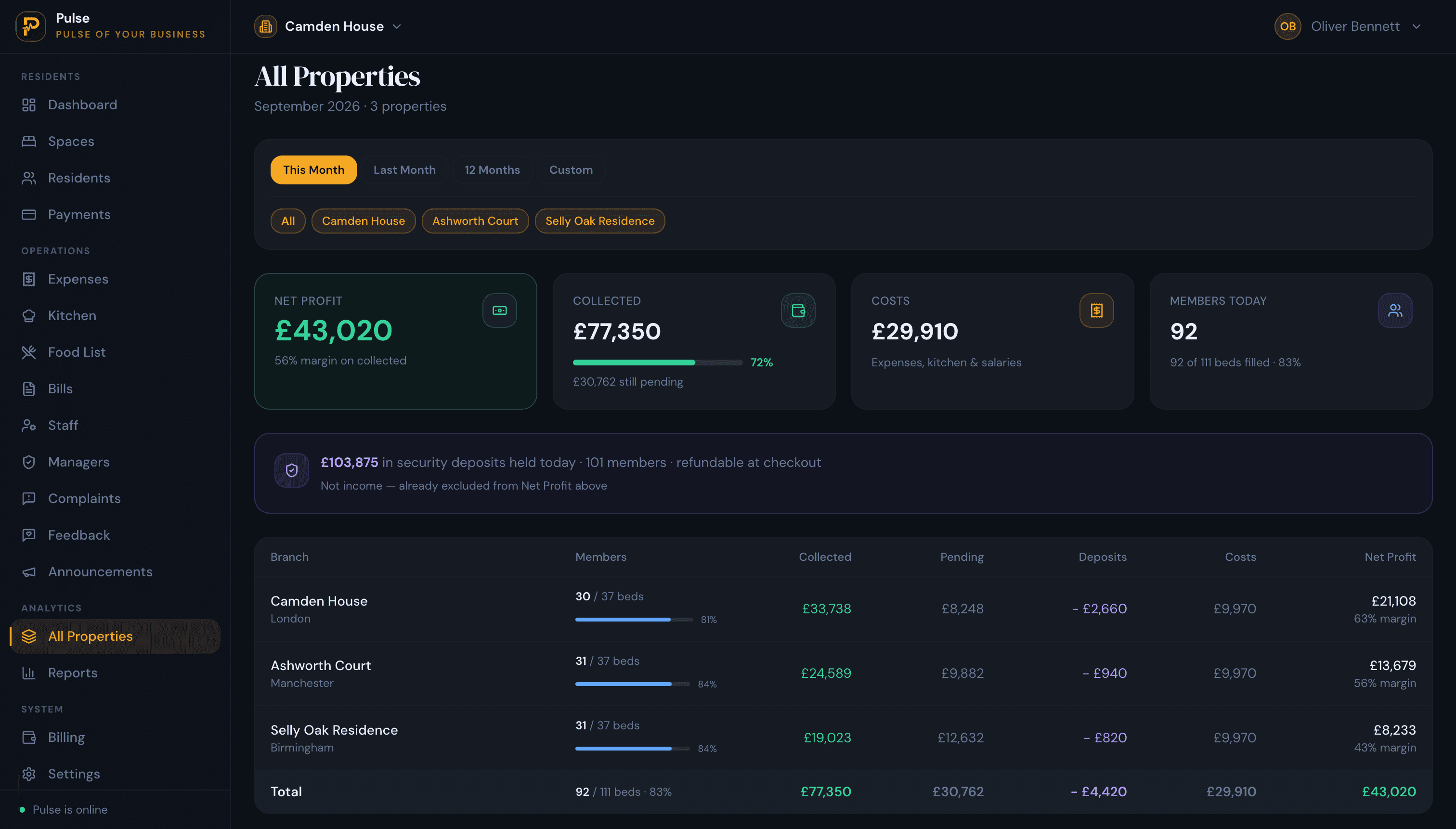
Co-living management software runs the operational side of a co-living business: the rooms and who is in them, the all-inclusive rent, the shared bills, the deposits, the maintenance, and how every building is performing. It takes the parts of the job that would otherwise live in spreadsheets and message threads and puts them in one place.
Co-living sits between a flatshare and a serviced building. Residents, usually working professionals, take a private room in a shared home and pay one monthly price that rolls rent and bills together, often on a flexible term. That model is pleasant to live in and fiddly to operate: the income is per room, the stays are shorter than a standard tenancy, and the bills you bundle have to be paid by someone. This guide covers what the software does, how to think about the community side versus the operational side, and how to choose a tool that fits.
What is co-living management software?
Co-living management software is the system an operator uses to run shared living day to day. It holds each room and its availability across your buildings, a record for every resident, the monthly bill, the shared costs, and the maintenance, so the business can be run from one account instead of a folder of spreadsheets.
The defining feature is that you let and bill by the room, not by the flat. One four-bedroom co-living home carries four agreements, four move-in dates and four monthly bills, with the kitchen, bathrooms and bills shared between the people in it. The software has to treat each room as its own lettable, billable unit. PulseHub organises each property as individual rooms you can let and bill one at a time.
This sits inside the wider category covered by our guide to the accommodation management system, and in the UK a shared co-living house can also fall under HMO rules, which our HMO management software guide covers.
Operations software vs a community app
“Co-living software” is used for two different things, and it helps to keep them apart. One is the resident experience: a community app, event sign-ups, social feeds and messaging. The other is operations: rooms, occupancy, residents, billing, shared costs, maintenance and reporting. A big community app does not collect your rent, and a solid operations platform does not run your socials.
PulseHub is firmly the operations side. It manages occupancy, residents, payments, shared costs, maintenance and reporting, and it is not a community, events or resident social app. That is worth knowing before you shortlist: decide whether you are buying the system that runs your rooms and rent, the tool that runs your community, or one of each.
What makes co-living different to run
A few things separate co-living from a standard buy-to-let or a block of flats:
- Income is per room. A vacancy is one empty room, not an empty building, so you track occupancy and re-lets room by room.
- Stays are shorter. Co-living terms often run months rather than years, so more of your time goes on move-ins, move-outs and keeping rooms filled.
- The price is all-inclusive. One monthly figure usually covers rent, utilities, internet and sometimes cleaning, so the bills you bundle still have to be tracked and paid.
- Agreements are per resident. Letting each room on its own agreement means one person leaving does not unravel everyone else’s arrangement.
- Costs are shared. Utilities and communal expenses need apportioning across rooms in a way you can explain.
- Buildings add up. Run co-living across several sites and the admin multiplies unless it lives in one place.
What the software should do
The labels vary by product, but the operational jobs below are the ones that matter, and here is how PulseHub approaches each.
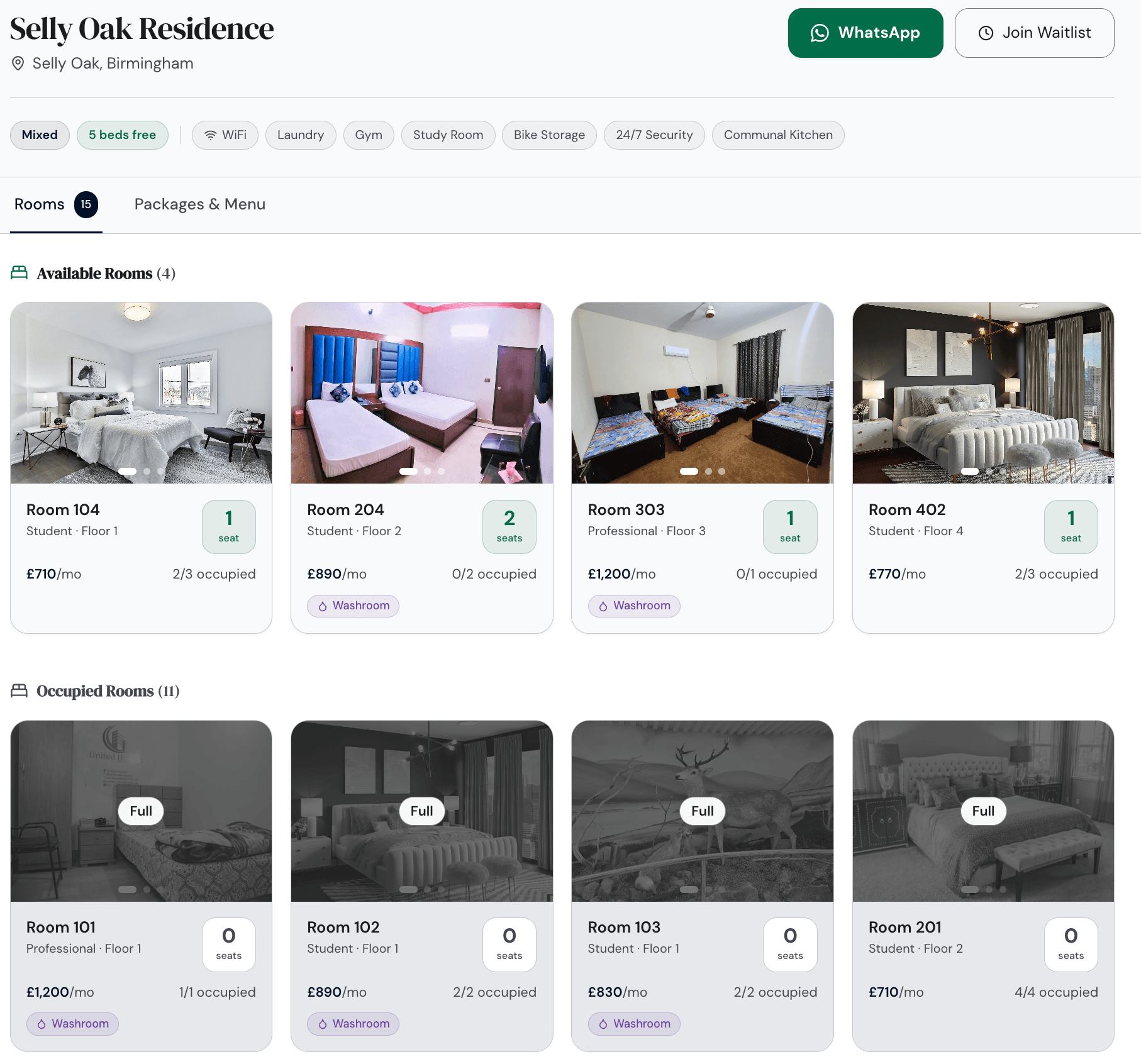
Rooms and occupancy across shared spaces
The system should let each room on its own and show, per building, which rooms are let, vacant or being held for an incoming resident. That room-level view is what co-living runs on, and it is the number you check first every morning. PulseHub keeps room availability current across every shared space as residents are allocated and move on.
Resident records on individual agreements
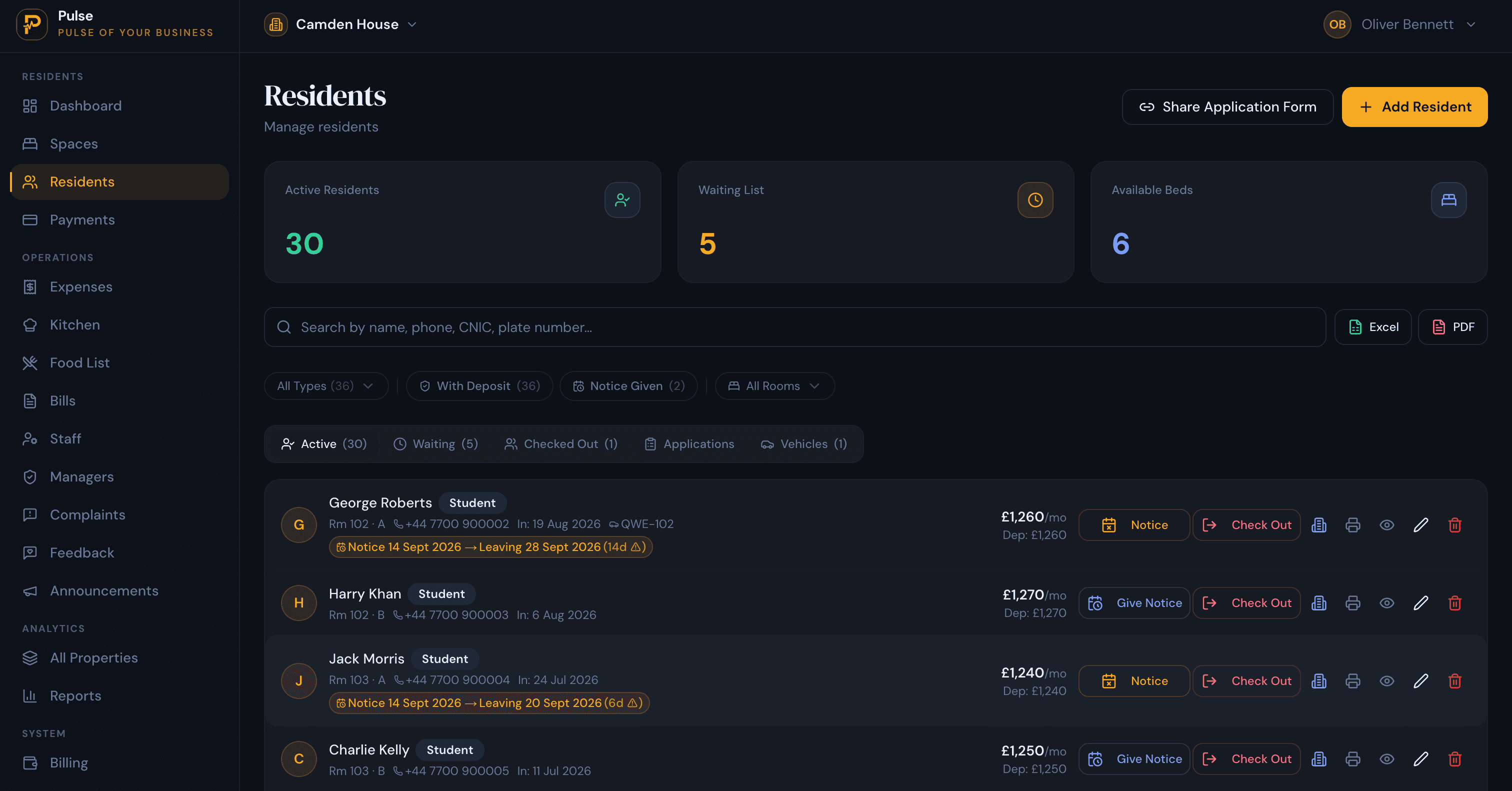
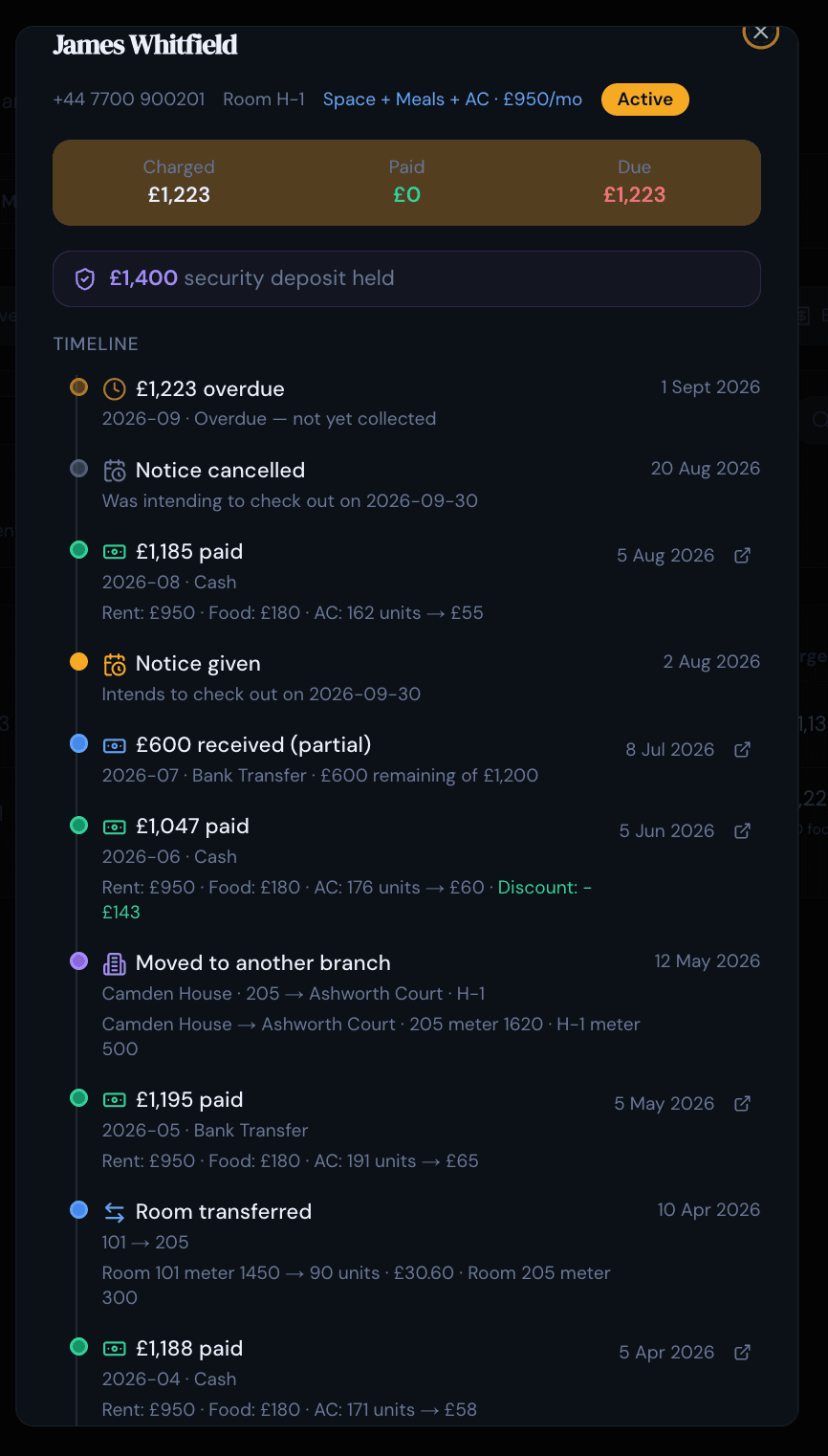
Each resident should have their own record and their own room agreement, with their ID and paperwork, their term dates, the deposit and what they have paid. Individual agreements are the point: they let one person move on without disturbing anyone else in the house. PulseHub keeps a record and a running timeline for each resident.
All-inclusive billing and shared costs
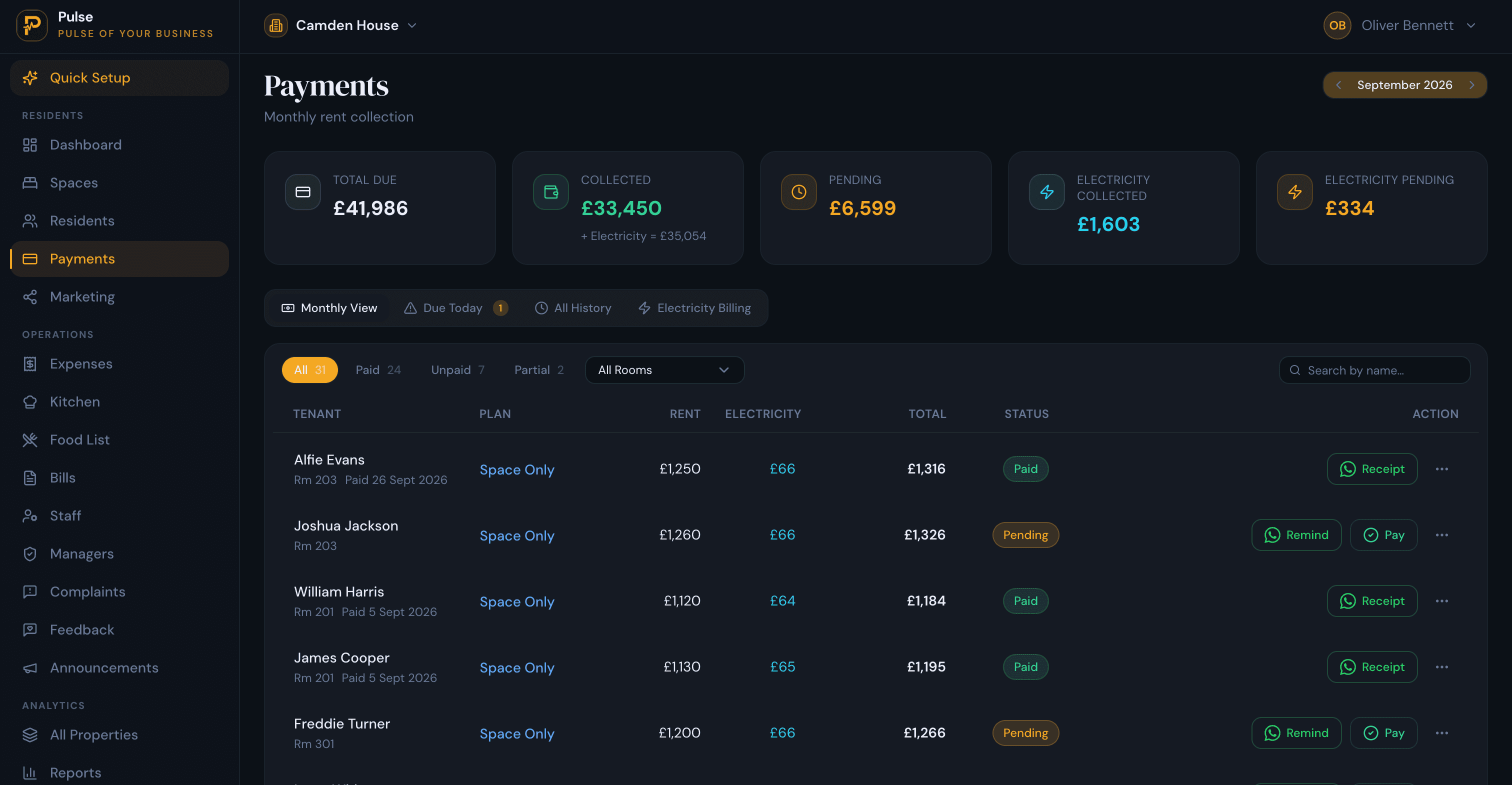
A co-living bill is one monthly price that bundles rent with the services you include, and behind it sit utilities and communal costs that have to be apportioned across rooms. The software should bill the inclusive amount and allocate the shared costs, not leave them in a side spreadsheet. PulseHub bills each resident monthly and records utility and shared-cost allocation alongside the rent.
Occupancy, turnover and the waiting list
Because stays are shorter, the gap between one resident leaving and the next arriving is where co-living quietly loses money. A room-by-room occupancy view plus a queue of confirmed arrivals lets you refill a room for the week after it empties rather than the month after. PulseHub tracks occupancy building by building and queues each incoming resident against the room and date they are due.
Maintenance and upkeep
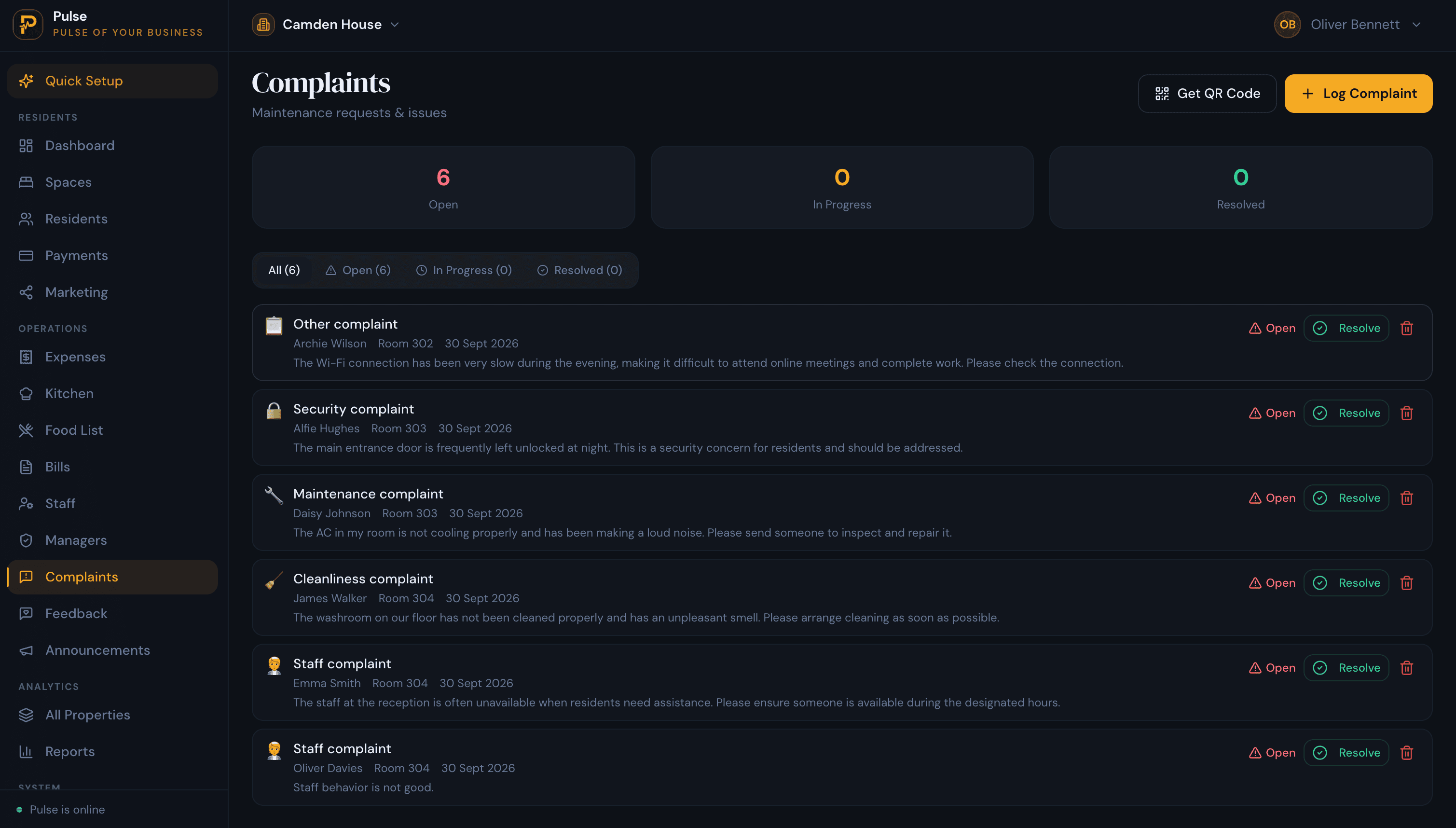
Communal kitchens, bathrooms and living space take heavy daily use, so something always needs attention. What matters is that a reported fault does not fall through the gaps: a resident flags it, it reaches whoever handles repairs, and the thread stays attached to the room it came from. In PulseHub a resident scans a QR code in the house to report a fault, and each one keeps its own status and history.
Several buildings in one place
Co-living operators rarely stop at one house. Instead of a separate login or sheet per building, the whole portfolio should sit in one place you can read without exporting. PulseHub stacks every building into a single all-properties screen, so you can read occupancy and collections for the portfolio side by side rather than opening each one in turn.
A public page and reporting
A public page for each building, listing the rooms, the all-inclusive price and what is bundled in, gives prospective residents somewhere to look and a way to enquire. Paired with reporting on how each building and the portfolio are performing, it closes the loop from enquiry to occupancy. PulseHub publishes a listing page per property and reports on the numbers that matter. The features page has the full list.
How to choose the right system
- It lets a room on its own, with room-by-room occupancy across buildings.
- All-inclusive billing that bundles rent with bills and allocates shared costs.
- Individual resident agreements, so one departure does not disturb the rest.
- Deposits, part-payments and clear arrears.
- Multi-building operations from one account, with a view that compares sites.
- A clear line on community features. Decide whether you need them, and from which tool.
- Sensible pricing and a trial so you can test it on your own rooms and rents.
PulseHub is built for the operational side of co-living and is priced by the number of properties, with plans for 1, 3 or 10 and a 14-day free trial with no card. See PulseHub for co-living operators, compare plans on the pricing page, or talk to the team if you run a larger portfolio.
How PulseHub covers co-living operations
PulseHub handles the operational side in the order the work happens:
Building → Rooms → Resident → All-inclusive rent → Payments → Shared costs → All buildings
- Building. Set up each property and the rooms inside it.
- Room. Make each room lettable on its own, with its price.
- Resident. Add a resident on their own room agreement.
- All-inclusive rent. Set one monthly price for the rent and bundled bills.
- Payments. Record what comes in, with deposits and any part-payments.
- Shared costs. Allocate utilities and communal costs across rooms.
- All buildings. Compare every property in one view.
These are the operational steps PulseHub handles today; the community side is deliberately left to tools built for it.
Frequently asked questions
What is co-living management software?
Co-living management software runs the operational side of a co-living business: rooms and their occupancy across shared flats or buildings, resident records, all-inclusive rent, shared costs and utilities, deposits, maintenance and reporting, across one or more properties from one account. It is the operations layer, as distinct from a resident community or social app.
Is it also a resident community or events app?
Some products do and some do not, and the two jobs are different. PulseHub is the operations side: occupancy, residents, payments, shared costs, maintenance and reporting. It is not a community, events or resident social app. If community features matter to you, treat them as a separate tool from the system that runs your rooms and rent.
What should co-living management software do?
Let each room in a shared space on its own; keep a record for each resident on their own agreement; bill an all-inclusive monthly price; allocate shared utilities and costs across rooms; track deposits and part-payments; show room-by-room occupancy and a waiting list; log maintenance; run several buildings from one account; and report on it.
Can it handle all-inclusive rent and shared bills?
Yes, and for co-living that is central. The monthly price usually bundles rent with utilities, internet and sometimes cleaning, and shared costs have to be apportioned fairly across rooms. PulseHub bills a monthly amount per resident and allocates utilities and shared costs rather than leaving them on a separate spreadsheet.
Can it manage rooms and occupancy across several buildings?
Yes. You run every building under one login and switch between them, with a roll-up that stacks them for comparison on occupancy and collections. PulseHub ships a building switcher and a combined all-properties view, and plans scale across 1, 3 and 10 properties.
How is co-living software different from a hotel or hostel booking system?
Booking systems are built for nightly stays and availability calendars. Co-living residents take a room on a membership or tenancy that runs for months, with an all-inclusive monthly price, a deposit and a notice period. The software has to manage long-stay occupancy and recurring billing, not nightly reservations.
How much does co-living management software cost?
Pricing usually scales with the number of properties or rooms. PulseHub is priced by the number of properties, with plans for 1, 3 or 10 and a 14-day free trial that needs no card. See the pricing page for current figures in your region.
Run your co-living operation on PulseHub
The appeal of co-living for residents is exactly what makes it work for operators: one simple price, a room of their own, a bit of community. Behind that simplicity sit per-room income, short stays and bundled bills that still have to be paid. PulseHub runs that operational layer, from rooms and residents to billing, shared costs, occupancy and maintenance, for every building you own. See PulseHub for co-living operators, compare plans on the pricing page, or start a free trial and set up your first building in minutes.